
GetResponse Integrations: Best 2026 Guide for Affiliate Marketers
This article contains affiliate links. If you sign up for GetResponse through a link on this page, I may earn a commission at no extra cost to you. I only recommend tools I have researched and believe are relevant to the reader’s use case.
Hundreds of Integrations, Most of Which You’ll Never Touch
Open GetResponse’s integrations directory and you’ll find a wall of logos — CRMs, sales pipelines, enterprise chat tools, ecommerce platforms, survey builders. If you’re running an affiliate content site rather than a Shopify store or a sales team, most of that list isn’t for you, and figuring out which handful of connections actually matter can feel like its own research project.
I am Andreas Maratheftis, 30 years in professional finance and the person running InnovateHub Finance on GetResponse. This guide cuts through the full directory and focuses only on GetResponse integrations that make sense for an affiliate or content site: what they do, how to set them up, and — just as importantly — which of the more heavily marketed integrations you can safely ignore. By the end, you’ll know exactly which connections to prioritise this week.
Always verify current integration availability at getresponse.com/integrations before building a workflow around any specific tool.
Quick Answer
For an affiliate marketer, the GetResponse integrations that matter most are: WordPress (capturing leads from your blog directly into your automation), Zapier (connecting GetResponse to almost anything else you use, including WPForms and Google Sheets), and — if you sell a digital product yourself — Shopify or WooCommerce. GetResponse’s own pages list different integration counts depending on which page you check, so rather than repeating a specific number, this guide focuses on which of them are actually relevant to a content-driven affiliate site rather than an ecommerce store or sales team.
Start your free GetResponse account and explore its integrations →
How Many GetResponse Integrations Are There, Actually?
This is worth addressing directly because GetResponse’s own pages don’t agree with each other. The main integrations directory at getresponse.com/integrations states “400+ apps.” The GetResponse MAX-specific integrations page states “170+ ready-made integrations.” Independent sources add further confusion, citing figures anywhere from 170 to 750, depending on whether they’re counting native integrations, Zapier-accessible apps, or both combined.
Rather than repeating a number that may already be out of date by the time you read this, the honest answer is: GetResponse offers a genuinely large integration library, spanning ecommerce, CRM, forms, webinars, and payment processing — but the exact count depends on which GetResponse page you’re looking at and whether Zapier-only connections are included. Check getresponse.com/integrations directly for the current, browsable list rather than relying on any specific figure quoted elsewhere, including this article.
Native Integrations vs Zapier: The Distinction That Actually Matters
Before diving into specific tools, it’s worth understanding the two fundamentally different ways GetResponse connects to other software, because this determines both cost and complexity.
| Connection Type | How It Works | Cost |
|---|---|---|
| Native integration | Built directly into GetResponse — connect once under Tools → Integrations, no third-party account needed | Included with your GetResponse plan |
| Zapier-powered integration | Routes through a separate Zapier account, using triggers and actions between GetResponse and thousands of other apps | Requires its own Zapier subscription beyond a limited free tier |
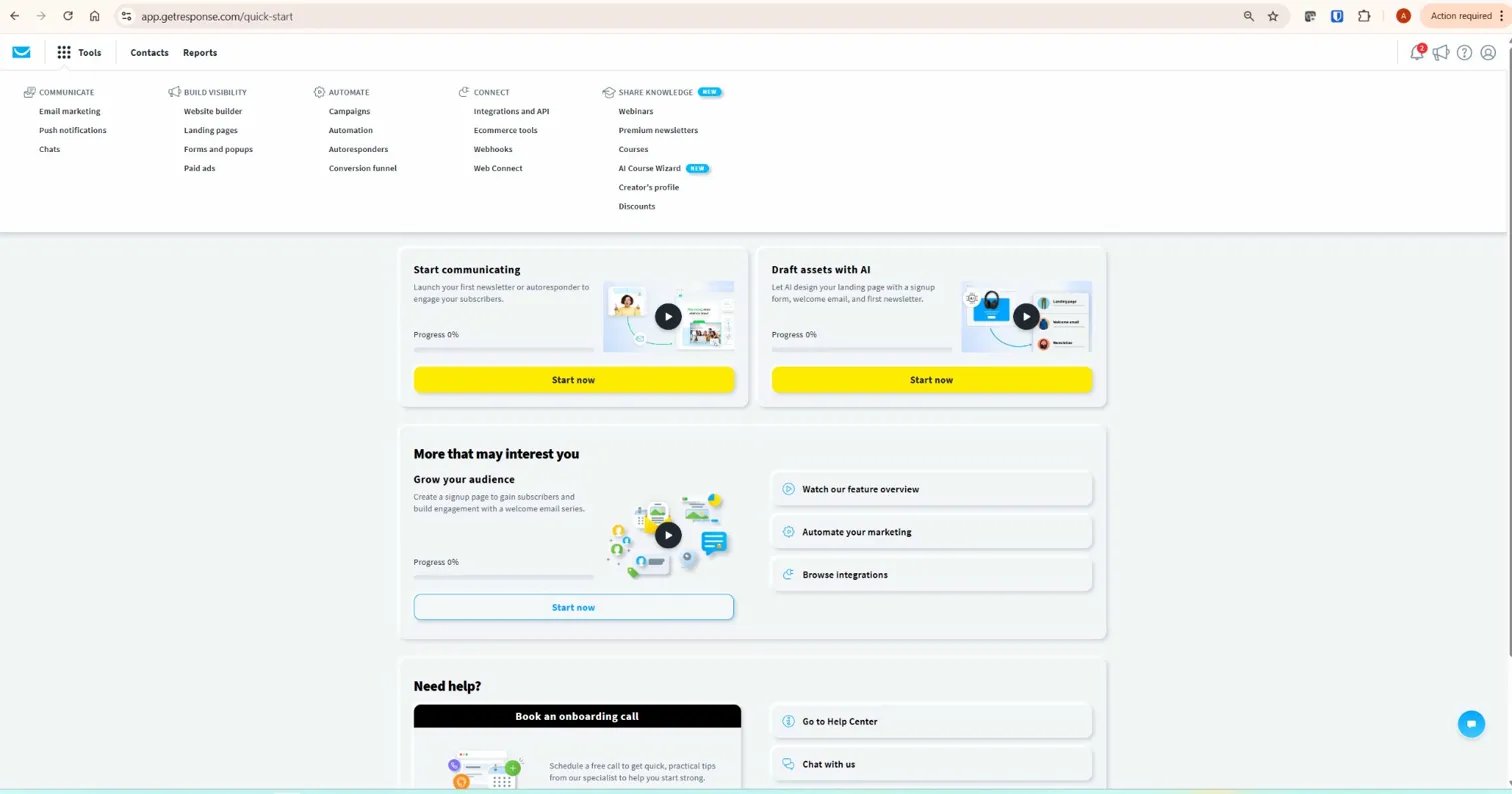
GetResponse integrates its own Zapier connection directly into the dashboard — you’ll find it under Tools → Integrations & API, with a separate tab specifically for “Integrations by Zapier.” This makes Zapier feel like a native GetResponse feature, but it isn’t one: connecting GetResponse to Zapier still requires you to have your own Zapier account, and Zapier’s free tier is limited in the number of automated tasks (called “Zaps”) it runs per month. For a handful of simple, infrequent automations, the free tier may be enough. For anything running constantly across a busy affiliate site, you’ll likely need a paid Zapier plan on top of your GetResponse subscription.
GetResponse Integrations That Actually Matter for Affiliate Marketers
Here is the honest priority list for GetResponse integrations worth your time if you’re running a content or review site, in the order most affiliates should tackle them.
1. WordPress. If your site runs on WordPress, this is the single most useful GetResponse integration for a content-driven affiliate business. It lets you capture leads directly from your blog through forms and popups, feeding straight into your GetResponse lists and automation sequences without any manual export or import. For most affiliate sites, this connection alone covers the majority of the integration work that actually matters. See the GetResponse forms and popups guide for the specific setup steps.
2. Zapier. Once WordPress lead capture is handled, Zapier is where the real flexibility comes in. Through Zapier, GetResponse can connect to WPForms (routing form submissions directly into specific lists), Google Sheets (logging new contacts or automation events into a spreadsheet for your own records), and PayPal (adding a contact to a list automatically when a payment comes through — useful if you sell a digital product like the Financial Clarity Toolkit). Zapier triggers include new contact added, new autoresponder created, and new landing page created; typical actions include creating or updating a contact and finding an existing one.
3. Payment processors. PayPal has confirmed native GetResponse support — connecting it means a completed sale can automatically add the buyer to a GetResponse list, trigger a delivery email, or start an onboarding sequence. Some independent reviews also list Stripe among GetResponse’s supported integrations, though this isn’t confirmed on GetResponse’s own primary documentation at the time of writing — verify Stripe-specific integration support directly at getresponse.com/integrations before building a workflow around it. If you sell any digital product directly, this integration removes the manual step of adding customers by hand after every sale.
4. Shopify or WooCommerce (situational). These matter only if you’re running an actual online store rather than an affiliate content site. GetResponse’s native Shopify integration syncs customer and order data, letting you build automation around purchase behaviour — abandoned cart follow-ups, post-purchase sequences, product recommendations based on past orders. WooCommerce integrates through GetResponse’s WordPress/WooCommerce connection, which passes product and customer data into GetResponse once your store is linked. Unless you’re selling physical products or run a WooCommerce-based digital storefront, this integration isn’t relevant to a typical affiliate review site.
Integrations You Can Safely Ignore as an Affiliate Marketer
Just as important as knowing which GetResponse integrations to set up is knowing what to skip. GetResponse’s integration directory is built to serve every type of business, from solo bloggers to enterprise sales teams — most of it doesn’t apply to you.
CRM integrations (Salesforce, HubSpot CRM, Pipedrive) are built for businesses with a sales team following up on leads individually. An affiliate site’s “sales process” is a reader clicking an affiliate link — there’s no sales pipeline to sync. Enterprise chat and support tools similarly assume a customer support operation you likely don’t run. Advanced ecommerce integrations beyond basic Shopify/WooCommerce — inventory management connectors, multi-currency tools — only matter once you’re running a genuine online store at scale.
The honest test: if an integration exists to solve a problem you don’t have — a sales pipeline, a support ticket queue, a warehouse of physical inventory — skip it, regardless of how prominently GetResponse features it in their marketing.
Setting Up GetResponse Integrations With WordPress
This is the integration nearly every affiliate site needs, so here is the practical setup path.
Step 1. If your primary goal is lead capture (forms and popups on your existing WordPress content), you don’t need a dedicated WordPress plugin at all — you need the Web Connect snippet from GetResponse’s Forms and Popups tool. This is covered in full detail in the GetResponse forms and popups guide, and it’s the fastest path to a working WordPress connection.
Step 2. If you’re using a WordPress form plugin like WPForms and want submissions routed directly into a specific GetResponse list — rather than relying on GetResponse’s own popup forms — connect the two through Zapier: create a Zap with WPForms as the trigger (“New Submission”) and GetResponse as the action (“Create or Update Contact”).
Step 3. If you’re running WooCommerce on your WordPress site and want customer or order data flowing into GetResponse, this integrates through GetResponse’s WordPress/WooCommerce connection directly, rather than through Zapier — GetResponse’s help documentation covers this as a direct connection separate from the general Zapier pathway.
Setting Up GetResponse Integrations With Zapier
Setting up the Zapier connection itself takes a few minutes and opens the door to dozens of other tools.
Step 1. In your GetResponse dashboard, go to Tools → Integrations & API.
Step 2. Click into the “Integrations by Zapier” tab and click Connect.
Step 3. Log into your existing Zapier account, or create one if you don’t already have it.
Step 4. Zapier will ask a few onboarding questions and suggest personalised workflow templates based on your answers. You can select up to five apps to get tailored recommendations.
Step 5. Build your first Zap — choose a trigger app and event (for example, “New Submission” in WPForms), then choose the GetResponse action that should follow (“Create or Update Contact,” specifying which list the new contact should join).
One detail worth flagging for GetResponse MAX account holders: Zapier is not available under the standard Tools → Integrations & API section for MAX accounts specifically, though it can still be set up and used through Zapier’s own platform directly.
Original Data Point: Integration Cost Stacking
With GetResponse integrations, it’s easy to overlook that “integration” doesn’t always mean “free.” Connecting GetResponse to WordPress via the Forms and Popups tool costs nothing extra — it’s included in your GetResponse plan. Connecting to Zapier for anything beyond a handful of simple automations typically requires a paid Zapier subscription on top of GetResponse, since Zapier’s free tier caps the number of monthly automated tasks.
For a solo affiliate marketer, this means the real cost of a “fully integrated” setup can be GetResponse’s own subscription plus a separate Zapier plan — not GetResponse alone. Before assuming you need Zapier for everything, check whether the specific tool you want to connect has a native GetResponse integration first (WordPress, Shopify, and PayPal all do); only reach for Zapier when no direct connection exists, since that’s the point where you start paying for a second tool to bridge the gap.
What To Do Next
Ready to set up your first GetResponse integrations? Open your account and go to Tools → Integrations & API. If you haven’t already, install the Web Connect snippet on your WordPress site — this alone covers the highest-value integration for most affiliate content sites. If you’re using a form plugin like WPForms and want submissions routed automatically into specific lists, set up that single Zapier connection next. Everything else on GetResponse’s integration list can wait until you have an actual, specific need for it. For the complete picture of what else GetResponse offers, read the complete GetResponse review.
Try GetResponse free and connect your first integration today →

Conclusion
GetResponse’s integration library is genuinely large, but for an affiliate marketer, only a handful of GetResponse integrations actually earn their place in your workflow. WordPress lead capture matters to nearly everyone; Zapier matters once you need to connect specific form plugins or spreadsheets; Shopify and WooCommerce only matter if you’re actually running a store. Start with WordPress, add Zapier only when a genuine need arises, and ignore the CRM and enterprise-focused integrations entirely — they’re built for a different kind of business than the one you’re running. If you’re still deciding whether GetResponse is the right platform overall, the full GetResponse review covers the complete feature set and honest limitations in detail.
Start your free GetResponse account — WordPress integration is included from day one →
Frequently Asked Questions
Does GetResponse integrate with WordPress?
Yes. The most common connection is through GetResponse’s Forms and Popups tool, which uses a single Web Connect code snippet installed once on your WordPress site to capture leads directly into your GetResponse lists and automation workflows. For more advanced needs, such as routing WPForms submissions into specific lists, GetResponse also connects to WordPress form plugins through Zapier.
How many integrations does GetResponse have?
GetResponse’s own pages don’t fully agree — the main integrations directory states “400+ apps,” while the GetResponse MAX-specific page states “170+ ready-made integrations.” The exact figure depends on whether Zapier-accessible apps are included in the count. Check getresponse.com/integrations directly for the current, browsable list rather than relying on any single figure.
Is the GetResponse Zapier integration free?
Connecting GetResponse to Zapier itself doesn’t cost extra through GetResponse, but Zapier requires its own separate account, and its free tier limits the number of automated tasks (“Zaps”) you can run per month. For light, occasional automations, the free tier may suffice. For anything running continuously across a busy site, expect to need a paid Zapier plan in addition to your GetResponse subscription.
Can GetResponse connect to Shopify or WooCommerce?
Yes, both are supported. GetResponse’s native Shopify integration syncs customer and order data, enabling automation based on purchase behaviour like abandoned carts and post-purchase follow-ups. WooCommerce connects through linking your WordPress site and store directly with GetResponse. Neither is relevant unless you’re running an actual online store — for a typical affiliate review site, these integrations can be safely skipped.
Which GetResponse integrations matter most for affiliate marketers?
WordPress is the highest-priority integration for most affiliate sites, since it handles lead capture directly from your content. Zapier follows closely behind, connecting GetResponse to form plugins, spreadsheets, and payment processors like PayPal. CRM integrations, enterprise support tools, and advanced ecommerce connectors are built for different business models and generally aren’t relevant to a content-driven affiliate site.
Does GetResponse have its own API?
Yes. Beyond the ready-made integrations directory, GetResponse offers an API that developers can use to build custom connections — for example, with an in-house CRM, proprietary internal software, custom signup forms, or a mobile app not covered by an existing integration. This is generally only necessary if none of GetResponse’s native or Zapier-accessible integrations cover your specific use case.
