
GetResponse vs ConvertKit: Honest 2026 Verdict for Affiliates
Affiliate Disclosure: This article contains affiliate links. If you purchase through these links, I may earn a commission at no extra cost to you. I only recommend tools I have personally used and genuinely believe in. Read my full disclosure policy.
The getresponse vs convertkit decision for affiliate marketers, the standard advice — “ConvertKit is for creators, GetResponse is for businesses” — misses the point entirely. Affiliate marketing sits at the intersection of content creation and business automation. You need both. After 30 years in finance and building InnovateHub Finance on GetResponse, I have looked at this comparison from the angle that actually matters: which platform generates more affiliate revenue for a content site owner, and which one poses risks that most comparisons never mention.
This getresponse vs convertkit comparison covers pricing, automation, landing pages, deliverability, and the affiliate link policy issue that could get your account restricted on one of these platforms without warning.
→ Try GetResponse free for 30 days — full platform access, no credit card required
GetResponse vs ConvertKit: Quick Verdict
For affiliate marketers specifically, GetResponse wins this comparison — and the margin is wider than most articles suggest.
ConvertKit (now rebranded as Kit in 2024) is a genuinely excellent platform for content creators who want simple, text-based email sequences and a clean subscriber management interface. But it has three problems for affiliate marketers: it restricts affiliate links more aggressively than GetResponse, it has no native webinar tool, and at 10,000 contacts it costs $119/month versus GetResponse’s $59/month — exactly double the price for fewer features.
GetResponse wins on price, features, affiliate-friendliness, and all-in-one value. ConvertKit wins on interface simplicity and creator-focused workflow design. For a content site owner building affiliate revenue, the GetResponse vs ConvertKit choice is clear.
Platform Overview
What Is GetResponse?
GetResponse is an all-in-one marketing platform founded in 1998, serving over 350,000 customers across 183 countries. Beyond email, it includes visual automation workflows, landing pages, webinar hosting, conversion funnels, AI course creation, and paid newsletters — all under one subscription. The platform is designed for marketers who want one tool to handle their entire email marketing infrastructure rather than stitching together multiple services.
What Is ConvertKit (Kit)?
ConvertKit was founded in 2013 specifically for professional bloggers and content creators. In 2024 it rebranded to Kit — though most users and comparison articles still refer to it as ConvertKit. The platform deliberately prioritises simplicity over feature breadth: minimal email design, straightforward subscriber tagging, basic landing pages, and clean automation sequences. It is the platform that says “we do email well and nothing else” — which is an honest position, but one that has significant cost implications for affiliate marketers as list size grows.
GetResponse vs ConvertKit: Pricing Comparison
The getresponse vs convertkit pricing comparison is where the decision becomes most concrete — and where ConvertKit’s positioning as a “creator-friendly” platform starts to look expensive.
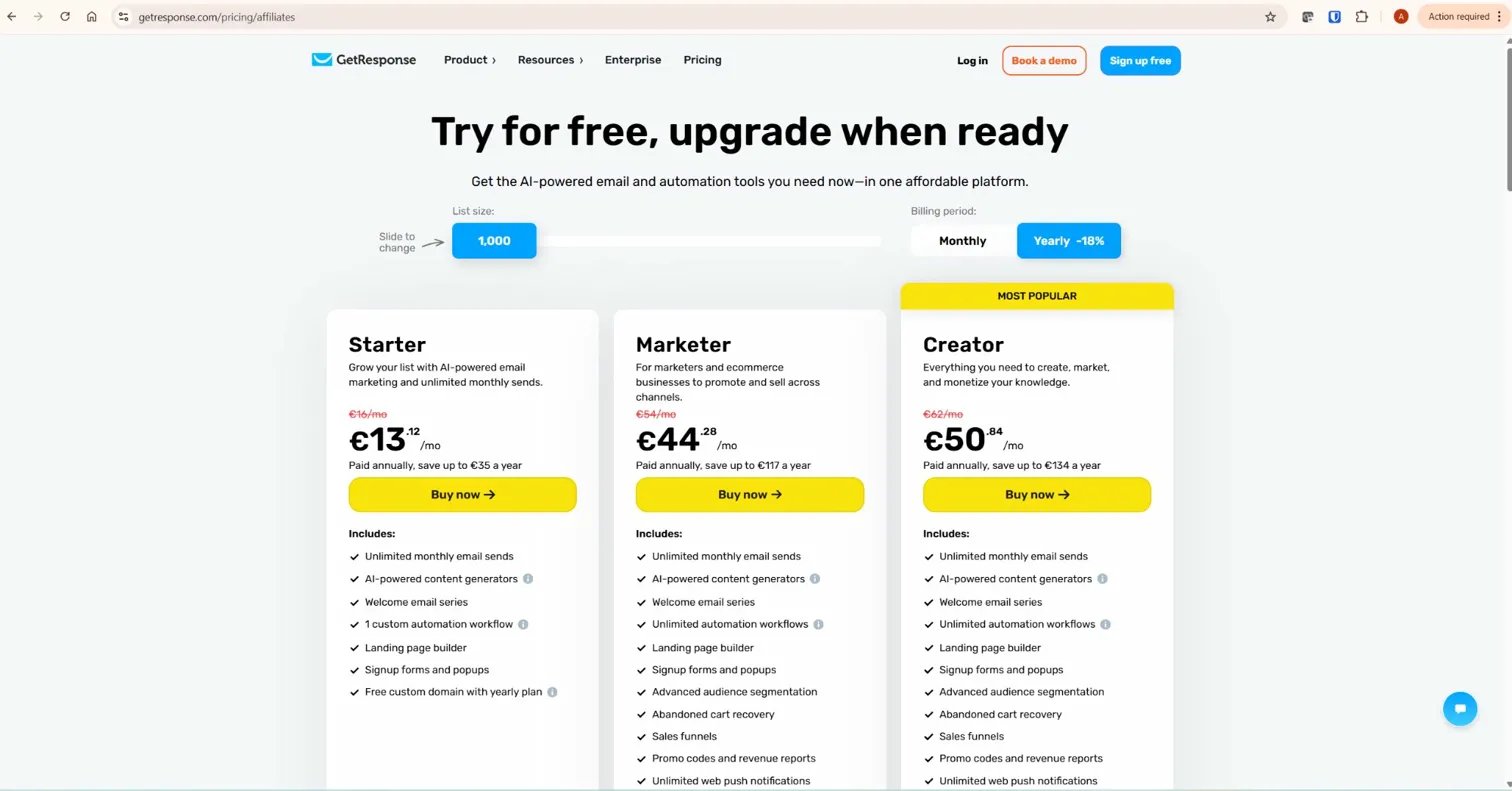
GetResponse Pricing
- Free plan: 500 contacts, 2,500 emails/month, basic workflows
- Starter: ~$19/month (1,000 contacts) — unlimited emails, landing pages, 1 automation workflow
- Marketer: ~$59/month (1,000 contacts) — unlimited workflows, webinars excluded
- Creator: ~$69/month (1,000 contacts) — webinars (100 attendees), course creation, paid newsletters
- MAX: Custom from $1,099/month
ConvertKit (Kit) Pricing
- Free plan: Up to 10,000 subscribers, unlimited landing pages, no automation sequences
- Creator: $25/month (1,000 subscribers) — automation sequences, integrations, free migration
- Creator Pro: $50/month (1,000 subscribers) — newsletter referral system, subscriber scoring, priority support
The pricing gap widens dramatically as your list grows in the getresponse vs convertkit comparison. At 10,000 contacts, GetResponse Marketer costs $79/month. ConvertKit Creator costs $119/month for the same contact count. That is $480 per year more for a platform that does not include webinars, has no conversion funnels, and has a more restrictive affiliate link policy. The GetResponse vs ConvertKit price comparison at scale is not close.
| Contact Count | GetResponse Marketer | ConvertKit Creator | Annual Saving with GetResponse |
|---|---|---|---|
| 1,000 contacts | $59/month | $25/month | ConvertKit cheaper by $408/yr |
| 5,000 contacts | $79/month | $66/month | ConvertKit cheaper by $156/yr |
| 10,000 contacts | $79/month | $119/month | GetResponse cheaper by $480/yr |
| 25,000 contacts | $139/month | $199/month | GetResponse cheaper by $720/yr |
The crossover point is around 5,000–7,000 contacts. Below that, ConvertKit’s Creator plan is cheaper. Above it, GetResponse is meaningfully cheaper — and that gap compounds as your list grows. For any affiliate content site with a serious growth trajectory, GetResponse wins the pricing comparison at the scale that matters.
→ See GetResponse’s full pricing — plans start free and scale predictably as your list grows
The Affiliate Link Policy: The Section Most Comparisons Skip
This is the most important section of this GetResponse vs ConvertKit comparison for affiliate marketers — and almost no review covers it honestly.
ConvertKit (Kit) has a documented history of restricting or suspending accounts that send emails containing affiliate links, particularly when those links appear prominently in promotional emails. The platform’s compliance team is known for flagging accounts without prior warning, even when the list is entirely opt-in and the content is substantive. Multiple verified user reviews on Capterra and G2 report accounts being restricted mid-campaign with no clear appeal path.
This is not unique to ConvertKit — all reputable email platforms prohibit unsolicited promotion and bulk affiliate blasting. The difference is enforcement aggressiveness. ConvertKit applies stricter standards than most platforms, which is a genuine operational risk for anyone whose primary content model is affiliate recommendations.
GetResponse’s terms explicitly acknowledge affiliate marketing as a valid use case. The platform is widely used throughout the affiliate marketing community and has a well-established track record of supporting content-led affiliate sites without the compliance friction that ConvertKit users report. For a comprehensive affiliate content business, this is a material consideration — not a minor footnote.
GetResponse vs ConvertKit: Automation
Automation is the engine of affiliate email revenue — and in the getresponse vs convertkit debate it is the feature that separates serious affiliate infrastructure from basic newsletter tools. Your welcome sequences, lead magnet delivery, nurture flows, and product recommendation series run without you — but only if the platform supports the conditional logic needed to segment and personalise at scale.
GetResponse Automation
GetResponse’s visual automation builder supports unlimited workflows on the Marketer plan, with 15+ condition types covering email opens, link clicks, page visits, tag assignments, form submissions, ecommerce events, and course activity. The canvas-based interface lets you build branching sequences where different subscribers receive different emails based on their behaviour — clicking a pricing link triggers one sequence, ignoring it triggers another.

Over 50 pre-built workflow templates cover welcome sequences, lead magnet delivery, re-engagement, post-purchase follow-ups, and affiliate marketing-specific flows. The automation builder is available in full on the Marketer plan — there is no need to upgrade further to access conditional logic.
ConvertKit Automation
ConvertKit’s automation is simpler by design. The visual sequence builder is clean and intuitive — you can see all emails in a sequence at once and edit them in a single view, which is genuinely better than GetResponse’s tab-switching workflow for basic sequences. Automation is included from the Creator plan upward and covers welcome sequences, tag-based branching, and time-delay follow-ups.
Where ConvertKit automation shows its limits for affiliate marketers: the conditional logic is less granular than GetResponse’s. Multi-trigger workflows, advanced scoring, and ecommerce event triggers are either absent or require third-party integrations. The platform is designed for linear creator sequences — “subscriber joins, receives welcome, receives content series, receives pitch” — rather than the complex conditional branching that drives serious affiliate revenue from segmented lists.
Automation Verdict
ConvertKit wins on simplicity for basic sequences. GetResponse wins on depth for conditional automation. For an affiliate content site with multiple topic clusters requiring segmented sequences based on subscriber behaviour, GetResponse’s automation is the more powerful and appropriately priced tool.
GetResponse vs ConvertKit: Landing Pages
Landing pages are essential for affiliate marketers building lead magnet funnels. The getresponse vs convertkit comparison on landing pages is straightforward.
GetResponse includes a full landing page builder with 200+ responsive templates, AI-powered page generation, A/B testing on paid plans, and direct integration with automation workflows. When a subscriber submits a GetResponse landing page form, they immediately enter your chosen automation sequence — no Zapier, no third-party connection required.

ConvertKit includes landing pages across all plans including free. The builder is deliberately minimal — clean, fast, and focused on collecting email addresses. There are fewer templates, no AI builder, and limited design flexibility. For a simple opt-in page to a free newsletter, ConvertKit’s landing pages work well. For more sophisticated lead magnet pages with A/B testing, countdown timers, social proof sections, and custom branding, GetResponse’s builder is significantly more capable.
Landing pages verdict: GetResponse wins decisively. More templates, AI builder, A/B testing, and native automation integration at no additional cost.
GetResponse vs ConvertKit: Webinars and Additional Features
This is the clearest differentiator in the getresponse vs convertkit comparison for affiliate marketers who want to build authority through live content.
GetResponse includes built-in webinar hosting on the Creator plan — up to 100 attendees, registration pages, automated email reminders, screen sharing, polls, Q&A, and on-demand replay. Attendees automatically enter different follow-up sequences depending on whether they attended live, watched the replay, or registered but did not show up. For affiliate marketers building webinar funnels — teaching something valuable then recommending a product — this is a significant revenue opportunity that requires no additional tools.
ConvertKit has no webinar functionality at any plan level. If you want webinars alongside ConvertKit, you need Zoom Webinars (from $149/month), Demio (from $59/month), or a similar third-party tool. That additional cost closes the pricing gap between the platforms at smaller list sizes entirely.
GetResponse also includes conversion funnels (30+ templates combining landing pages, email sequences, and sales pages), AI course creation, and paid newsletters on the Creator plan. ConvertKit includes paid newsletters and digital product selling — a genuine strength for creators — but no funnels and no course hosting.
GetResponse vs ConvertKit: Email Design
This is where ConvertKit has a genuine, honest advantage — and it is worth acknowledging directly.
ConvertKit deliberately prioritises text-based emails over HTML design. The philosophy is that plain-text emails feel more personal, receive higher open rates, and are less likely to be filtered to the Promotions tab. The email editor is minimal by design — you write content, you do not design campaigns. For a creator whose brand is built on personal connection with an audience, this approach works well and the simplicity is a feature rather than a limitation.
GetResponse’s email editor is a full drag-and-drop builder with 150+ templates, image blocks, product blocks, and HTML customisation. The templates are functional rather than design-forward — more professional than beautiful. For an affiliate content site where the email serves a functional purpose (deliver information, recommend a product, nurture toward a decision), GetResponse’s editor is more than adequate.
If your brand aesthetic depends on highly designed email newsletters, neither platform is the right answer — that is a use case for Mailchimp or Campaign Monitor. For affiliate marketing emails focused on content and conversion, both editors are sufficient, with GetResponse offering more flexibility and ConvertKit offering more simplicity.
GetResponse vs ConvertKit: Deliverability
Both platforms perform respectably on independent deliverability tests. In the getresponse vs convertkit deliverability question, neither platform provides a decisive advantage. According to EmailToolTester’s deliverability assessments, GetResponse and ConvertKit both score in the acceptable-to-good range. Neither platform gives you a decisive deliverability advantage over the other.
The more important deliverability consideration in the GetResponse vs ConvertKit debate is list quality management. ConvertKit’s stricter compliance enforcement — while frustrating for affiliate marketers — does result in a cleaner overall sending reputation on the platform. GetResponse’s more permissive approach requires you to manage your own list quality more actively: double opt-in, regular hygiene, and engagement-based suppression.
In practice, a well-managed list on GetResponse will outperform a poorly managed list on ConvertKit. Platform deliverability differences are a factor — your sending practices are a bigger one.
GetResponse vs ConvertKit: Head-to-Head Summary
| Category | GetResponse | ConvertKit (Kit) |
|---|---|---|
| Free plan | 500 contacts, 2,500 emails/month | 10,000 contacts, no automation |
| Pricing at 10k contacts | $79/month (Marketer) | $119/month (Creator) |
| Automation depth | Advanced conditional workflows | Simple linear sequences |
| Landing pages | 200+ templates, AI builder, A/B testing | Basic, minimal design options |
| Webinars | Built-in on Creator plan | Not available |
| Course creation | AI course builder (Creator plan) | Not available |
| Conversion funnels | 30+ templates included | Not available |
| Email design | Full HTML drag-and-drop | Minimal text-focused editor |
| Affiliate link policy | Permissive, affiliate-friendly | Stricter enforcement history |
| Ease of use | More features, slightly steeper curve | Simpler, faster to learn |
| Integrations | 170+ native | 100+ native |
Who Should Choose GetResponse
- Affiliate marketers who need conditional automation workflows that respond to subscriber behaviour
- Content site owners who want email, landing pages, and automation under one subscription
- Marketers planning to run webinar funnels without paying for a separate platform
- Anyone building a list above 5,000–7,000 contacts where GetResponse is meaningfully cheaper
- Affiliate marketers who want a platform with a well-established track record of supporting affiliate content businesses
Who Should Choose ConvertKit (Kit)
- Pure content creators — bloggers, podcasters, newsletter writers — whose email strategy is straightforward personal communication rather than structured funnels
- Marketers with lists under 5,000 contacts where ConvertKit’s lower entry pricing is an advantage
- Anyone who values maximum email editor simplicity and minimal design complexity
- Digital product sellers using ConvertKit’s native paid newsletter and product delivery features
Final Verdict: GetResponse vs ConvertKit for Affiliate Marketers
The getresponse vs convertkit decision for affiliate marketers is clearer than most comparisons suggest.
ConvertKit is an excellent platform in the getresponse vs convertkit space — but it is built for creators who want to grow an audience and sell their own products directly. Its pricing scales aggressively, its affiliate link policy creates operational risk, and it lacks the webinar hosting, conversion funnels, and advanced automation that drive serious affiliate revenue at scale.
GetResponse is built for marketers who need a complete infrastructure: email, automation, landing pages, webinars, and funnels in one platform at a price that becomes more competitive as your list grows. After 30 years in finance, my framework for tool selection is consistent: pay for capability you will actually use, at a price that makes business sense at your target scale. At 10,000 contacts, GetResponse is $480/year cheaper than ConvertKit and includes features that would cost an additional $600–$1,800/year to replicate through third-party tools.
For the full picture of what GetResponse offers, read our complete GetResponse review. For a detailed look at how GetResponse compares to other platforms, see our GetResponse vs MailerLite comparison and our GetResponse vs ActiveCampaign guide. According to G2’s verified user comparison, GetResponse scores higher on overall satisfaction and quality of support — the two factors that matter most when your email marketing is generating real revenue.
Frequently Asked Questions
Is GetResponse better than ConvertKit for affiliate marketing?
Yes, for most affiliate marketers. GetResponse has more permissive affiliate link policies, better conditional automation at scale, built-in webinars, and is significantly cheaper at list sizes above 7,000 contacts. ConvertKit is better for pure content creators who want maximum simplicity and whose email strategy does not depend on affiliate recommendations.
Does ConvertKit allow affiliate links in emails?
ConvertKit allows affiliate links in emails but has a stricter compliance enforcement history than most platforms. Multiple verified users report accounts being restricted without prior warning for affiliate-heavy promotional email content, even on opt-in lists. Content-led affiliate marketers with substantive email content rarely encounter issues, but the risk is higher than on GetResponse, which has a more established track record supporting affiliate content businesses.
Which is cheaper — GetResponse or ConvertKit?
ConvertKit is cheaper at small list sizes — its Creator plan starts at $25/month for 1,000 contacts versus GetResponse’s $19/month for Starter (though GetResponse Starter limits you to one automation workflow). Above 7,000–10,000 contacts, GetResponse is significantly cheaper: $79/month versus ConvertKit’s $119/month at 10,000 contacts. The annual saving with GetResponse grows as your list scales.
Does ConvertKit have webinars?
No. ConvertKit has no native webinar functionality at any plan level. To run webinars alongside ConvertKit you need a separate tool — Zoom Webinars starts at $149/month, adding significantly to the total cost. GetResponse includes built-in webinar hosting on the Creator plan for up to 100 attendees with automated follow-up sequences included.
Which has better automation — GetResponse or ConvertKit?
GetResponse has more advanced automation. It supports conditional branching, 15+ trigger types, ecommerce events, course activity triggers, and lead scoring — all available on the Marketer plan. ConvertKit’s automation is simpler and more intuitive for basic sequences, but lacks the conditional logic that affiliate marketers need to segment and personalise at scale. For complex multi-branch workflows, GetResponse is the stronger tool.
Can I switch from ConvertKit to GetResponse easily?
Yes. Export your subscriber list from ConvertKit as a CSV and import it into GetResponse. Your email templates need to be rebuilt in GetResponse’s editor, and automation sequences need to be recreated in the workflow builder. GetResponse’s onboarding team can assist on paid plans. Most users complete a full migration within a week. See our GetResponse email funnel guide for how to rebuild your sequences after migrating.
Does GetResponse have a free plan like ConvertKit?
Both platforms offer free plans but they work differently. ConvertKit’s free plan allows up to 10,000 subscribers but excludes automation sequences — you cannot send automated emails on the free plan. GetResponse’s free plan caps at 500 contacts but includes basic automation workflows and a 14-day premium trial with full platform access. For a detailed breakdown of what GetResponse offers at no cost, see our GetResponse free plan guide.
Related GetResponse Articles
- GetResponse Review 2026: The Honest Verdict for Affiliate Marketers
- GetResponse vs Mailchimp: Which Email Marketing Platform Is Better?
- GetResponse vs MailerLite: Honest 2026 Verdict for Affiliates
- GetResponse vs ActiveCampaign: The Ultimate 2026 Guide
- GetResponse Pricing in 2026: Plans, Features & What You Actually Pay For
This comparison is based on platform research and direct experience using GetResponse for InnovateHub Finance as of April 2026. Pricing and features are subject to change — always verify current details directly with both platforms before making a purchase decision.
