
GetResponse Pricing: 3 Plans, Real Costs & Which One You Need
This article contains affiliate links. If you sign up for GetResponse through a link on this page, I may earn a commission at no extra cost to you. I only recommend tools I have genuinely evaluated.
Quick Answer: How Much Does GetResponse Cost?
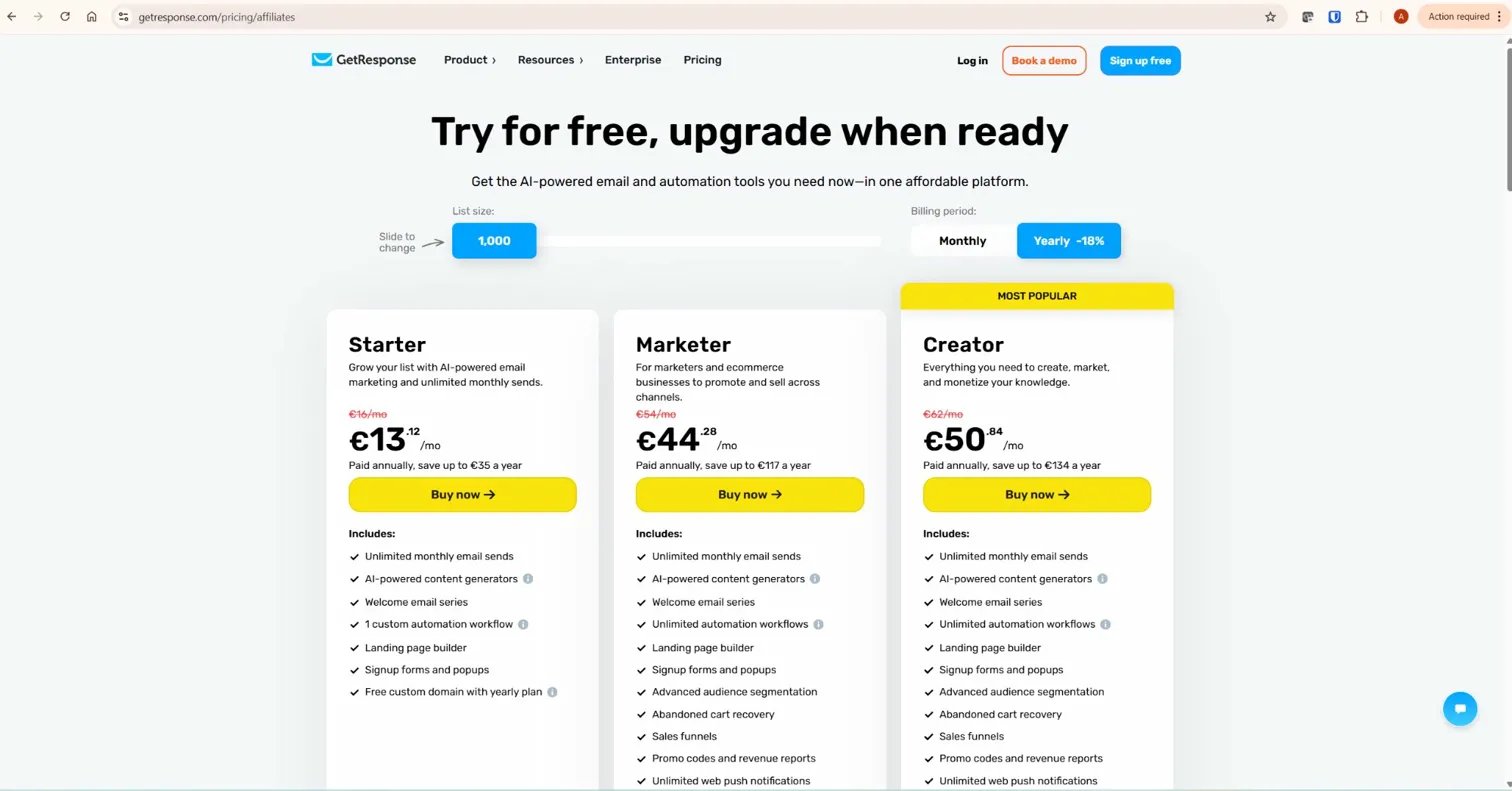
GetResponse pricing starts at $19 per month for up to 1,000 contacts on the Starter plan. The Marketer plan — the minimum viable option for affiliate marketers who need full automation, tagging, and conditional workflows — starts at $59 per month for 1,000 contacts. The Creator plan, which adds webinar hosting and course tools, starts at $69 per month. Annual billing reduces these prices by 18%. There is a permanent free plan capped at 500 contacts and 2,500 email sends per month, which is useful for testing but not for running a structured affiliate marketing operation.
GetResponse pricing scales with list size, so the number that matters most is not your current subscriber count — it is your projected count in twelve months. Start your free GetResponse account here — no credit card required.
GetResponse Pricing Plans: What Each One Actually Includes
GetResponse pricing is structured around three paid plans plus a free tier. Understanding what each tier genuinely unlocks — not just the marketing description — is what allows you to choose correctly without paying for features you do not need or missing the ones you do.
| Plan | 1,000 contacts | 5,000 contacts | 10,000 contacts | Key Features |
|---|---|---|---|---|
| Free | $0 (500 contacts max) | — | — | Basic emails, landing pages (1,000 visitors/month), 1 automation workflow, website builder |
| Starter | $19/month | $54/month | $79/month | Unlimited emails, autoresponders, 1 workflow, welcome series, landing pages, signup forms |
| Marketer | $59/month | $89/month | $114/month | Full automation builder, unlimited workflows, tagging, lead scoring, advanced segmentation, sales funnels, abandoned cart |
| Creator | $69/month | $99/month | $139/month | Everything in Marketer + webinars (100 attendees), online courses, paid newsletters |
| Enterprise (MAX) | Custom pricing | — | — | Custom infrastructure, SMS, dedicated support, transactional emails |
All prices shown are monthly billing rates. Annual billing reduces GetResponse pricing by 18% across all plans — worth calculating before you commit if you are confident in your long-term use of the platform.
The Starter Plan: What It Actually Covers
The Starter plan at $19 per month for 1,000 contacts is where most people begin. It covers unlimited email sends, autoresponders, one automation workflow, a welcome email series, landing pages, signup forms and popups, a website builder, and 24/7 chat support. That is a genuinely strong entry-level offering — most competing platforms charge more for a comparable feature set at this tier.
The limitation that matters for affiliate marketers: the Starter plan includes only one automation workflow and does not include the full visual automation workflow builder, tagging, or lead scoring. You can set up a basic welcome sequence and a lead magnet delivery email. You cannot build conditional branches — the logic that routes engaged subscribers differently from passive ones, or sends different recommendations to subscribers from different traffic sources. That capability lives exclusively in the Marketer plan.
For a beginner building their first email list and sending monthly newsletters, the Starter plan is a solid choice. For anyone running a multi-product affiliate site with segmented audiences, it is not sufficient — and starting on Starter with the intention of upgrading later means rebuilding your automation architecture after the fact.
The Marketer Plan: The Right Plan for Affiliate Content Sites
The Marketer plan is where GetResponse pricing aligns with what affiliate content site operators actually need. At $59 per month for 1,000 contacts, it unlocks the full visual automation workflow builder, unlimited workflows, behavioural tagging, lead scoring, advanced segmentation, sales funnels, and abandoned cart recovery. These are not incremental upgrades from the Starter plan — they are the core mechanisms of a conversion-focused email system.
Tagging allows you to label every subscriber by source and behaviour — which lead magnet brought them in, which affiliate links they clicked, how engaged they have been over time. Lead scoring assigns numerical values to actions so you can identify high-intent subscribers and route them into more direct sequences. Conditional branching lets you build workflows where subscribers who click an affiliate link in Email 2 receive a different Email 3 than those who did not. None of this is available on the Starter plan.
I use the Marketer plan for InnovateHub Finance, which runs four affiliate product clusters — TradingView, Koinly, GetResponse, and Semrush — each with its own subscriber segment and automation sequence. The Marketer plan handles all of it within a single account. At $59 per month for a well-managed list under 1,000 contacts, the pricing at this tier is competitive with alternatives that deliver significantly less automation depth.
The Creator Plan: When to Upgrade
The Creator plan at $69 per month for 1,000 contacts adds webinar hosting (up to 100 attendees), online course hosting, and paid newsletter functionality to everything included in the Marketer plan. The $10 per month difference from Marketer to Creator is only worth paying if you are actively running webinars as a lead generation or sales channel, or if you plan to sell online courses through GetResponse’s native tools.
For an affiliate content site that monetises through commissions rather than direct product sales, the Marketer plan covers everything needed. The Creator plan becomes relevant when you productise — digital products, paid memberships, or webinar-based affiliate promotions. If that is not currently part of your strategy, the Marketer tier is the more efficient choice.
How GetResponse Pricing Scales With List Size
The monthly cost increases at each subscriber tier, and the jumps are not always linear. Understanding the price points before you hit them is important for budgeting — and for knowing when list cleaning becomes a financial priority rather than just a best practice.
| Subscribers | Starter | Marketer | Creator |
|---|---|---|---|
| 1,000 | $19/month | $59/month | $69/month |
| 2,500 | $29/month | $69/month | $79/month |
| 5,000 | $54/month | $89/month | $99/month |
| 10,000 | $79/month | $114/month | $139/month |
| 25,000 | $174/month | $219/month | $259/month |
| 50,000 | $299/month | $369/month | $414/month |
| 100,000 | $539/month | $599/month | $699/month |
Two things stand out in this pricing table. First, the gap between Starter and Marketer narrows significantly at higher list sizes — at 100,000 contacts, the difference is only $60 per month for a vastly more capable automation system. Second, the price jumps between tiers (1,000 to 2,500, 2,500 to 5,000) are the points where proactive list cleaning pays off. Removing inactive subscribers before you cross a tier threshold can delay a price increase by months. Always verify current pricing at getresponse.com before making a plan decision, as rates are subject to change.
The Duplicate Contact Problem: A Hidden Pricing Consideration
This is the detail that catches the most users off guard and almost no guide covers clearly. If the same email address appears on more than one list in your account, GetResponse counts it as multiple contacts — not one. A subscriber on three lists counts as three contacts toward your plan limit.
For an affiliate content site running separate lists for different product clusters, this matters. If you manage a TradingView list and a Koinly list as separate entities and some subscribers appear on both, they are being counted twice. The practical solution is to use a single list with tags rather than multiple separate lists wherever possible. Tags accomplish the same segmentation goal — routing different subscribers to different sequences — without the contact duplication cost that multiple lists create.
Similarly, unsubscribed contacts count toward your total unless you actively delete them from the account. A subscriber who opts out is no longer receiving emails but is still contributing to your list size — and therefore your monthly cost. Regular account hygiene — removing hard bounces, deleting unsubscribes, and suppressing inactive contacts — keeps pricing predictable and prevents unexpected tier jumps.
Annual vs Monthly Billing: The 18% Decision
GetResponse offers an 18% discount on annual prepay across all plans. On the Marketer plan at $59 per month, that works out to approximately $128 saved over twelve months — roughly two months free. On the Creator plan at 5,000 contacts ($99/month), the annual saving is approximately $214.
The annual billing decision depends on one question: how confident are you that your list size and plan requirements will remain stable for twelve months? If you are currently at 800 contacts and growing steadily, committing to a 1,000-contact annual plan means either paying for headroom you have not yet used or upgrading mid-cycle when you cross the tier — which triggers a new billing calculation. Monthly billing costs more but gives you flexibility to upgrade tiers precisely when your list demands it without financial waste.
The practical approach: start on monthly billing until your list size has stabilised for two or three months at a consistent tier, then switch to annual billing to lock in the discount. GetResponse allows upgrades at any time and downgrades via support request.
Is GetResponse Pricing Worth It? An ROI Framework
The right question about GetResponse pricing is not whether the monthly fee is reasonable in absolute terms — it is whether the revenue your email system generates justifies the cost of running it. With 30 years of evaluating financial tools and investment decisions, this is the framework I apply to every platform subscription: what is the return per pound invested, and does it compound over time?
For an affiliate content site on the Marketer plan at $59 per month with 1,000 subscribers, the break-even point is modest. If your automation sequences generate a 1% conversion rate on a $50 affiliate commission, ten sales per month covers the platform cost entirely. At 5,000 subscribers on the same conversion rate, fifty sales per month at $50 commission produces $2,500 in revenue against an $89 platform cost — a strong return ratio for infrastructure that runs automatically.
The platform cost becomes infrastructure, not expense, when automation is running properly. A GetResponse pricing investment that is not generating a return is almost always a usage problem rather than a pricing problem — the automation is not built, the sequences are not running, or the list is not being actively segmented. Email marketing consistently delivers strong returns as a digital marketing channel, and that return is amplified by the behavioural automation that the Marketer plan unlocks.
For a complete assessment of whether GetResponse delivers on its promises beyond pricing, read the full GetResponse review. For how the pricing compares against the closest competitor, see GetResponse vs Mailchimp.
When GetResponse Pricing Is Not the Right Choice
GetResponse pricing is not the right fit for every use case. If you are sending one newsletter per month to a list of 200 subscribers with no plans to build automation sequences, the Starter plan is functional but Mailchimp’s permanent free tier delivers the same outcome at no cost. GetResponse’s value is in its automation depth — if you are not using automation, you are paying for capability you are not accessing.
If you need deep ecommerce integration with Shopify or WooCommerce as your primary use case and webinars or affiliate funnels are not part of your strategy, Klaviyo or Mailchimp’s ecommerce tooling may be better suited. GetResponse pricing reflects an all-in-one marketing platform — the cost is justified when you use multiple components of that platform. If you only need one component, a specialist tool may deliver better value.
GetResponse holds a 4.3/5 rating on G2 from over 760 verified reviews, with pricing and value for money cited positively specifically by users who are actively using the automation and funnel features — not by those using it as a basic newsletter tool. That pattern is consistent with the pricing structure: the cost-to-value ratio improves as you use more of the platform.
What To Do Next
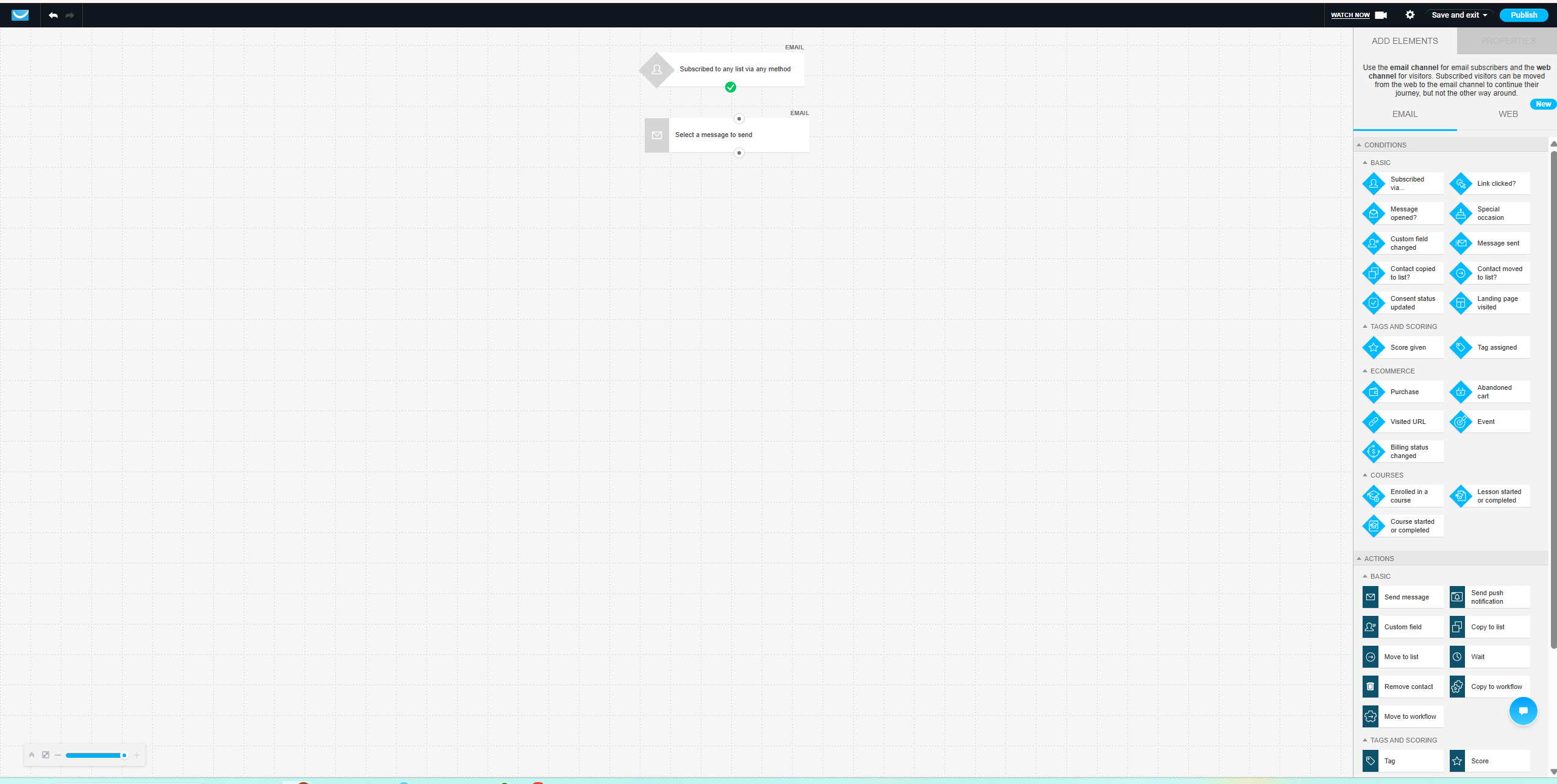
If you are evaluating GetResponse and have not yet tested the platform, start with the free account — no credit card required. You get 14 days of premium feature access from day one, which is enough time to build one complete automation workflow — trigger, tag, three emails, one conditional branch — and evaluate whether the Marketer plan’s automation builder solves the specific problem you need it to solve before committing to a paid subscription. Do not evaluate the platform on Starter plan features alone, because the Starter plan does not represent what GetResponse is built to do.
If you are already on GetResponse and evaluating whether to upgrade from Starter to Marketer, the decision is straightforward: if you are promoting affiliate products to a list and not using behavioural tagging and conditional sequences, you are leaving conversion rate on the table. The $40 monthly difference between Starter and Marketer at 1,000 contacts pays for itself with one additional affiliate conversion per month at most commission rates.
Explore GetResponse plans and start your free account here.
Frequently Asked Questions
Does GetResponse have a free plan?
Yes — GetResponse offers a free forever account with no credit card required, capped at 500 contacts and 2,500 email sends per month. Every new free account also receives 14 days of premium feature access from signup, which lets you test the full platform before deciding whether to upgrade. After the 14-day premium period, the account reverts to the permanent free tier with basic functionality — basic email templates, landing pages limited to 1,000 unique visitors per month, one automation workflow, and a website builder. The free plan is useful for testing but is not sufficient for running a structured affiliate marketing operation.
Which GetResponse pricing plan do affiliate marketers need?
The Marketer plan is the minimum viable option for affiliate marketers. It starts at $59 per month for 1,000 contacts and unlocks the full visual automation workflow builder, unlimited workflows, behavioural tagging, lead scoring, advanced segmentation, and sales funnels. These are the features that allow you to segment subscribers by traffic source, build conditional sequences based on engagement, and send different affiliate recommendations to different audience segments. The Starter plan does not include any of these capabilities.
How much does GetResponse cost for 10,000 subscribers?
At 10,000 subscribers, GetResponse pricing is $79 per month on the Starter plan and $114 per month on the Marketer plan. Annual billing reduces both by 18% — approximately $65 per month on Starter and $93 per month on Marketer when paid annually. At this list size, the Marketer plan’s automation depth is likely generating sufficient affiliate revenue to justify the additional $35 per month over Starter, making the upgrade economically rational for an active affiliate content site.
Does GetResponse charge for inactive or unsubscribed contacts?
Yes — unsubscribed contacts remain counted toward your list total unless you actively delete them from the account. Similarly, if the same email address appears on multiple lists in your account, it is counted as multiple contacts. Regular list hygiene — removing bounced addresses, deleting unsubscribes, and using tags instead of multiple lists for segmentation — keeps pricing predictable and prevents unexpected tier upgrades.
Is annual billing worth it for GetResponse?
Annual billing saves 18% on GetResponse pricing across all plans — roughly two months free over a twelve-month period. It is worth committing to once your list size has stabilised at a consistent tier for two or three months. If your list is growing rapidly toward the next pricing tier, monthly billing is more financially flexible because it allows you to upgrade precisely when your list demands it rather than paying for a tier in advance that you may outgrow before the annual period ends.
