
GetResponse Email Funnel: Honest Step-by-Step Build Guide (2026)
This article contains affiliate links. If you sign up for GetResponse through a link on this page, I may earn a commission at no extra cost to you. I only recommend tools I have genuinely evaluated.
If you have been publishing content consistently but your traffic is not converting into any kind of recurring income — and visitors read your articles then disappear forever — the missing piece is almost certainly an email funnel. An email list gives you a direct channel to people who have already demonstrated interest in your content, and it continues generating revenue from subscribers you captured months or years earlier, independent of what happens to your search rankings.
I use GetResponse for the InnovateHub Finance email list, so this is not a theoretical walkthrough. After 30 years in finance, I approach every tool the same way: does it actually work in practice for the specific job it is supposed to do? For an affiliate content operator building a subscriber base and delivering lead magnets automatically, GetResponse does. Every step in this guide reflects how the platform works for that use case.
By the end of this guide you will have a complete, functional email funnel built inside GetResponse — a signup page, a lead magnet delivery system, a thank-you page, and a follow-up email sequence — ready to capture your first subscribers and begin the automation that turns a content site into a recurring revenue asset.
GetResponse’s free trial requires no credit card. Start your free trial here and follow along.
Quick Answer
To build an email funnel with GetResponse: go to Tools → Conversion Funnel, select Build a List → Lead Magnet Funnel, name your funnel, upload your lead magnet file, then build your signup page, thank-you page, and first follow-up email inside the visual editor. The complete setup takes about an hour for a first funnel. The result is a fully automated system that captures subscriber emails, delivers your lead magnet instantly, and begins a follow-up sequence without any manual action required — running continuously while you publish new content.
Why an Email Funnel Changes the Economics of Affiliate Content
Organic traffic from search is the foundation — but it is not the asset. A visitor who reads your article and leaves has contributed nothing durable to your business. A visitor who downloads your lead magnet and joins your email list becomes a subscriber you can reach repeatedly, without needing them to find you through Google again.
According to Campaign Monitor’s email marketing benchmarks, email consistently ranks among the highest-ROI digital marketing channels across industries. For affiliate marketers, the compounding effect is significant: each subscriber represents a relationship you own, not one that depends on a platform algorithm.
Building this funnel inside GetResponse specifically — rather than assembling separate tools — matters because the platform combines the funnel builder, landing page editor, email automation, and list management in a single interface. The alternative is paying for three or four separate tools and managing data flows between them. For our full evaluation of the platform, our GetResponse review covers every feature in detail.
What You Need Before Starting
Three things need to be prepared before opening the funnel builder — without them, the setup stalls at the first step.
First, a GetResponse account — the free trial is sufficient to build and test a complete first funnel. Second, a lead magnet file — a PDF is the simplest format. A one-page quick-start guide, a checklist, a template, or a short report covering a specific problem your audience has. The specificity of the topic matters more than the length. A focused checklist that solves one concrete problem tends to perform better on download rate than a broad comprehensive guide, because the value proposition is immediately clear. Third, clarity on what you want subscribers to do after joining your list — buy a specific affiliate product, sign up for a free trial of a tool, or engage with your content over a defined period before a recommendation is made.
Step-by-Step: Building Your Email Funnel in GetResponse
The funnel setup follows a clear sequence inside the platform. Each step builds on the previous one — do not skip ahead or publish before completing the full setup.
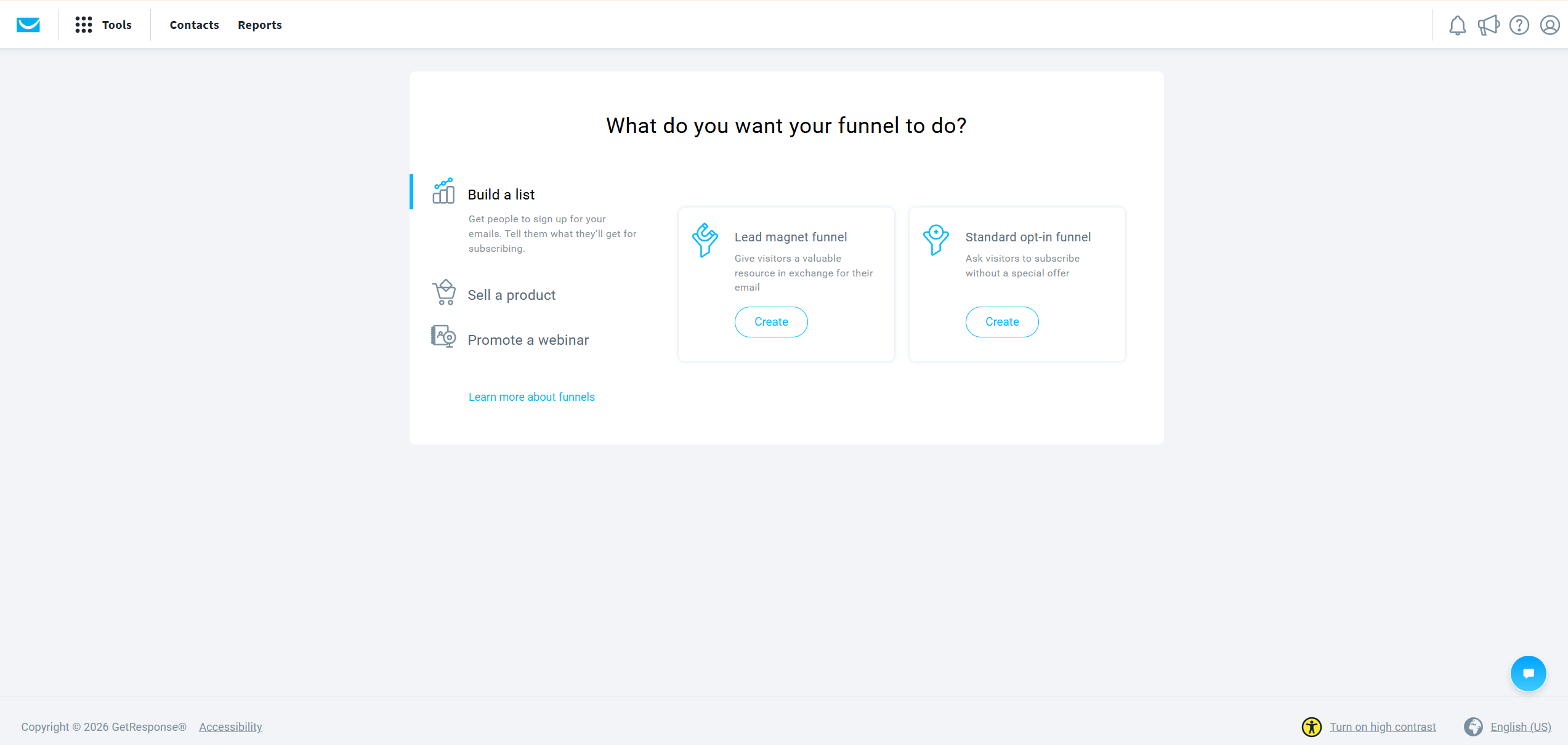
Step 1: Navigate to Conversion Funnel. From your GetResponse dashboard, click Tools in the top navigation, then select Conversion Funnel. This section contains all pre-built funnel templates and the visual funnel builder.
Step 2: Select Build a List → Lead Magnet Funnel. Inside the Conversion Funnel section, click Create Funnel. Select Build a List as your goal, then choose Lead Magnet Funnel as the funnel type. This path is specifically designed for the subscriber acquisition model that affiliate content sites use.
Step 3: Name your funnel and save. Enter a clear, specific name — not “Funnel 1” but something like “TradingView Guide Lead Magnet” or “Crypto Tax Checklist Funnel.” This matters when you have multiple funnels running simultaneously and need to identify performance by source. Click Save and Continue. GetResponse automatically creates a dedicated contact list for this funnel.
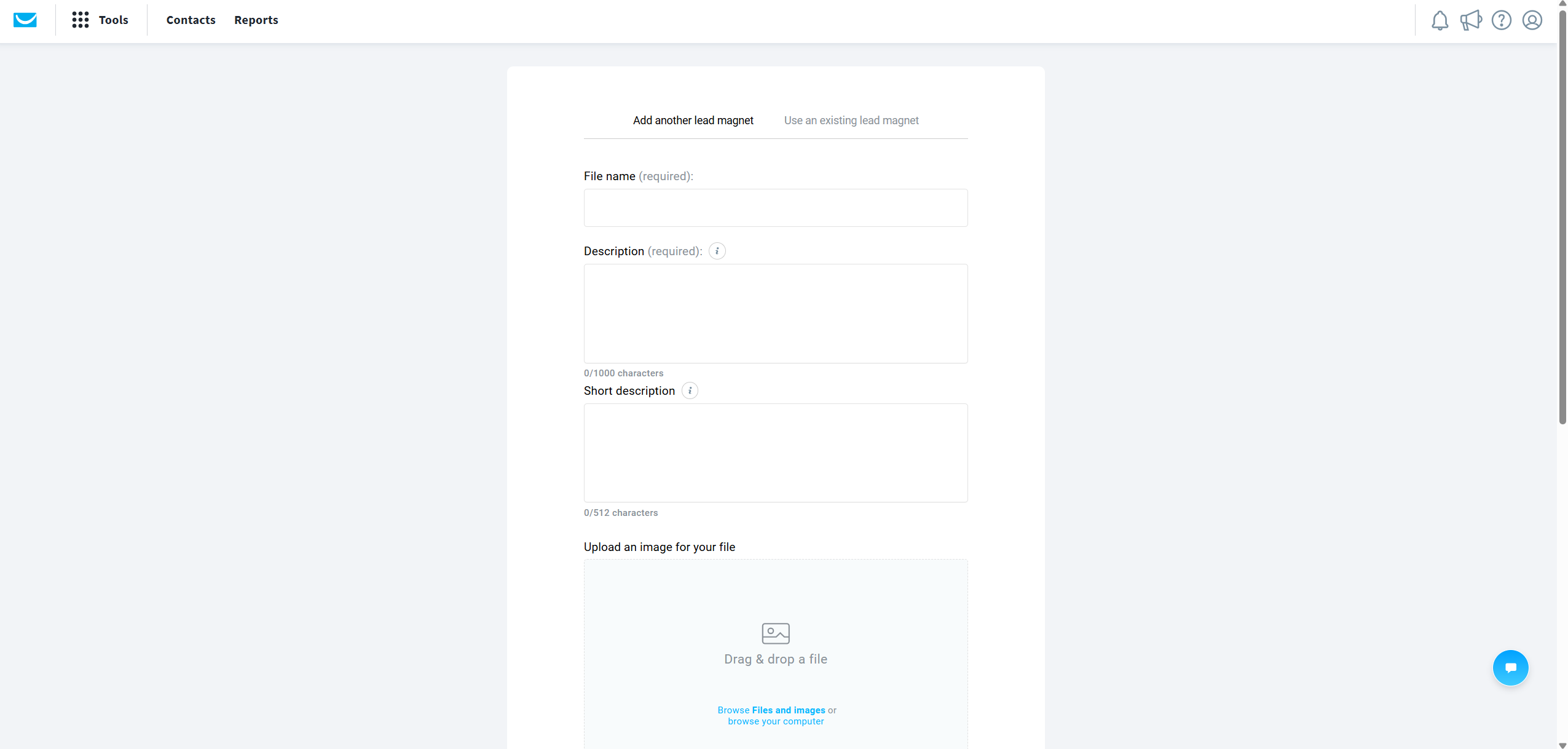
Step 4: Upload your lead magnet. In the lead magnet upload section, select your PDF file and upload it. GetResponse stores the file and automatically attaches it to the confirmation email that subscribers receive after signup. Verify the file uploads successfully and appears in the preview before proceeding. A broken lead magnet delivery destroys the subscriber relationship at the moment of highest trust.
Step 5: Build your signup page. Click Create a Signup Page. Select Build from Scratch for full control. Replace the default headline with your specific offer. The headline formula that works consistently: state exactly what the subscriber gets and the primary benefit in one sentence. “Download the Free [Specific Resource]: [What It Helps Them Do].” Remove every element that does not directly support the single action of entering an email address — no navigation menu, no multiple offers, no lengthy copy blocks.
Step 6: Edit the thank-you page. After completing the signup page, click the Thank-You Page tab. Update the headline to something specific: “Check Your Email — Your [Resource Name] Is On Its Way.” This confirms the action, sets the expectation of an email, and reduces the friction of a subscriber wondering whether something went wrong. Keep this page clean — it is confirmation and trust establishment, not a sales page.
Step 7: Configure and publish. Click Next Step to reach the configuration screen. For a basic first funnel, the default settings are sufficient. Click Publish. Your signup page is now live and accepting subscribers.
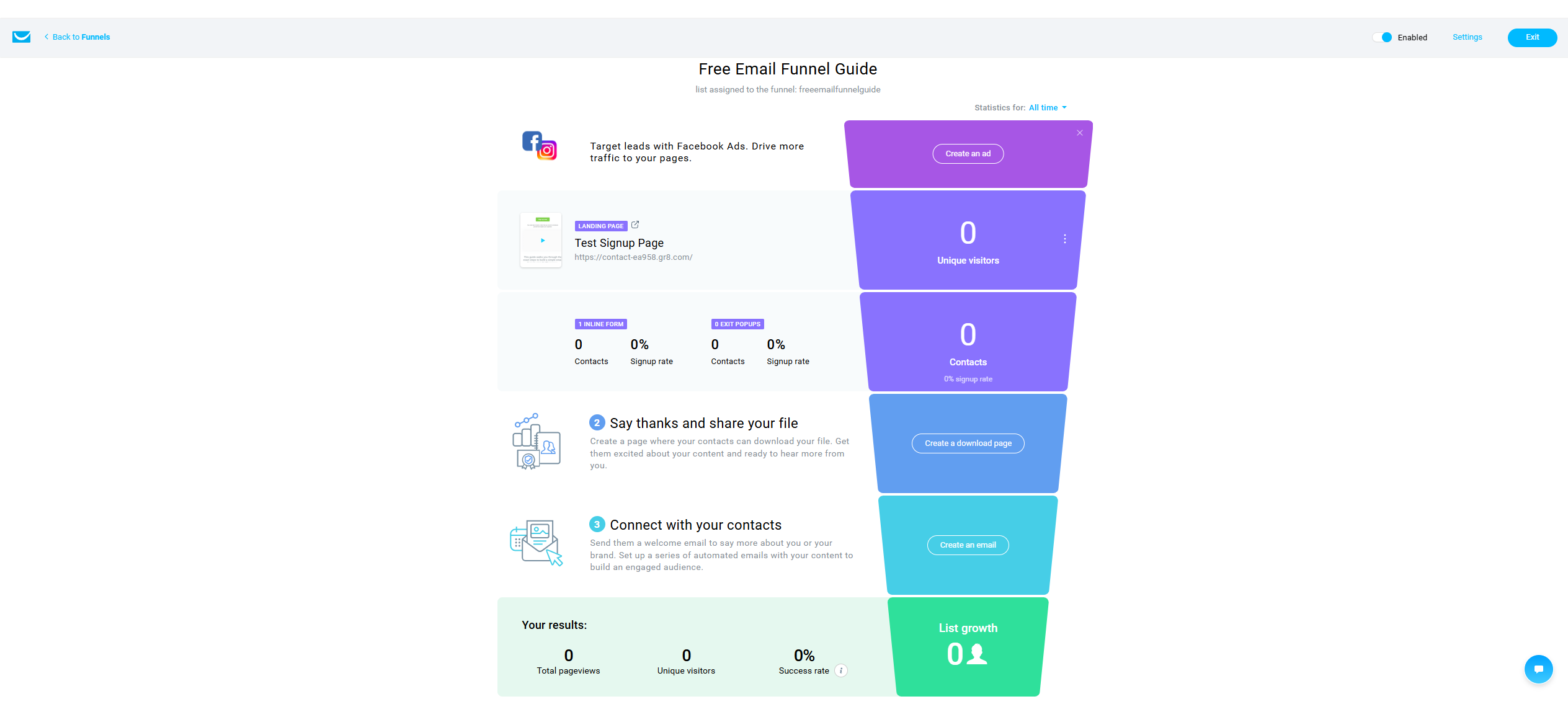
Step 8: Verify the complete funnel. Back in the funnel overview, confirm the status shows as Enabled. Click the signup page URL and test the complete subscriber journey yourself — enter your own email address, confirm you receive the lead magnet, check that the thank-you page loads correctly, and verify the confirmation email arrives within a few minutes. This final verification step is non-negotiable before driving any traffic.
Building the Follow-Up Sequence That Generates Revenue
The lead magnet delivery is step one. The revenue comes from what happens in the five to seven days after signup — and that requires a deliberate follow-up sequence, not just a single welcome email.
The sequence structure that works consistently for affiliate content operators: Email 1, sent immediately — deliver the lead magnet with a personal note explaining what it covers and what to focus on first. This email has one job: fulfil the promise made on the signup page. Nothing else. Email 2, sent two days later — provide additional educational value that expands on the lead magnet topic. No affiliate recommendation yet. This email builds trust and establishes your voice as someone who gives before asking. Email 3, sent four days after signup — introduce one relevant affiliate tool naturally, positioned as the logical next step for someone who has engaged with your content. Not a promotion. A recommendation from someone who has already provided value.
To build this sequence: go to the Email section within your funnel builder and add an autoresponder series. Set the timing intervals between each email, write each one in the same direct voice as your articles, and test the complete sequence from a second email address before activating. According to G2 reviews of GetResponse, the automation builder is consistently rated as one of the platform’s strongest features — users particularly highlight the visual workflow editor for building these kinds of sequential nurture sequences.
What Makes a High-Converting Signup Page
The signup page copy determines whether visitors subscribe — not the design. The visual editor gives you significant flexibility, but the principles that drive conversion are consistent regardless of template.
Three questions your signup page must answer within three seconds of a visitor arriving: what am I getting, why does it matter specifically to me, and how quickly do I get it? If any of those three questions requires more than one sentence to answer, the page is too complex. The most common conversion killer on affiliate site signup pages is over-explaining the lead magnet instead of just offering it clearly.
Practical signup page formula: headline states the specific resource, subheadline states the primary benefit in one sentence, single form field — email address only, not name and email — and one button with action-oriented copy: “Send Me the Guide” not “Submit.” This structure takes under 20 minutes to build in the landing page editor once you have the copy written before opening the builder.
Is GetResponse the Right Platform for This?
GetResponse makes the most sense if you want the funnel builder, landing page editor, and email automation in one platform without paying for three separate tools. Here is the honest comparison.
| Feature | GetResponse | Mailchimp | ActiveCampaign |
|---|---|---|---|
| Built-in funnel builder | Yes — full visual funnel | No — basic landing pages only | No — requires third-party |
| Lead magnet delivery | Automated within funnel | Manual setup required | Manual setup required |
| Landing page builder | Yes — included | Yes — limited templates | Limited |
| Automation for affiliate sites | Strong — visual builder | Basic — limited triggers | Very strong — higher cost |
| Affiliate marketing terms | Permitted | Allows affiliate links but restricts affiliate marketing as a use case | Permitted |
| Entry price | Free trial, ~$19/month | Free plan, $13/month | From $29/month |
| Best for | Affiliate bloggers, list builders | Newsletter senders, e-commerce | Advanced automation users |
The honest limitations: Mailchimp’s template design quality is more polished, and ActiveCampaign’s conditional automation logic is more powerful. For an affiliate blogger scaling to 10,000 subscribers, GetResponse’s balance of features and price is the strongest single-platform option. For our complete head-to-head, our GetResponse vs Mailchimp guide covers every dimension in detail.
A Real Example: The InnovateHub Finance Funnel Setup
Here is the exact funnel structure used for InnovateHub Finance — because a concrete example is more useful than an abstract one.
Lead magnet: the Financial Clarity Toolkit — a free Excel and Google Sheets tool covering portfolio tracking, an FI calculator, and five financial health indicators. Signup page: single headline “Download the Free Financial Clarity Toolkit,” single email field, one button. Follow-up sequence: Email 1 delivers the toolkit immediately with a note on which tab to start with. Email 2 covers how to interpret the FI calculator results. Email 3 introduces TradingView as the natural next tool for someone managing an investment portfolio, positioned as what toolkit users consistently ask about next.
The result: a subscriber who downloaded a free financial tool receives three emails over five days before any affiliate recommendation is made. By the time the TradingView recommendation arrives, the subscriber has already received more value than most paid newsletter subscriptions deliver. Warm recommendations from a trusted source consistently outperform cold article CTAs — the trust built through the sequence is what drives that difference. For the complete automation workflow behind this kind of sequence, our GetResponse automation for affiliate marketing guide covers every step.
Common Mistakes That Kill Funnel Performance
These are the specific errors that produce either low subscriber rates or low conversion rates after building — all avoidable.
Over-complicating the signup page. Remove everything that does not directly support the single action of entering an email address. Navigation menus, multiple offers, social media links, and long copy blocks all reduce conversion rates. The funnel builder defaults are clean — resist the urge to add elements.
Asking for too much information. Every additional form field reduces conversion rate. For a first funnel, collect email only. You can ask for more information in a follow-up email once trust is established.
Not testing before publishing. Submit your own email address before sending any traffic. Confirm the lead magnet arrives, the thank-you page loads, and the automation triggers correctly. Silent failures at this stage cost real subscribers.
Making the affiliate recommendation too early. Email 1 or Email 2 affiliate promotions destroy the subscriber relationship before it has started. Wait until Email 3 at minimum — and frame the recommendation as a natural next step, not a promotional offer.
Building a funnel with no traffic source. The funnel setup is step one — embedding the signup form or funnel link within your highest-traffic articles is step two. A funnel with no traffic source generates no subscribers regardless of how well it is built.
Compliance: What Every Email Funnel Must Include
Every email funnel must meet three non-negotiable requirements regardless of where your subscribers are based.
Every email must include an unsubscribe link — GetResponse adds this automatically. The signup page must clearly state what subscribers are signing up for — not just “get the guide” but “get the guide and receive occasional emails about [topic].” Your privacy policy must be linked from the signup page.
For EU-based operators or anyone with EU subscribers, GDPR is the applicable data protection framework. GDPR governs how personal data — including email addresses — is collected, stored, and processed, and applies to organisations outside the EU when they target EU residents. GetResponse provides GDPR-compliant data processing settings within the platform — ensure these are configured correctly for your situation and consult a qualified legal professional if you are unsure about your specific obligations. For further guidance, the EmailToolTester deliverability resource covers email compliance and deliverability best practices in detail.
What To Do Next
Build your first funnel this week — not next month. Here is the exact sequence:
Create your GetResponse account on the free trial. Prepare a focused one-page PDF on a specific problem your audience has — do not wait for the perfect lead magnet, a focused checklist that solves one concrete problem is enough to start. Follow the eight setup steps in this guide to build your signup page and thank-you page. Write your three-email welcome sequence before activating the funnel. Test the complete journey from your own email address. Then embed the funnel link in your three highest-traffic articles.
For the complete guide to GetResponse’s pricing and which plan you need at different subscriber volumes, our GetResponse pricing guide covers every tier and limit in detail. Start your free GetResponse trial here.
Frequently Asked Questions
Do I need a paid plan to build an email funnel with GetResponse?
GetResponse’s free trial includes access to the Conversion Funnel builder, landing page editor, and basic email sending — enough to build and test a complete lead magnet funnel without paying anything. Advanced automation sequences with conditional logic require the Email Marketing plan or higher. Verify current plan limits at getresponse.com before upgrading.
How long does it take to build a funnel with GetResponse?
A first funnel takes about an hour from account creation to live. The platform’s visual builder is beginner-accessible and each step is clearly labelled. The time investment is in writing the signup page copy and the email sequence, not in learning the platform interface.
Can I build multiple funnels for different affiliate products?
Yes — GetResponse allows you to create separate funnels for each lead magnet and product cluster, each with separate subscriber lists, automation sequences, and conversion tracking. For InnovateHub Finance, this means one funnel for TradingView subscribers, a separate one for Koinly subscribers, and another for GetResponse subscribers — each receiving recommendations relevant to what they originally signed up for.
Is GetResponse good for affiliate marketing email funnels specifically?
Yes — GetResponse is one of the few email platforms that explicitly permits affiliate marketing use, unlike Mailchimp which has historically been more restrictive on this. The built-in funnel builder, landing page editor, and automation workflow make it the most complete single-platform solution for affiliate bloggers who want to capture subscribers, deliver lead magnets, and send promotional sequences without managing multiple tools. For a complete platform evaluation, read our full GetResponse review.
What lead magnet works best for an affiliate content site?
The most effective lead magnets for affiliate content sites solve one specific, immediately actionable problem that your audience is already searching for answers to. Checklists, templates, calculators, and quick-start guides consistently outperform broad comprehensive guides in both download rate and subscriber quality — because the value proposition is immediately clear. The lead magnet should be directly related to the affiliate products you plan to recommend in your follow-up sequence, so the transition from free content to paid recommendation feels natural rather than disconnected.
