
GetResponse vs HubSpot: Honest 2026 Verdict for Affiliates
This article contains affiliate links. If you sign up for GetResponse through a link on this page, I may earn a commission at no extra cost to you. I only recommend tools I have personally evaluated.
Last verified: July 2026, using GetResponse’s official pricing page and HubSpot’s official Marketing Hub pricing page (hubspot.com/pricing/marketing).
GetResponse wins this comparison for the vast majority of affiliate marketers and content site owners — but HubSpot wins it for businesses that need a full CRM, multi-team sales pipeline, and enterprise-grade reporting. Those are genuinely different tools serving genuinely different needs.
I am Andreas Maratheftis, with 30 years of professional finance experience, running InnovateHub Finance on GetResponse. This comparison covers verified pricing, automation depth, the features each platform includes and excludes, and the use cases where I would recommend each one — including the cases where HubSpot is the right answer.
Key Takeaways
- GetResponse starts at $19/month. HubSpot Marketing Hub Professional starts at $800/month plus a mandatory $3,000 one-time onboarding fee — the real entry cost is dramatically higher than the headline.
- For email marketing, automation, landing pages, and webinars, GetResponse competes strongly with or exceeds HubSpot at a fraction of the price.
- HubSpot wins for businesses that need deep CRM integration, multi-team sales pipelines, and enterprise reporting — use cases that most affiliate content site owners do not have.
- Neither platform is a bad choice. The decision is purely about what you need: email-first marketing or CRM-first business management.
Quick Answer: GetResponse vs HubSpot for Affiliate Marketers
In the GetResponse vs HubSpot comparison, GetResponse is the right choice for affiliate marketers, content site owners, and small businesses that need email marketing, automation workflows, landing pages, and webinars in one affordable platform. HubSpot is the right choice for businesses that need a full CRM with sales pipeline management, multi-team reporting, and enterprise marketing automation — and have the budget to match.
For most readers of this article, GetResponse is the answer. The verification log for all pricing claims is at the bottom of this article.
→ Try GetResponse free — 500 contacts forever, 14-day premium trial, no credit card required
GetResponse vs HubSpot: Head-to-Head at a Glance
| Category | GetResponse | HubSpot Marketing Hub | Verdict |
|---|---|---|---|
| Entry price | Free forever + $19/month Starter | Free tools + $7/seat/month Starter | Comparable at entry |
| Serious marketing price | $59/month (Marketer — unlimited automation) | $800/month (Professional) + $3,000 onboarding | GetResponse by a wide margin |
| Email automation | Unlimited workflows on Marketer | 300 workflows on Professional | GetResponse more affordable for depth |
| Webinars | Built-in on Creator ($69/month) | Not available | GetResponse |
| Landing pages | Included on all paid plans | Included from Starter | Tied |
| CRM depth | Basic contact management | Full CRM with sales pipeline, deal stages, forecasting | HubSpot |
| A/B testing (email) | Available on paid plans | Professional and Enterprise only | GetResponse more accessible |
| Deliverability | Above 80% (EmailToolTester) | No directly comparable EmailToolTester benchmark available at time of writing | Comparable |
| Onboarding fee | None | $3,000 (Professional), $7,000 (Enterprise) | GetResponse |
| Built-in courses | Creator plan | Not included in Marketing Hub | GetResponse |
GetResponse vs HubSpot Pricing: What You Actually Pay
The GetResponse vs HubSpot headline prices are misleading in both directions. HubSpot looks cheaper than it is; GetResponse looks more limited than it is.
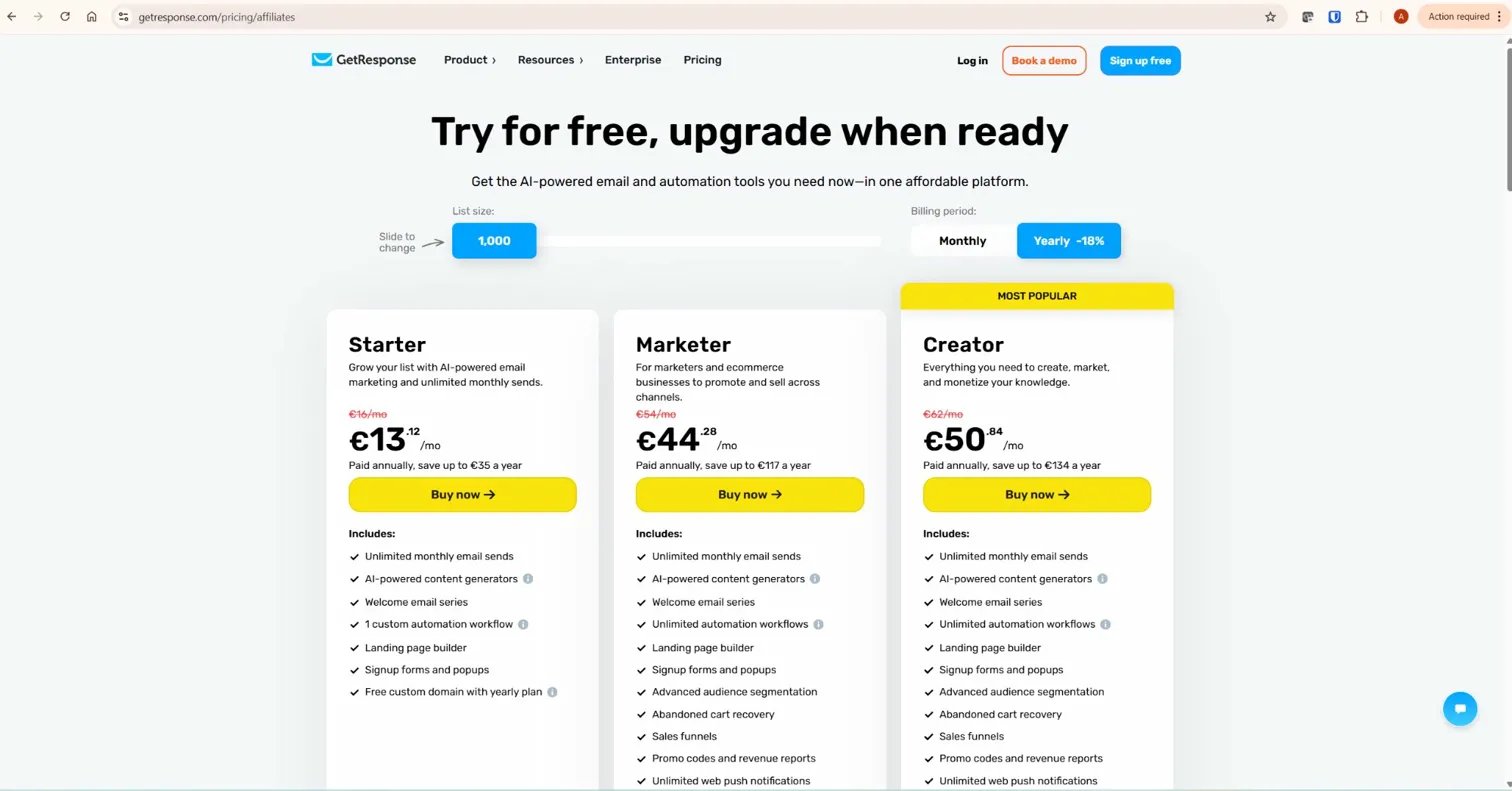
GetResponse Pricing (verified from getresponse.com/pricing)
- Free account: 500 contacts, 14-day premium trial, forever free tier
- Starter ($19/month): Unlimited emails, landing pages, 1 automation workflow (max 6 elements, no tags or scoring)
- Marketer ($59/month): Unlimited workflows, tags, scoring — the minimum viable plan for affiliate marketing
- Creator ($69/month): Everything in Marketer plus webinars (100 attendees), online courses, paid newsletters
- 18% discount on annual billing. No mandatory onboarding fees at any tier.
HubSpot Marketing Hub Pricing (verified from hubspot.com/pricing/marketing, July 2026)
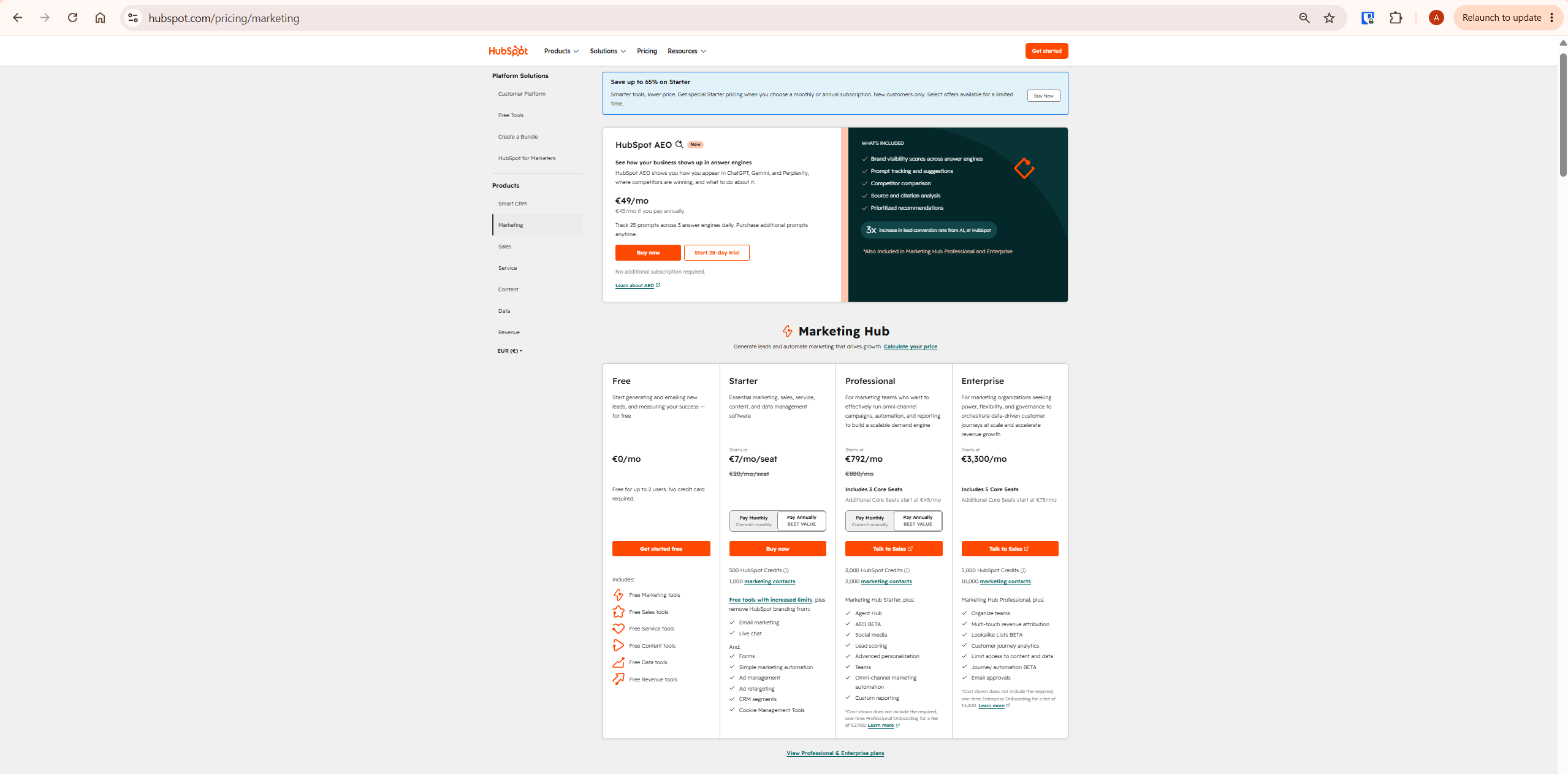
- Free tools: Up to 2 users, 2,000 email sends/month, HubSpot branding on all communications, 1 automated action
- Starter ($7/seat/month): 1,000 marketing contacts included, 10 automated actions only, HubSpot branding removed, email support only
- Professional ($800/month): 2,000 contacts included, 3 core seats, up to 300 workflows, unlimited automation actions, phone support — plus a mandatory one-time onboarding fee of $3,000
- Enterprise ($3,600/month): 10,000 contacts included, 5 core seats, up to 1,000 workflows — plus a mandatory one-time onboarding fee of $7,000
The Hidden Cost: HubSpot’s Mandatory Onboarding Fees
This is the most important pricing detail most GetResponse vs HubSpot comparisons omit.
When you upgrade to HubSpot Marketing Hub Professional, you are automatically charged a mandatory one-time onboarding fee of $3,000 — confirmed directly from hubspot.com/pricing/marketing. Enterprise adds a mandatory $7,000 onboarding fee. These are not optional.
This means the real first-year cost of HubSpot Marketing Hub Professional is $800/month × 12 + $3,000 onboarding = $12,600 minimum. At 2,001 contacts you automatically move to the 5,000-contact tier, adding approximately $250/month. GetResponse Marketer at 5,000 contacts costs $79/month — $948/year. The difference is not marginal.
For a complete breakdown of GetResponse’s plans, see our GetResponse pricing guide.
GetResponse vs HubSpot: Automation Depth Compared
In the GetResponse vs HubSpot comparison, automation is the most consequential category for affiliate content site owners. This is where welcome sequences, lead magnet delivery, nurture flows, and product recommendations run without manual intervention.
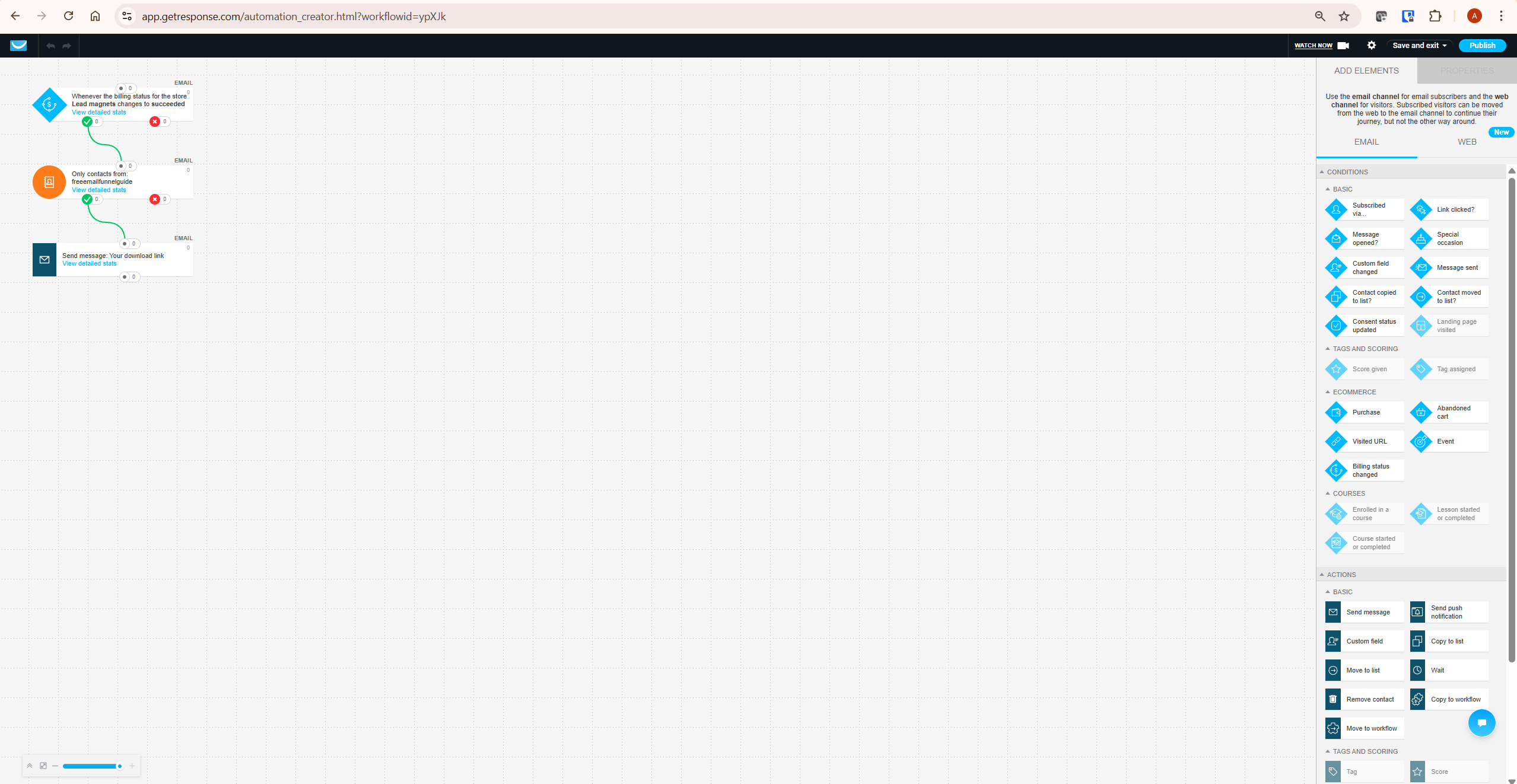
GetResponse Automation
GetResponse’s visual workflow builder on the Marketer plan supports unlimited workflows with tags, scoring, and conditions covering email opens, link clicks, page visits, tag assignments, and form submissions. The Trigger → Condition → Action architecture allows multi-branch sequences — if a subscriber clicks a pricing link they enter one path, if not they enter another. Over 50 pre-built templates cover the most common affiliate marketing flows.
One honest limitation: the Starter plan limits you to one workflow with a maximum of 6 elements, and tags and scoring are unavailable. If you need more than one sequence simultaneously — a second lead magnet, a re-engagement campaign — you need the Marketer plan. Plan accordingly.
HubSpot Marketing Hub Automation
HubSpot’s automation on the Starter plan is severely limited: 10 automated actions only, confirmed from hubspot.com/pricing/marketing. Meaningful marketing automation — multi-step sequences, conditional logic, omni-channel workflows — requires the Professional plan at $800/month.
At Professional, HubSpot supports up to 300 workflows with unlimited actions. At Enterprise, up to 1,000 workflows with predictive lead scoring and behavioral event triggers.
HubSpot’s automation is genuinely powerful at Professional and Enterprise — but the access cost is dramatically higher than GetResponse’s equivalent.
Automation verdict: For affiliate marketers who need unlimited automation at an affordable price, GetResponse’s Marketer plan at $59/month delivers more accessible depth than HubSpot’s comparable tier at $800/month plus onboarding. For enterprise teams with complex omni-channel requirements and the budget to match, HubSpot Professional’s 300-workflow cap and CRM integration offer genuine advantages.
Where HubSpot Genuinely Wins
Per the InnovateHub Finance editorial standard: if HubSpot is genuinely better for a specific use case, this article says so clearly.
CRM and Sales Pipeline
HubSpot is built around a full CRM. Deal stages, sales pipeline visualisation, contact timelines, lead scoring across sales and marketing, meeting booking, call tracking, and multi-team reporting are native to the platform. GetResponse has basic contact management — it is not a CRM.
If your business runs sales calls, tracks deals through a pipeline, or needs your marketing and sales teams working from the same contact database, HubSpot is the right tool. GetResponse is not a substitute for this use case.
Enterprise Reporting
HubSpot’s reporting at Professional and Enterprise — custom report builders, multi-touch revenue attribution, customer journey analytics, up to 500 custom reports — goes significantly deeper than GetResponse’s analytics. For marketing teams that need to report on revenue impact, channel attribution, and campaign ROI across multiple products, HubSpot’s reporting is a genuine differentiator.
Ecosystem and Integrations
HubSpot’s App Marketplace includes 1,200+ integrations with major business tools — Salesforce, Slack, Google Workspace, Microsoft Teams, Shopify, and hundreds more. For businesses already running on HubSpot’s CRM or integrating with enterprise sales tools, staying in the HubSpot ecosystem makes operational sense. GetResponse integrates with major tools but does not match HubSpot’s ecosystem breadth.
GetResponse vs HubSpot: Webinars, Courses and Content Tools
GetResponse includes built-in webinar hosting on the Creator plan for up to 100 attendees, with registration pages, automated reminders, on-demand replay, and direct automation integration for post-webinar follow-up sequences. HubSpot does not include webinar hosting in Marketing Hub at any tier — webinars require a third-party tool connected via integration.
GetResponse’s Creator plan also includes online course creation and paid newsletters — features that allow affiliate content site owners to build additional revenue streams without adding more subscriptions. HubSpot’s Content Hub covers website and content management but is a separate product with its own pricing.
For a detailed walkthrough of GetResponse’s webinar feature, see our GetResponse webinars guide.
GetResponse vs HubSpot: Email Deliverability
GetResponse’s self-reported deliverability rate is 99%. Independent testing by EmailToolTester places GetResponse at above 80% inbox placement — described as good but not class-leading. Both figures are worth knowing: the self-reported figure is marketing, the independent benchmark is the more useful reference point.
No directly comparable EmailToolTester benchmark for HubSpot was available at the time of writing. For both platforms, your sending practices — double opt-in, list hygiene, DKIM authentication, engagement-based suppression — matter more than platform choice. A well-managed list on either platform outperforms a poorly managed list on the other.
Who Should Use GetResponse
- Affiliate content site owners who need email marketing, automation, landing pages, and webinars under one affordable subscription
- Bloggers, creators, and solo operators who do not run a sales team and have no CRM requirement
- Anyone whose list is under 50,000 contacts and does not need enterprise reporting or multi-team pipeline management
- Businesses that want unlimited automation workflows without paying $800/month for the privilege
Who Should Use HubSpot
- Businesses with a sales team that needs CRM, deal pipeline, and contact management integrated with marketing
- Marketing teams that need enterprise reporting — multi-touch attribution, customer journey analytics, custom reports across hundreds of thousands of contacts
- Companies already running on HubSpot’s CRM who want to keep marketing data in the same system
- Organisations with the budget for $800/month plus onboarding and the team size to justify it
What To Do Next
If you are running an affiliate content site or solo marketing operation: start the GetResponse free trial. Use the 14-day premium window to build your landing page, automation workflow, and first newsletter. If everything works — upgrade to Marketer at $59/month. That infrastructure handles everything an affiliate content site needs for the next two to three years without a platform change.
If you are evaluating HubSpot for a business with a sales team: start with HubSpot’s free CRM tools, which are genuinely useful and have no time limit. Test whether your team actually uses the CRM before committing to Professional. The $3,000 onboarding fee and $800/month price point are significant commitments — validate the use case first.
Final Verdict: GetResponse vs HubSpot
If I had to summarise these two platforms in one sentence: GetResponse is an affordable email-first marketing platform for content creators and affiliate marketers; HubSpot is a comprehensive CRM-first business platform for sales-led companies with larger budgets.
For the audience reading this article — affiliate marketers, content site owners, and solo operators — GetResponse wins on price, automation accessibility, webinar inclusion, and overall value per pound spent. The Marketer plan at $59/month delivers everything an affiliate content site needs. HubSpot’s equivalent capability costs $800/month before onboarding.
The one use case where I would send someone to HubSpot without hesitation: a business with an active sales team that needs CRM, pipeline tracking, and marketing data unified in one system. GetResponse is not built for that, and recommending it there would be doing the reader a disservice.
For more context on GetResponse’s full feature set, see our complete GetResponse review. For comparisons with other platforms, see our GetResponse vs ActiveCampaign and GetResponse vs Mailchimp guides. According to G2’s verified user comparison of GetResponse vs HubSpot, GetResponse scores higher on ease of use and value for money while HubSpot scores higher on feature breadth — reflecting exactly the trade-off at the centre of this comparison.
→ Try GetResponse free — no credit card required, premium features active from day one
Frequently Asked Questions
Is GetResponse better than HubSpot?
For affiliate marketers and content site owners, yes. GetResponse delivers email marketing, unlimited automation, landing pages, webinars, and online courses at a fraction of HubSpot’s cost. HubSpot is better for businesses that need a full CRM with sales pipeline management, enterprise reporting, and multi-team coordination — use cases most affiliate marketers do not have.
Is HubSpot really $800/month?
HubSpot Marketing Hub Professional starts at $800/month on annual billing — confirmed from hubspot.com/pricing/marketing. This is the first plan with meaningful automation (unlimited actions, up to 300 workflows). It also requires a mandatory one-time onboarding fee of $3,000, making the real first-year cost at least $12,600. Additional contacts above the 2,000 included add roughly $250/month per tier. Verify current pricing directly at hubspot.com/pricing/marketing before committing.
Does HubSpot have webinars?
HubSpot Marketing Hub does not include built-in webinar hosting at any tier. Webinars require a third-party tool — Zoom Webinars, Demio, or similar — connected via HubSpot’s integration marketplace. GetResponse includes built-in webinar hosting on the Creator plan ($69/month) for up to 100 attendees with registration pages, automated follow-up sequences, and on-demand replay.
Can GetResponse replace HubSpot?
For email marketing, automation, landing pages, and webinars — yes. For CRM, sales pipeline management, deal tracking, and enterprise reporting — no. GetResponse does not have a CRM. If your business needs marketing and sales data unified in one system with pipeline visibility, GetResponse is not a substitute for HubSpot. For pure email-first marketing without CRM requirements, GetResponse handles everything at a significantly lower cost.
What is HubSpot’s free plan?
HubSpot’s free Marketing Hub tools include: up to 2 users, 2,000 email sends per calendar month, HubSpot branding on all emails and forms, 1 automated action, basic forms and live chat, and 10 reporting dashboards. Confirmed from hubspot.com/pricing/marketing. The free tools are genuinely useful for testing the CRM and basic email capabilities — HubSpot does not expire free accounts. For email automation beyond 1 action, you need at least Starter.
Is GetResponse good for small businesses?
Yes — GetResponse is specifically strong for small businesses and solo operators. The free account (500 contacts) covers early-stage list building. The Starter plan ($19/month) handles single-funnel operations. The Marketer plan ($59/month) delivers unlimited automation, tags, and scoring — everything a small affiliate content business needs for the next several years. HubSpot’s equivalent automation depth starts at $800/month plus onboarding, which most small businesses cannot justify.
Which has better email deliverability — GetResponse or HubSpot?
GetResponse is independently benchmarked by EmailToolTester at above 80% inbox placement — described as good but not class-leading. GetResponse’s self-reported rate is 99%. No directly comparable EmailToolTester benchmark for HubSpot was available at time of writing. For both platforms, your list hygiene, sending practices, and domain authentication matter more than platform choice. Verify current deliverability data at emailtooltester.com before making platform decisions based on this factor.
Related GetResponse Articles
- GetResponse Review 2026: The Honest Verdict for Affiliate Marketers
- GetResponse Pricing in 2026: Plans, Features & What You Actually Pay For
- GetResponse vs ActiveCampaign: Which Is Better for Automation in 2026?
- GetResponse vs Mailchimp: Honest Comparison 2026
- GetResponse vs ConvertKit: Honest 2026 Verdict for Affiliates
- GetResponse Webinars: The Honest Guide for Affiliates (2026)
Pricing figures for HubSpot are verified directly from hubspot.com/pricing/marketing, fetched July 2026. Pricing figures for GetResponse are verified from getresponse.com/pricing. Both platforms update pricing regularly — always verify current figures before making purchase decisions. GetResponse deliverability figure sourced from EmailToolTester’s independent testing; verify current results at emailtooltester.com.
