
Koinly Showing Wrong Gains? How to Fix Cost Basis Errors
Affiliate Disclosure: This article contains affiliate links. If you sign up for Koinly through a link on this page, I may earn a commission at no extra cost to you. I only recommend tools I have genuinely evaluated.
This article is for informational purposes only and does not constitute professional tax or financial advice. Tax laws vary by country and change frequently. Consult a qualified tax professional for advice specific to your situation.
Last verified: July 2026, using Koinly’s official documentation and IRS.gov guidance.
Koinly showing wrong gains is usually not a software bug — it is a data problem. If your capital gains look wildly inflated, inconsistent with your trading history, or completely different from your exchange report, the most likely causes are missing purchase history, incomplete wallet imports, duplicate transactions, or transfers being misclassified as disposals. After 30 years of reviewing financial software across asset classes, I can tell you this pattern is consistent: in most cases the calculation engine is working correctly — it just does not have complete data to work from.
That distinction matters enormously. Chasing a software bug that does not exist wastes time and can lead to manual corrections that actually introduce errors into an otherwise sound calculation. The right approach is systematic: audit your data inputs before you question the outputs.
This guide walks through every meaningful cause of Koinly showing wrong gains — from missing cost basis to misclassified wallet transfers — and gives you the exact steps to resolve each one. If you are new to the platform and want to understand how it works before troubleshooting, start with my full Koinly review.
- Koinly showing wrong gains is almost always a data problem, not a software bug — the calculation engine is correct but working from incomplete information
- The fastest fix: open Transactions → filter by Warnings → resolve every Missing Purchase and Missing Cost Basis flag before touching anything else
- Missing purchase history is the most common cause — if Koinly cannot find the original acquisition, it defaults to zero cost basis and treats the full sale value as gain
- Transfers between your own wallets must have both sides imported — one missing wallet causes disposals to appear where none exist
- Duplicate imports (CSV + API for the same exchange) double the transaction count and inflate gains — check your wallet list for duplicates
Quick Answer: Why Is Koinly Showing Wrong Gains?
Koinly usually shows wrong gains because it is missing part of your transaction history. The most common cause is missing cost basis: Koinly can see that you sold, swapped, or spent crypto, but it cannot see when and for how much you originally acquired it. When that happens, Koinly may treat the cost basis as zero, making the full disposal value appear as a gain.
The fastest fix is to open the Transactions tab, filter by Warnings, resolve Missing Purchase or Missing Cost Basis warnings, check for negative balances, import every exchange and wallet you have used, remove duplicate imports, and confirm your accounting method is correct for your country.
Symptom to Cause: What You See and Why
Identify your specific symptom first — it points directly to the likely cause and the fastest fix.
| What You See in Koinly | Most Likely Cause | First Place to Check |
|---|---|---|
| Very high gains | Missing purchase history / zero cost basis | Transactions → Warnings |
| Wallet transfer shown as taxable | Receiving wallet not imported | Wallets page + Transactions |
| Coinbase report differs from Koinly | Coinbase only sees its own activity | Import all exchanges |
| Gains doubled on specific assets | Duplicate CSV and API import | Wallet list — remove duplicates |
| Income missing from report | Staking or airdrops not tagged correctly | Transaction type and tag filters |
| Negative asset balance showing | Missing deposit or purchase history | Wallet transaction history |
Quick Diagnostic: Wrong Gains Checklist
Run through this checklist first. In most cases, one of these steps identifies the issue immediately.
- Open the Transactions tab and filter by Warnings
- Check for “Missing purchase,” “Missing cost basis,” or “Missing acq. price for disposal” flags
- Confirm every exchange and wallet you have ever used is imported — including old or inactive accounts
- Verify that transfers between your own wallets are labelled as transfers, not trades or disposals
- Check your accounting method under Settings and confirm it matches your jurisdiction’s requirements
- Re-sync any wallets where recent activity may not have been captured
- Check for duplicate transactions if you imported the same wallet via both CSV and API
Why Wrong Gains Happen: The Core Principle
Koinly calculates based entirely on what you import. It has no independent visibility into your trading history. If a purchase record is missing, the platform cannot infer it — and in the absence of acquisition cost data, it defaults to a zero cost basis, making the entire sale value appear as taxable gain.
In most cases, the issue is not the calculation formula itself but the data Koinly has available to calculate from. According to IRS digital assets guidance, taxpayers are responsible for maintaining accurate records of their crypto acquisitions and disposals, including cost basis for every asset. An accountant handed incomplete records produces an incomplete report — the same logic applies here.
The 5-Step Koinly Wrong Gains Audit
Work through these five steps in order before making any manual edits or contacting support.
- Start with Warnings: Filter the Transactions tab by Warnings and resolve Missing Purchase, Missing Cost Basis, and Missing Price issues first. These flags point directly to the transactions causing incorrect figures.
- Check wallet completeness: Confirm every exchange, self-custody wallet, DeFi wallet, and old inactive account is imported. Missing a single exchange from an earlier year can inflate gains significantly.
- Look for duplicate imports: If the same account was imported by CSV and API, remove the CSV wallet before recalculating. Duplicates double the transaction count and distort gains.
- Review transfers: Make sure wallet-to-wallet movements are labelled as transfers, not sales, trades, or withdrawals. Both the sending and receiving wallet must be connected for automatic matching to work.
- Confirm tax settings: Check your country, base currency, accounting method, and tax year in Settings before generating the final report. The wrong method produces a correctly calculated result under the wrong rules.
Avoid manual edits until you have completed these checks. Manual changes can hide the real problem and make future reconciliation harder. In most cases, fixing the missing wallet, duplicate import, transfer match, or cost basis warning is safer and more reliable than overriding the gain manually.
Cause 1: Missing Cost Basis from Prior Years
Incomplete historical data is the most frequent cause of inflated gains figures. Investors who have been active since 2017, 2018, or 2020 often import only their recent exchange data — either because they are focused on the current tax year or because they have forgotten the full scope of their earlier activity.
If you purchased Bitcoin in 2020 and Koinly has visibility into only your 2025 transactions, it cannot locate the original acquisition. When you sell that Bitcoin in 2025, the entire proceeds appear as a gain rather than the actual profit above your purchase price. The fix is straightforward: import the complete transaction history for every exchange and wallet you have used, going back to your first crypto transaction.
How to Identify Cost Basis Warnings in Koinly
Koinly surfaces data gaps through its Warnings system — the most efficient starting point for any wrong gains investigation. Inside the Transactions tab, click the Warnings dropdown to reveal three specific warning types.
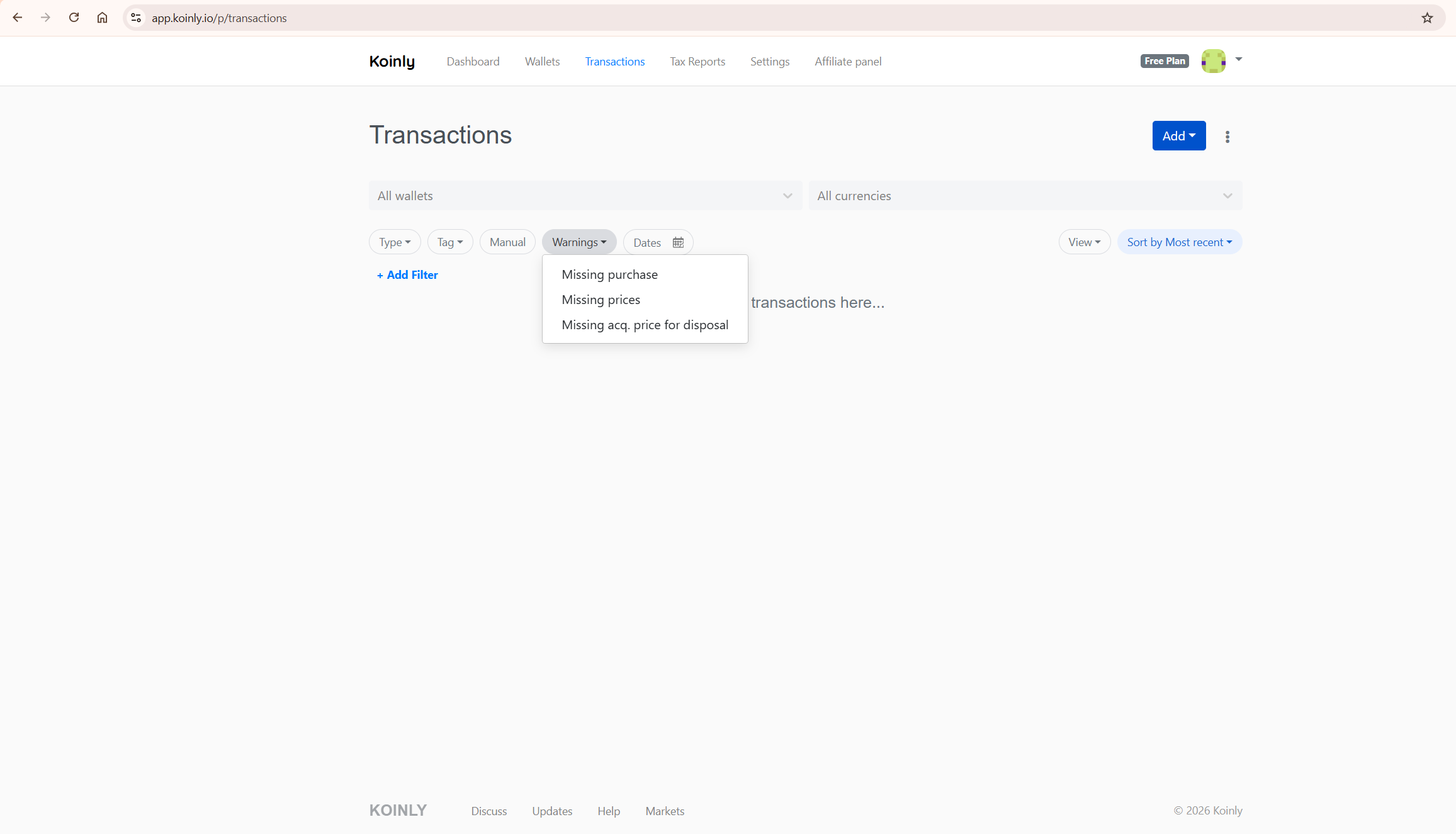
Missing purchase means Koinly cannot find the original acquisition for an asset being disposed of. Missing prices means the market price at the time of a transaction could not be determined. Missing acq. price for disposal means a specific disposal transaction has no associated cost basis. Each warning points to the specific transaction causing the issue — resolve them systematically rather than guessing at the overall figure.
Cause 2: Incomplete Wallet and Exchange Imports
A scenario that causes inflated gains repeatedly: an investor imports their primary exchange but has not connected other exchanges or hardware wallets used in earlier years. Koinly receives the incoming transfers from those unimported sources and has no way to trace them back to their original purchase prices.
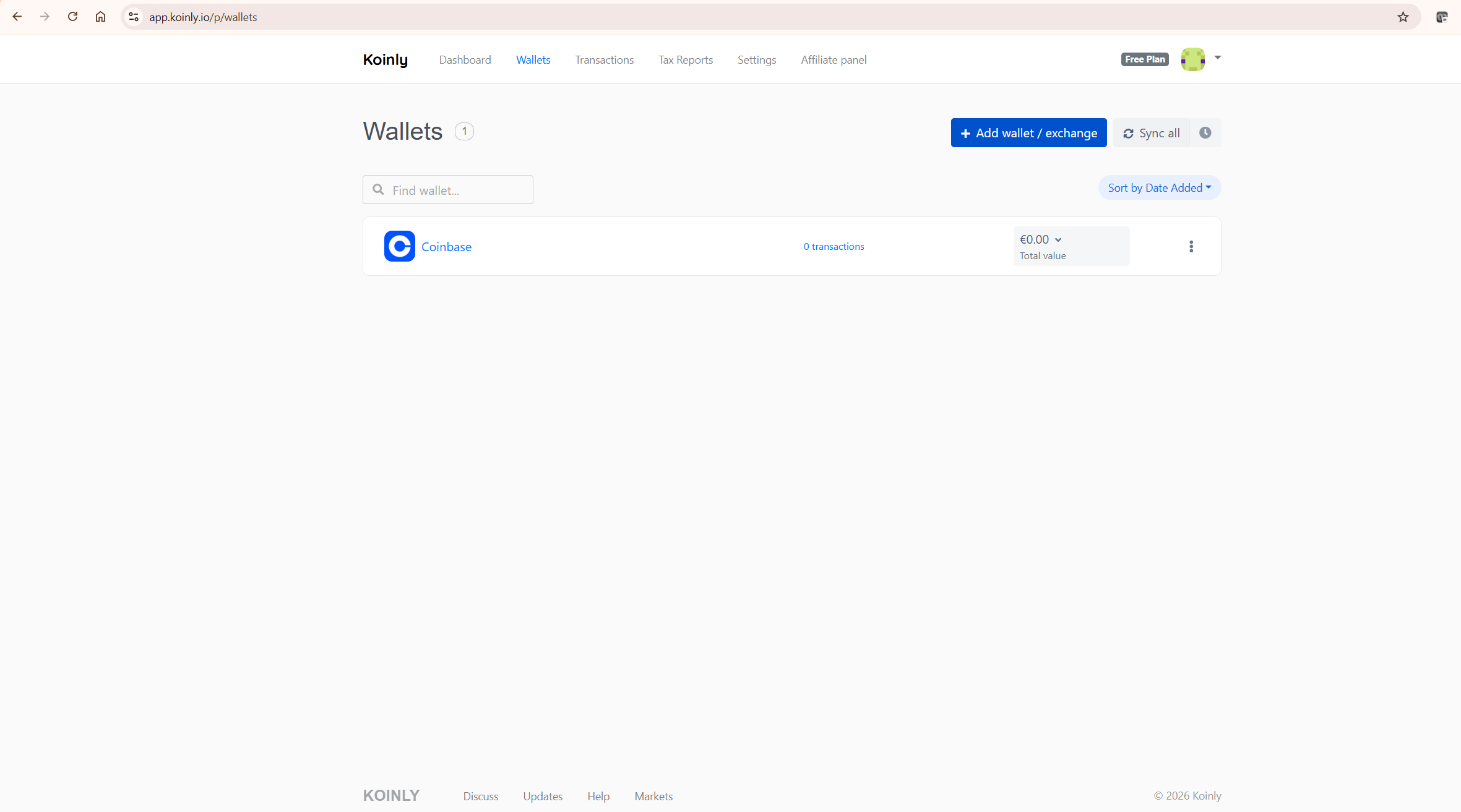
Every asset arriving from an unimported source appears as an inflow with zero cost basis. When those assets are subsequently sold, the full sale value is treated as gain. The solution is comprehensive — every exchange account, every self-custody wallet, and every DeFi protocol you have interacted with needs to be connected. This includes accounts you consider inactive or closed. For step-by-step guidance on connecting specific exchanges, my how to connect Binance to Koinly guide covers the API setup in detail.
Cause 3: Wallet-to-Wallet Transfers Classified as Disposals
Moving crypto between wallets you own is not a taxable event in many major tax systems — but the key point for Koinly is that both sides of the transfer must be imported for the platform to match the withdrawal and deposit correctly. Local tax rules on this vary, so always confirm your jurisdiction’s position.
Koinly recognises same-owner transfers automatically — but only when both sides of the transfer are visible. If you withdraw ETH from Coinbase and that ETH arrives in a MetaMask wallet that is not imported into Koinly, the platform sees only the outgoing transaction. With no corresponding deposit to match against, the system may classify the withdrawal as a disposal, triggering an artificial capital gain.
To resolve this: import both the sending and receiving wallets. Koinly will then match the transactions and correctly classify the movement as a non-taxable transfer. If automatic matching does not trigger — which can happen when timestamps differ slightly between platforms — manually label the transaction as a Transfer within the Transactions tab. According to HMRC’s cryptoassets guidance, transferring crypto between wallets where you retain beneficial ownership is not a disposal for UK Capital Gains Tax purposes.
Cause 4: Duplicate Transactions
Duplicate transactions are a common but easily missed cause of inflated gains. They occur most often when the same exchange account has been imported twice — once via CSV and once via API — resulting in every transaction appearing twice in Koinly’s ledger.
The symptom is gains that are roughly double what you would expect on specific assets. To identify duplicates, check your Wallets page for the same exchange appearing more than once. If you see both a CSV-imported wallet and an API-connected wallet for the same exchange, delete the CSV wallet and rely on the API connection. The API will always provide more complete and up-to-date data.
Cause 5: Negative Balances and Missing Asset History
Negative balances are a direct signal that Koinly does not have the full transaction history for a wallet or exchange. If Koinly shows that you sold or transferred more of an asset than you appear to own, the platform is missing an earlier deposit, purchase, staking reward, airdrop, bridge transaction, or CSV record.
Do not ignore negative balances — they often point to the same root problem as missing cost basis. Koinly cannot calculate gains accurately if the asset history is incomplete. Resolve negative balances before relying on the final tax report, as they indicate the cost basis chain has a break that will affect every subsequent calculation for that asset.
Cause 6: Wrong Accounting Method
Koinly supports multiple cost basis accounting methods, and the choice between them can produce materially different gain figures from identical transaction data. This cause is particularly confusing because the platform is calculating correctly — just under the wrong rules.
Common methods include FIFO (First In, First Out), LIFO (Last In, First Out), and HIFO (Highest In, First Out), but the correct method depends on your country. Some jurisdictions use FIFO-style rules, while others use fundamentally different frameworks — for example, the UK uses share pooling rules including Section 104 pooling and same-day/30-day matching rather than simple FIFO. Koinly supports multiple cost basis methods including region-specific options where available, but you should confirm the correct setting for your jurisdiction with a qualified tax professional before generating a report.
To fix this: go to Settings in Koinly, locate the cost basis method selector, and confirm it reflects your jurisdiction’s requirements. If you change the method, Koinly recalculates all gains automatically — which is normal and expected behaviour.
Cause 7: Misclassified Staking Rewards, Airdrops, and DeFi
Staking rewards, airdrops, referral bonuses, and DeFi yield can all appear as incorrect gains if they are misclassified in Koinly. These should typically be classified as Income — taxable at the fair market value at the time of receipt — rather than as acquisitions at zero cost or as trades.
If staking rewards are classified as plain Receive transactions rather than Staking or Income, they will not appear in your income summary and their cost basis may be set incorrectly, affecting any future disposal calculation for those assets. Filter your Transactions tab by type and review all Receive transactions for correct classification, particularly for assets received from staking protocols, airdrop campaigns, or DeFi liquidity positions.
Auditing Your Transactions: Where to Look
The Transactions tab is where any wrong gains investigation should begin. It provides full visibility into every imported record and filtering tools that allow you to isolate exactly where discrepancies originate.
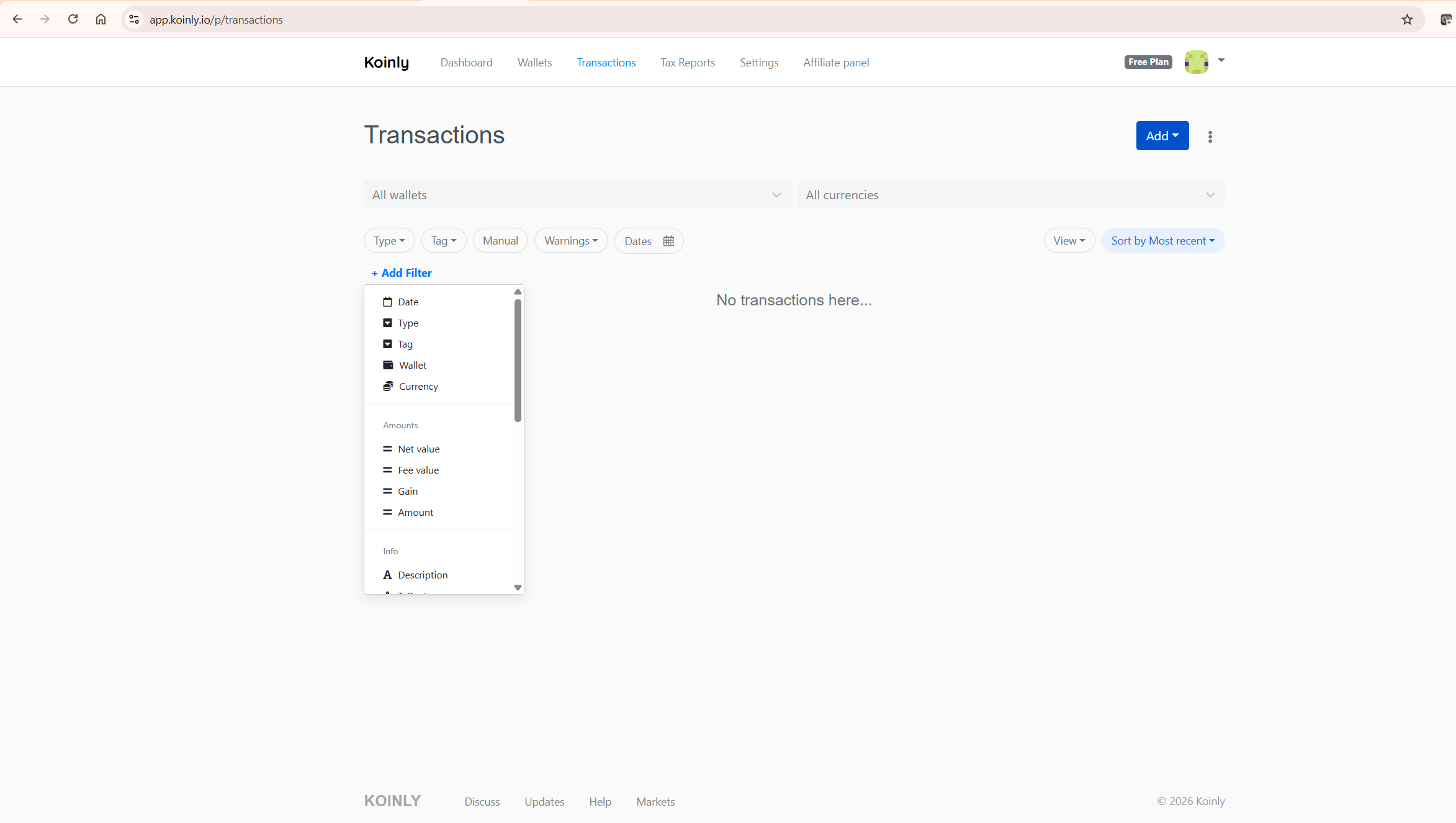
The standard filter bar gives you Type, Tag, Manual, Warnings, and Dates. The full power for investigation is accessed through Add Filter, which exposes additional options including wallet, currency, net value, fee value, gain amount, and transaction description. Working through these filters systematically allows you to trace incorrect gains back to the specific source transaction. If the overall gain looks wrong, do not start at the tax report — start at the transaction level.
What to Do When the Problem Persists After Fixes
If you have worked through all the steps — resolved warnings, confirmed complete imports, corrected transfer classifications, removed duplicates, and verified the accounting method — and the gains figure still looks wrong, the next layer of investigation involves: checking whether staking rewards, airdrops, or referral bonuses have been classified correctly; reviewing any DeFi activity for liquidity pool entries and exits which may require manual classification; and considering deleting and fully re-importing any wallet with structural inconsistencies.
If the problem continues after exhausting these steps, contact Koinly support directly. Provide specific transaction IDs and screenshots — this accelerates resolution considerably compared to a general enquiry. For a broader assessment of the platform’s accuracy, my is Koinly accurate guide covers the methodology in detail.
Impact on Your Tax Filing
If your gains figure is inflated, any tax report generated from that data will reflect those inflated figures — directly affecting your reported tax liability. Koinly is designed to generate tax reports such as Form 8949 and Schedule D data for US users, but users remain responsible for filing accurate information with the IRS. If your Koinly data is wrong, the exported report will also be wrong.
This is why resolving data issues before generating your tax report is far preferable to attempting to correct figures after filing. For a full breakdown of Koinly’s reporting obligations, my does Koinly report to the IRS guide covers everything in detail.
How to Prevent Wrong Gains Going Forward
The investors who experience data problems least frequently treat Koinly as an ongoing record-keeping system rather than a tool they open once a year at tax time. The more fragmented your activity — across exchanges, self-custody wallets, staking platforms, and DeFi protocols — the more valuable consistent maintenance becomes.
Practically, this means connecting new exchanges and wallets immediately when you open them, using API auto-sync rather than manual CSV exports wherever available, reviewing warnings monthly rather than letting them accumulate, and never deleting wallets that hold original acquisition records. For the complete setup guide, my how to use Koinly guide covers every step from initial setup through report generation.
What To Do Next
Do this now — it takes under 15 minutes to identify the root cause in most cases:
Open Koinly and go to the Transactions tab. Click the Warnings dropdown and filter for all flagged transactions. Work through each Missing Purchase warning — these point directly to the transactions where cost basis is absent. For each flagged asset, identify which exchange or wallet holds the original acquisition record and import it. Once all warnings are resolved, re-check the capital gains total.
If the figure is still wrong after resolving warnings, check your wallet list and confirm every exchange and wallet you have ever used is connected. Then verify your accounting method in Settings matches your jurisdiction. Those three steps — warnings, wallets, method — resolve the majority of cases.
Start with a free Koinly account here — import all your exchanges and wallets and preview your complete capital gains position before committing to a paid plan. For the full platform evaluation, read my complete Koinly review.
Frequently Asked Questions
Why is Koinly showing wrong gains?
In most cases, Koinly shows wrong gains because it is missing part of your transaction history. The most common cause is missing cost basis — Koinly can see a disposal but cannot find the original acquisition record, so it defaults to zero cost basis and treats the full sale value as gain. Import complete historical data from every exchange and wallet you have ever used, resolve all Warnings flags, and confirm your accounting method is correct for your jurisdiction.
Why is Koinly showing zero cost basis?
Koinly shows zero cost basis when it can see a disposal but cannot find the original acquisition record. This usually means an exchange, wallet, CSV file, airdrop record, staking reward, or earlier transaction history is missing. Import the missing source data and the cost basis will update automatically once Koinly can match the acquisition to the disposal.
Why are my gains higher in Koinly than on Coinbase?
Coinbase’s tax reports are limited to activity that occurred on Coinbase. If you transferred assets to Coinbase from another exchange, Coinbase has no record of the original acquisition price. A discrepancy usually means Koinly is missing historical data from the originating exchange, or Coinbase’s report may not include acquisition history from assets that originated elsewhere. Import complete history from all exchanges to resolve the discrepancy.
Should I manually edit wrong gains in Koinly?
Manual edits should be a last resort. In most cases, wrong gains are caused by missing or misclassified data. Fix the underlying wallet import, duplicate transaction, transfer match, or cost basis warning first. Manual edits can hide the real problem and may create inconsistencies that are difficult to trace later.
Why did my gains change after switching accounting methods?
This is expected behaviour. FIFO, LIFO, and HIFO each apply a different logic to which acquisition lots are treated as sold first. The same transaction data produces different gain figures under each method. If your gains changed after switching, Koinly is working correctly — confirm the correct method for your jurisdiction with a qualified tax professional before generating your final report.
What is the fastest way to fix wrong gains in Koinly?
Open the Transactions tab, filter by Warnings, and address each flagged transaction individually. Missing purchase warnings point directly to the transactions where cost basis is absent. Importing the relevant exchange history for those specific assets typically resolves the flags and corrects the gains figure without requiring a full portfolio re-import. For most users, resolving warning flags is the fastest route to an accurate gains figure.
