
Koinly Free Plan: What Can You Actually Do Without Paying?
Affiliate Disclosure: This article contains affiliate links. If you sign up for Koinly through a link on this page, I may earn a commission at no extra cost to you. I only recommend tools I have researched and believe are worth your time.
Tax Disclaimer: This article is for informational purposes only and does not constitute professional tax or financial advice. Consult a qualified tax professional for advice specific to your situation.
The Koinly free plan is one of the most capable free tiers in crypto tax software — but it has one hard limit that catches investors off guard every tax season. You can import transactions, connect exchanges, track your portfolio, run tax optimisation, and preview your capital gains, all without spending a cent. What you cannot do is download a tax report. That single restriction defines exactly who the Koinly free plan works for and who needs to upgrade.
After thirty years working in finance, I’ve watched crypto investors make the same mistake repeatedly: assuming “free crypto tax software” means free tax filing. With Koinly, that’s not how it works. The Koinly free plan is a fully functional portfolio tracker and tax planning tool — genuinely useful for monitoring your position and understanding your liability — but it stops short of producing the official, downloadable reports you need to actually file.
This article breaks down exactly what the Koinly free plan includes, what it locks behind a paywall, and who should use it versus upgrade. I’ll also cover the paid plan structure so you know precisely what you’d be moving to — and whether it’s worth it.
If you want to test Koinly with your own data before committing, the free plan requires no credit card: try Koinly free here.
What the Koinly Free Plan Actually Includes
Koinly describes the free tier as a “free forever” plan — not a trial that expires, but a permanent set of capabilities that remain available indefinitely. Here is what the Koinly free plan gives you at no cost.
Transaction Import — Up to 10,000 Transactions
The Koinly free plan allows you to import up to 10,000 transactions across as many wallets and exchanges as you like. Connections are available via API or CSV file upload, covering over 800 exchanges and wallets including Binance, Coinbase, Kraken, and most major DeFi protocols. For the majority of casual investors, 10,000 transactions is more than sufficient.
One detail worth understanding: Koinly’s transaction counting is smarter than it appears. Exchanges often split a single large order into dozens of smaller fills — Koinly groups these into a single transaction. It also excludes spam tokens and most small dust reward transactions from your billable count. In practice, your Koinly transaction count is typically much lower than the raw number in your exchange history.
Unlimited Wallets and Exchange Accounts
The Koinly free plan places no restriction on the number of wallets or exchange accounts you can connect. Whether you’re running two accounts or twelve, you won’t be penalised. Some competing platforms limit connections on free tiers, which quickly becomes unworkable for anyone holding assets across multiple chains. Koinly doesn’t do this.
Portfolio Tracking
Koinly’s portfolio dashboard gives you a consolidated view of all holdings across every connected wallet and exchange, updated in real time. You can see your total balance, individual asset holdings, profit and loss over time, and ROI figures. For investors who primarily want to understand their overall position, this is a functional portfolio management tool independent of the tax reporting function.
Capital Gains Preview
This is the most underrated feature on the Koinly free plan, and the one most investors overlook. Koinly calculates and displays your capital gains summary — total gains, losses, income from staking or mining, and your overall tax liability estimate — without requiring any payment. You can see exactly what your tax bill is likely to look like before committing to a paid plan.
From a planning perspective, this is genuinely useful. If you’re considering selling a position and want to understand the capital gains implications before acting, the free preview gives you a real number to work with. It’s also the correct way to decide which paid plan tier you actually need before purchasing.
Tax Optimizer
The tax optimizer is available on the Koinly free plan and is one of its more practical tools. It identifies unrealised losses in your portfolio that could be harvested to offset capital gains — giving you an actionable view of where you stand before year-end. For investors who want to manage their tax position actively, having this available on the free tier is a genuine advantage. Most competing platforms lock this kind of functionality behind paid tiers.
FIFO, LIFO, Average Cost and More
The Koinly free plan supports multiple cost basis accounting methods including FIFO (first in, first out), LIFO (last in, first out), and Average Cost. Different jurisdictions require or recommend different methods — FIFO is standard in the US, Average Cost is common in the UK, LIFO is used in some European jurisdictions. Having access to multiple methods on the free plan means you can check your liability under different accounting treatments before deciding which paid plan to purchase.
Wallet-Based Cost Tracking (Spec ID)
Specific Identification — also called Spec ID or wallet-based cost tracking — is available on the Koinly free plan. This allows Koinly to track the cost basis of individual units across specific wallets rather than pooling everything together. It’s the foundation of accurate cost basis calculation when you’re moving assets between wallets, and it’s included at no cost. The practical benefit is that internal transfers between your own wallets are correctly identified as non-taxable events rather than generating phantom gains.
DeFi, NFT, Margin Trades and Futures Support
Support for DeFi activity, NFT transactions, margin trades, and futures is included on the Koinly free plan. Koinly handles the categorisation of these transaction types automatically where supported. The caveat is that complex cross-chain DeFi activity — particularly on newer protocols or less-supported chains — may require manual review regardless of your plan tier.
Mining, Staking, Lending and Airdrop Tracking
Income from staking rewards, mining, lending, and airdrops is tracked and categorised on the Koinly free plan. Koinly separates these from capital gains disposals, which is the correct treatment in most jurisdictions — crypto income and capital gains are typically taxed differently. Seeing this breakdown clearly in the preview is helpful context even if you still need a paid plan to download the official report.
What the Koinly Free Plan Does Not Include
The Koinly free plan’s limitation is concentrated in one area: you cannot download any tax reports. Everything else — the tracking, the calculations, the preview, the tax optimiser — is visible on screen. But the moment you need a document you can actually submit to a tax authority or hand to an accountant, you need a paid plan.
Downloadable Tax Reports
No tax report downloads on the Koinly free plan. This includes IRS Form 8949, Schedule D, international tax reports for the UK, Australia, Canada, Germany and other jurisdictions, TurboTax export files, TaxACT export files, and comprehensive audit trail reports. All of these require at minimum the Newbie plan at $49 per tax year.
Email and Chat Support
Customer support beyond self-service documentation is not available on the Koinly free plan. Koinly’s help centre is reasonably comprehensive for straightforward setups, but if you’re dealing with complex import issues or edge-case transaction types, you’ll be on your own until you upgrade.
What Happens If You Exceed 10,000 Transactions
If your transaction count exceeds 10,000 on the Koinly free plan, Koinly halts all calculations. Your dashboard data becomes unreliable and you won’t be able to generate reports until you either upgrade or remove excess transactions. This is a hard stop, not a soft warning. High-volume traders importing several years of history simultaneously should check their transaction count before assuming the free plan covers their situation.
Koinly Paid Plans: What You’re Upgrading To
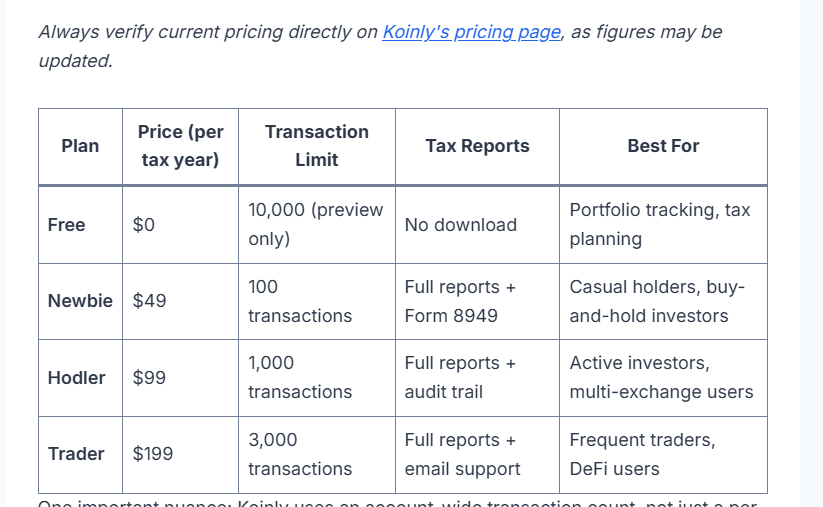
Understanding the paid tiers helps you make the right call about whether to upgrade and which plan fits your situation. Koinly prices per tax year, not as an annual subscription. You buy a plan for the specific tax year you need reports for, and that plan remains valid for ten years from purchase.
Always verify current pricing directly on Koinly’s pricing page, as figures may be updated.
| Plan | Price (per tax year) | Transaction Limit | Tax Reports | Best For |
|---|---|---|---|---|
| Free | $0 | 10,000 (preview only) | No download | Portfolio tracking, tax planning |
| Newbie | $49 | 100 transactions | Full reports + Form 8949 | Casual holders, buy-and-hold investors |
| Hodler | $99 | 1,000 transactions | Full reports + audit trail | Active investors, multi-exchange users |
| Trader | $199 | 3,000 transactions | Full reports + email support | Frequent traders, DeFi users |
One important nuance: Koinly uses an account-wide transaction count, not just a per-year limit. Transactions from all previous tax years count toward your cumulative total. If you’re importing several years of history at once, your transaction count will reflect that — and you may need a higher tier than a single year’s activity would suggest.
When upgrading between plans, you pay only the difference. There’s no penalty for starting lower and moving up.
For a full breakdown of every plan, limits, and what each tier is actually worth, see our dedicated Koinly pricing guide.
How to Get the Most Out of the Koinly Free Plan Before Upgrading
The Koinly free plan is most valuable when used strategically throughout the year — not just as a rushed setup in the weeks before a filing deadline. Here’s how to approach it properly.
Import Everything Before Tax Season
Connect all your wallets and exchanges as early in the tax year as possible. Koinly’s smart transfer matching and automatic categorisation works better with complete data. If you import transactions from multiple years at once, missing historical data creates cost basis gaps that lead to inflated gain calculations. Setting up the Koinly free plan early means that work is done before it becomes urgent.
Check Your Transaction Count Before Buying
Before purchasing any paid plan, check your transaction count directly in Koinly’s dashboard. The platform shows you this number clearly. The most common and avoidable mistake is purchasing the Newbie plan at $49 for 100 transactions and then discovering you had 340 trades last year. The Koinly free plan gives you this information before you spend anything — use it.
Use the Tax Optimizer for Year-End Planning
The tax optimizer on the Koinly free plan shows you unrealised losses that could offset existing capital gains before year-end. If you’re considering selling a position, the capital gains preview will reflect the updated liability as soon as the transaction is imported. You don’t need a paid plan to see this. You need a paid plan to download the official documentation of it.
For a deeper look at how this works in practice, see our guide on the full Koinly feature set and how it fits into a broader ta strategy.
Verify Your Data Accuracy Before Paying
Because the preview is free, you can audit Koinly’s calculations before committing any money. Check that transfers between your own wallets are correctly categorised as non-taxable internal transfers. Review any flagged transactions — Koinly highlights data issues directly in the dashboard. Clean up import errors and duplicates while still on the Koinly free plan. By the time you upgrade, you’re paying for a report you’ve already verified is accurate.
Who the Koinly Free Plan Is Right For
Investors Evaluating Whether to Use Koinly
If you’re comparing crypto tax platforms and haven’t committed, the Koinly free plan lets you test the interface and import quality with your actual data, at no cost. You’ll know quickly whether Koinly handles your specific exchanges and transaction types cleanly before spending anything. Given that competitors like CoinLedger and CryptoTaxCalculator all offer some form of free access, this is expected — but Koinly’s free tier is among the more generous in what it actually exposes.
Investors Who Only Need Portfolio Tracking
If you’re not actively filing crypto taxes — perhaps because your jurisdiction doesn’t currently tax crypto disposals, or your gains fall below reporting thresholds — the Koinly free plan’s portfolio tracker is a legitimate standalone tool. The consolidated dashboard across multiple exchanges and wallets has real value independent of the tax reporting function.
Investors Planning Ahead for Future Filing
There’s no benefit in importing your transactions only when deadlines arrive. Using the Koinly free plan throughout the year keeps your transaction history clean and current, makes the capital gains preview immediately usable for planning decisions, and means that when you do need a downloadable report, the data is already in good shape. The free tier is indefinite — you can use it continuously and only upgrade in the specific year you need an official report.
Who Should Skip the Free Plan and Upgrade Immediately
Anyone Filing Crypto Taxes This Year
If your jurisdiction requires you to report crypto capital gains and you need to submit a return, you need a paid plan. The Koinly free plan cannot produce the documentation required for filing — not for the IRS, not for HMRC, not for the ATO. The question is only which plan tier covers your transaction volume.
Investors With Several Years of Unfiled Crypto History
If you’ve been holding and trading crypto for several years without filing, Koinly requires your full historical transaction record to calculate cost basis accurately. Gains from 2026 disposals trace back to what you paid in 2019 or earlier. That cumulative transaction volume can push you into a higher plan tier than you’d expect for a single year’s activity. Import everything first, check your total count, then purchase accordingly.
How the Koinly Free Plan Compares to Competitors
Context matters here. The Koinly free plan isn’t the only free tier in this space, and the restrictions vary meaningfully across platforms.
Coinpanda allows you to generate tax reports on the free plan — but only if you have fewer than 25 transactions. That’s functionally useless for anyone with a meaningful trading history. CryptoTaxCalculator locks tax-loss harvesting behind plans starting at $249 annually. TokenTax has no free plan at all, with entry-level pricing at $65 per tax year for just 500 transactions.
The Koinly free plan — with 10,000 transaction imports, unlimited wallet connections, a genuine capital gains preview, tax optimizer, multiple cost basis methods, and Spec ID — is more substantial than most. The trade-off is clearly defined: the calculations are free, the downloadable report is not. You know exactly what you’re getting before you connect a single wallet.
For a direct comparison of Koinly against one of its closest competitors, see our Koinly vs CoinTracker comparison.
Common Questions About the Koinly Free Plan
Does the Koinly free plan ever expire?
No. The Koinly free plan is permanent. There’s no trial period, no credit card required to sign up, and no features that disappear after a fixed window. You can use it indefinitely.
Can I see my capital gains on the Koinly free plan?
Yes. The capital gains preview is included on the Koinly free plan. You can see your total gains, losses, staking and mining income, and a tax liability estimate for any tax year. You cannot download a formatted report of this data without upgrading to a paid plan.
What counts as a transaction in Koinly?
Any deposit, withdrawal, or trade counts as a transaction. However, Koinly groups large exchange orders split into smaller fills into a single transaction, and excludes spam tokens and most dust reward transactions from the count. Your Koinly transaction count is typically significantly lower than the raw activity on your exchanges.
Can I use the Koinly free plan for multiple tax years?
Yes. You can import transactions spanning multiple years and view previews for each year on the Koinly free plan. To download reports for any specific year, you’d need to purchase a paid plan for that year. Plans purchased are valid for ten years from the date of purchase.
What happens if I go over 10,000 transactions on the free plan?
Koinly halts all calculations and your dashboard data becomes unreliable. You won’t be able to generate reports until you either upgrade to a paid plan or remove excess transactions. This is a hard limit, not a soft warning.
Is it safe to connect my exchange accounts on the Koinly free plan?
API connections to Koinly are read-only. Koinly can import your transaction history but cannot execute trades, move funds, or access withdrawal functions. The security posture is identical regardless of whether you’re on the free plan or a paid tier. For a full breakdown, see our Koinly security and privacy review.
Verdict: Is the Koinly Free Plan Worth Using?
Yes — with a clear understanding of what it’s actually for. The Koinly free plan is not crypto tax software in the sense that it will get you to a filed tax return for nothing. It is a serious portfolio tracker and tax planning tool that happens to be free, with a capital gains preview and tax optimizer that have real practical value before you ever spend a dollar.
For investors who are still evaluating whether Koinly fits their setup, who want to keep their transaction history organised throughout the year, or who are planning their tax position ahead of a filing deadline, the Koinly free plan is the correct starting point. Import your wallets, check your transaction count, review the gains preview, and upgrade only when you actually need to file.
The progression from free to paid is transparent: you know the price, you know the transaction limits, and you can verify your data accuracy before committing. That’s a better model than most platforms in this space offer.
Ready to get started? Create your free Koily account here — no credit card required.
Related reading:
- Koinly Review: Is It the Best Crypto Tax Software in 2026?
- Koinly Pricing: Plans, Limits & Which One You Actually Need
- Is Koinly Accurate? How Reliable Is It for Crypto Taxes in 2026?
- Is Koinly Safe? Security, Privacy & API Risks Explained
- Koinly vs CoinTracker: Which Crypto Tax Software Is Better in 2026?
