
TradingView vs Webull: Honest Comparison for Traders (2026)
Affiliate Disclosure: This article contains affiliate links. If you sign up for TradingView through a link on this page, I may earn a commission at no extra cost to you. I only recommend tools I have genuinely evaluated.
TradingView is the stronger platform for serious traders. That is the honest verdict in the tradingview vs webull debate — and it is the answer most comparison articles dance around. TradingView and Webull are not competing for the same job. One is a professional charting and analysis platform. The other is a commission-free broker. Understanding that distinction is what makes this tradingview vs webull comparison genuinely useful.
With 30 years of professional finance experience and daily use of TradingView for analysis, I can tell you that these are tools for different stages of the trading process. The tradingview vs webull question is not which one to choose — it is how to use both together effectively. On the surface both platforms offer charts and market data. But the similarity ends there, and the differences matter enormously depending on how you trade.
This article covers every meaningful difference — charting depth, indicator count, alert systems, crypto capabilities, pricing, execution quality, and the integration that makes both platforms work together. By the end you will know exactly which platform belongs in which part of your workflow.
Quick Answer: TradingView vs Webull
TradingView wins on charting, technical analysis, alerts, and global market coverage. Webull wins on trade execution, commission-free brokerage, and mobile trading. They are not mutually exclusive — Webull is an official TradingView broker partner, meaning you can analyse on TradingView and execute trades directly through your Webull account without leaving the platform. For most active traders, the right answer to tradingview vs webull is to use both: TradingView for analysis, Webull for US stock and ETF execution.
TradingView vs Webull: Platform Overview
Before comparing features, it is worth being precise about what each platform actually is — because most tradingview vs webull comparisons get this wrong from the start.
| Feature | TradingView | Webull |
|---|---|---|
| Platform type | Charting and analysis platform | Commission-free broker |
| Primary purpose | Technical analysis, indicators, alerts | Trade execution, portfolio management |
| Can you trade directly? | Only via connected broker | Yes — directly |
| Free plan available? | Yes | Yes — no minimum deposit |
| Paid subscription | $12.95–$199.95/month | Webull Premium $3.99/month |
| Indicators available | 100,000+ community scripts | ~56 built-in indicators |
| Asset coverage | Global — stocks, crypto, forex, futures, indices | US stocks, ETFs, options, futures, ~30-40 crypto |
| Pine Script / custom indicators | Yes — full Pine Script v6 | No |
| Crypto wallet withdrawal | N/A | No — Webull holds custody |
| Regulated by | N/A (not a broker) | SEC, FINRA, SIPC |
| Best for | Technical analysis and market research | Commission-free US stock and ETF trading |
TradingView is not a broker and cannot hold your money. It is a charting platform that connects to brokers. Webull is a broker that includes charts. That is the fundamental distinction in the tradingview vs webull comparison — and it means these platforms serve different moments in the trading process rather than competing directly.
Charting and Technical Analysis
TradingView wins this category decisively. In any tradingview vs webull charting comparison, there is no serious debate among professional traders about which platform provides better analysis — TradingView has been the industry standard for retail technical analysis for years, and the gap between it and Webull’s built-in charts is significant.
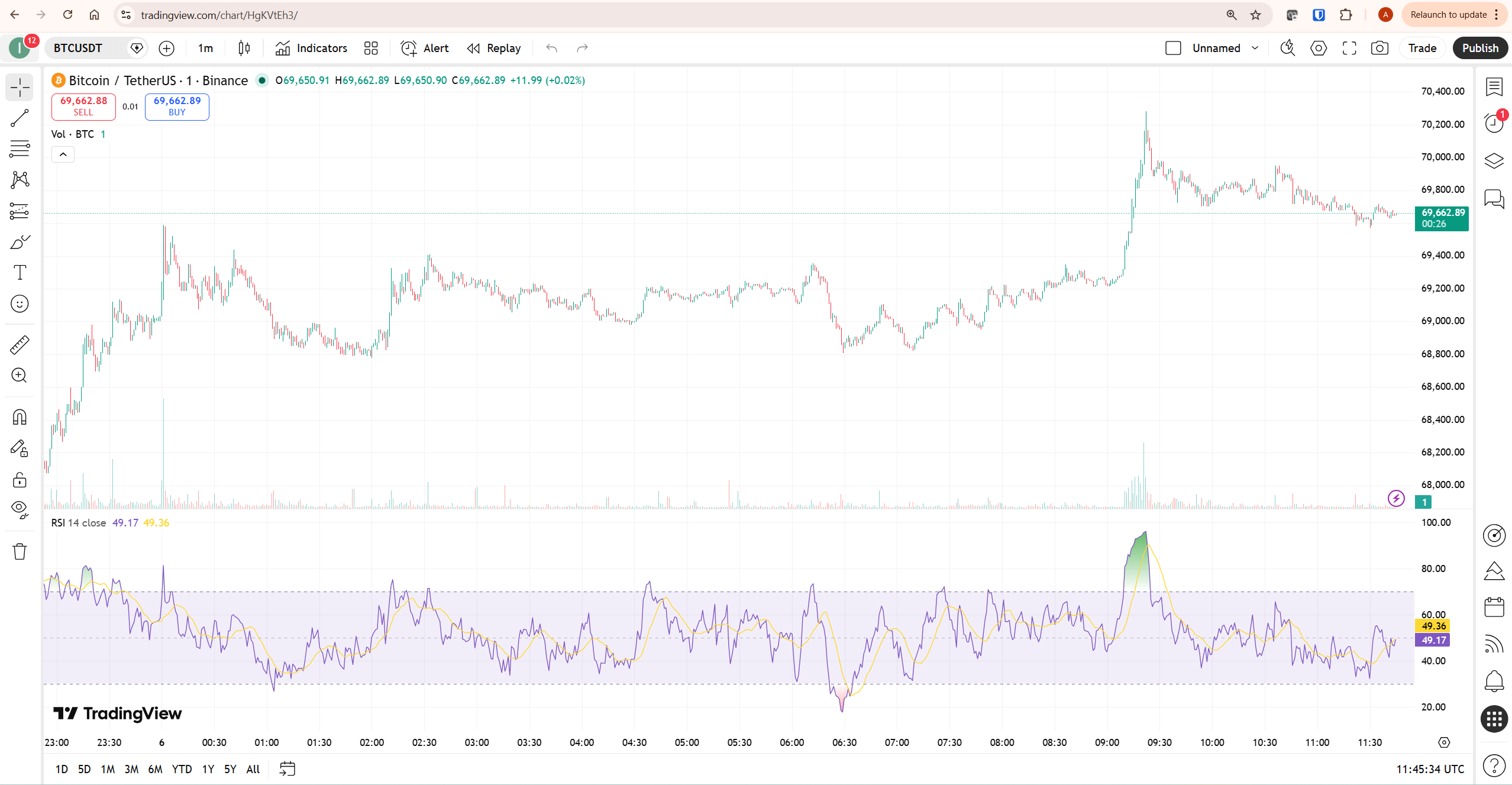
TradingView gives you access to over 100,000 community-published scripts and indicators through the Pine Script ecosystem. On a paid plan, you can run 25 indicators simultaneously on a single chart on Premium, or up to 50 on Ultimate. You can build custom indicators from scratch using Pine Script v6, backtest strategies against years of historical data, and run multi-timeframe analysis across up to 16 charts in a single layout. According to StockBrokers.com’s 2026 TradingView review, the platform consistently ranks among the top charting tools available to retail traders globally.
Webull provides approximately 56 built-in technical indicators. That covers the essentials — RSI, MACD, Bollinger Bands, moving averages — and for a commission-free broker it is genuinely impressive. But it does not support custom-coded indicators, Pine Script, or any form of strategy backtesting. The charting interface is functional and clean, particularly on mobile. It is simply a different category of tool.
The honest framing: if you are doing serious technical analysis — building multi-indicator setups, running custom strategies, or analysing across multiple timeframes simultaneously — Webull’s charts will feel limiting within a single session. TradingView is where that work actually happens. For a full breakdown of TradingView’s charting capabilities, our TradingView review covers the complete platform in detail.
Trade Execution and Brokerage
Webull wins the execution side of the tradingview vs webull comparison — and it is not close. Webull is built for execution. It offers commission-free trading on US stocks, ETFs, and equity options, with no minimum account balance and no inactivity fees. Extended hours trading runs from 4 AM to 8 PM ET. Order types include market, limit, stop-loss, trailing stop, and bracket orders. Fractional shares are available for selected stocks and ETFs.
TradingView is not a broker. It cannot hold your money, execute your trades, or manage your portfolio. What it can do is connect to broker partners — including Webull — and allow you to place orders directly from TradingView charts through those connections. When the integration works smoothly, this is a genuinely powerful workflow: analyse on TradingView’s professional charts, execute through Webull without switching platforms.
One honest limitation worth stating clearly: Webull uses payment for order flow (PFOF) to generate revenue, which means your orders are routed through market makers rather than directly to exchanges. Webull reports execution quality of 97.81% — meaning that percentage of orders execute at or better than the National Best Bid and Offer. According to NerdWallet’s Webull review, the average execution quality across all reviewed brokers sits at 97.51%, meaning Webull is marginally above average. For most retail stock and ETF trading the difference is negligible. For high-frequency trading or thinly traded instruments, it is worth understanding before relying on it.
Webull also launched Webull Premium in March 2025 — a $3.99/month subscription adding an IRA match of up to 3.5%, higher cash sweep rates, Level 2 market data, and an advanced data package from providers including Nasdaq Total View and Trading Central. For active traders who maintain larger cash balances or contribute regularly to an IRA, Premium’s match alone can exceed its cost within months.
The TradingView and Webull Integration
This is the angle that most tradingview vs webull comparisons miss entirely — and it fundamentally changes the framing of the question. Webull is not competing with TradingView. It is an official TradingView broker partner, accessible directly from TradingView’s trading panel.
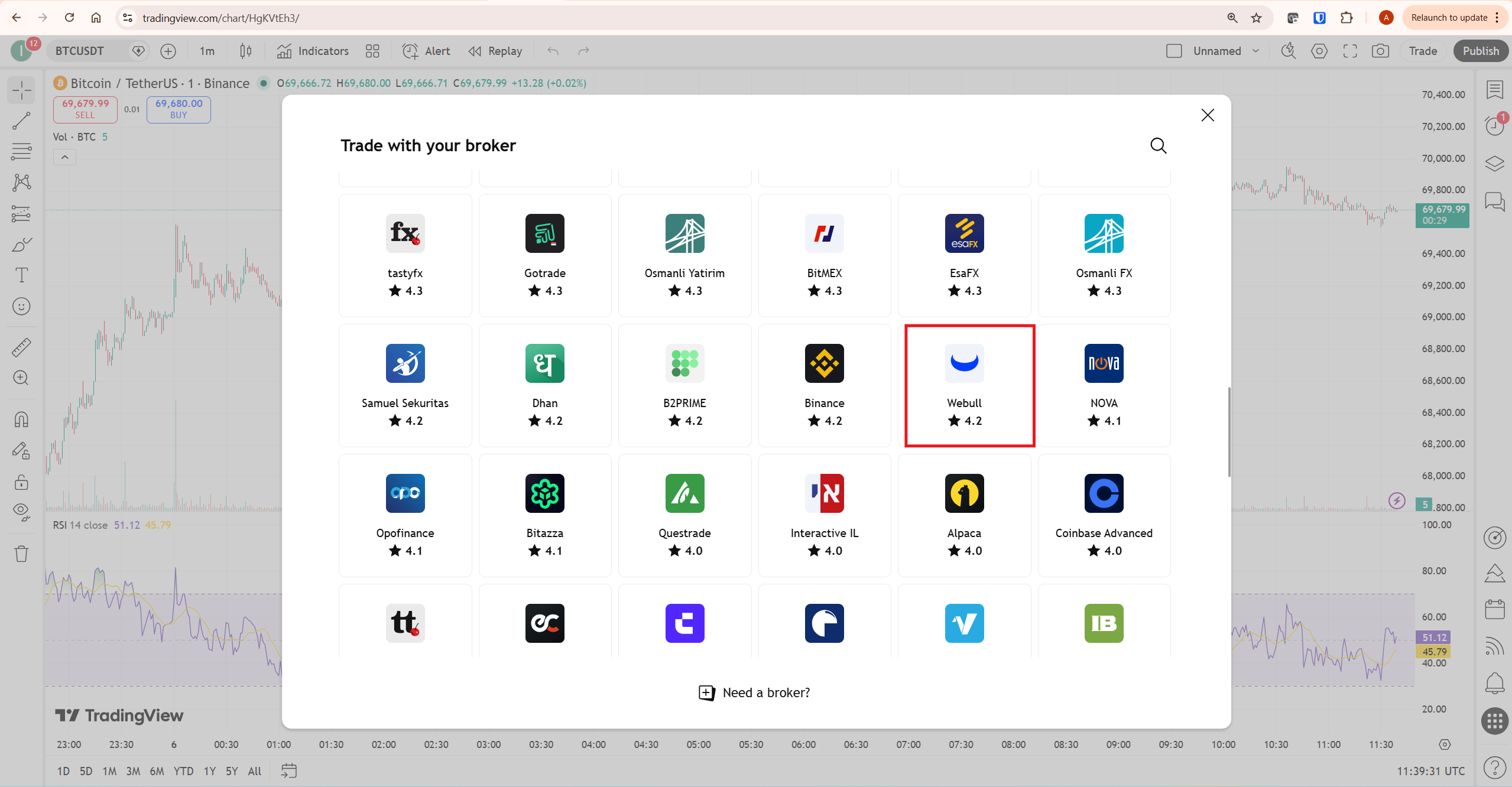
To connect your Webull account to TradingView, open any chart in Supercharts, click the Trade button at the top right, and find Webull in the broker panel. Connect your credentials and you can place commission-free trades directly from TradingView’s charts. The tradingview vs webull integration gives you TradingView’s analytical depth combined with Webull’s zero-commission execution — a compelling combination for US stock and ETF traders.
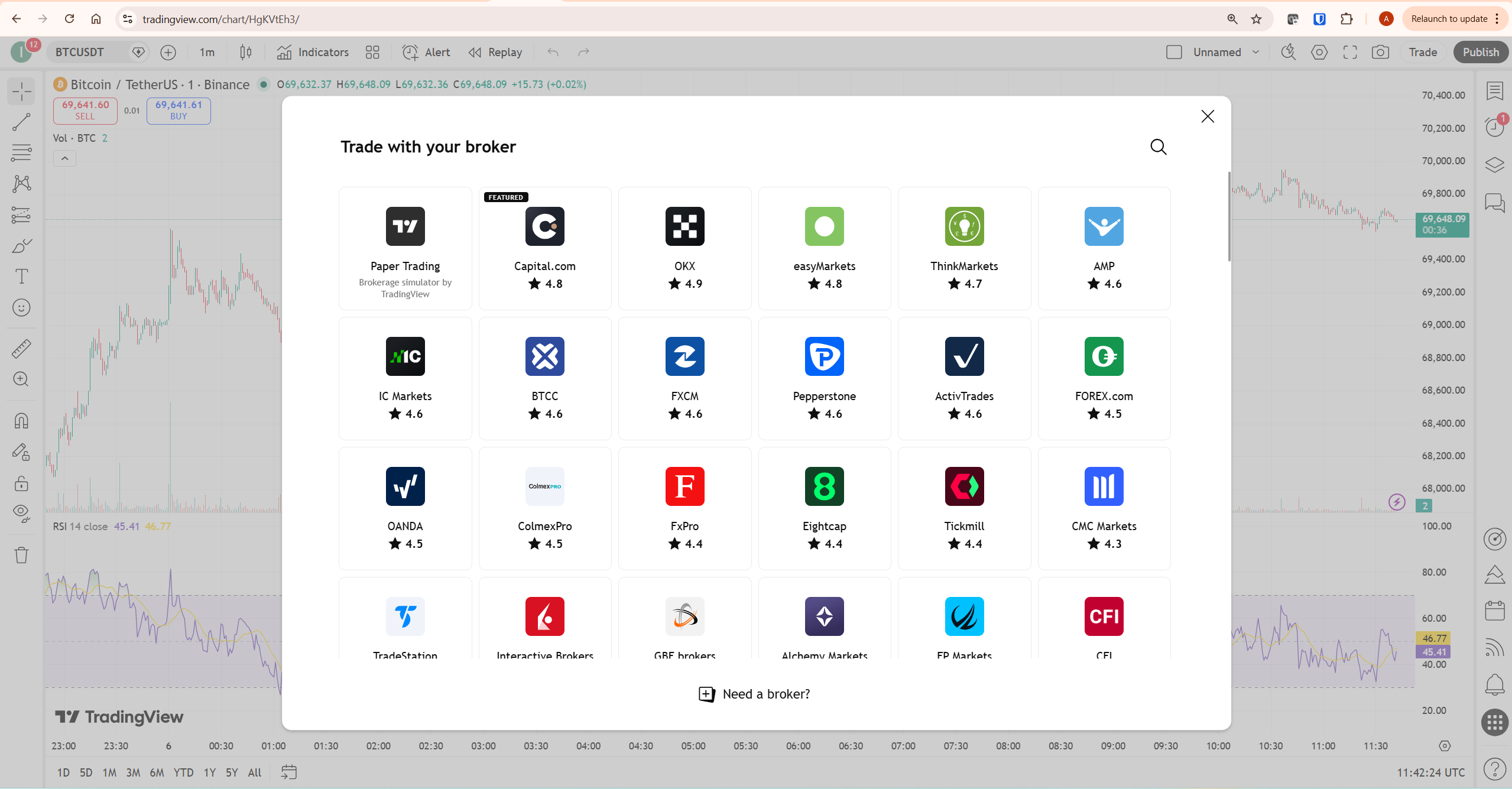
One important limitation: real user reviews on TradingView’s broker page report occasional disconnection issues and difficulty setting stop-loss and take-profit brackets simultaneously on market orders. These are not dealbreakers for most traders, but they are worth knowing before building an automated workflow that depends on the connection being reliable at all times.
TradingView vs Webull for Crypto Trading
For crypto traders specifically, the tradingview vs webull verdict is even more decisive — TradingView wins clearly for analysis, and Webull is not the right execution choice for serious crypto trading.
TradingView covers the entire global crypto market. You can chart Bitcoin, Ethereum, Solana, and thousands of altcoins across every major exchange — Binance, Coinbase, Kraken, OKX, Bybit — with full indicator support, multi-timeframe analysis, and real-time alerts. The crypto screener covers over 2,800 instruments. Pine Script lets you build custom crypto indicators and run strategy backtests on years of price data.
Webull’s crypto offering is considerably more limited. As of 2026, Webull supports approximately 30-40 cryptocurrencies — the major tokens only. Critically, Webull does not allow cryptocurrency withdrawal to external wallets. You cannot move your crypto from Webull to a hardware wallet or a DeFi protocol. Webull holds custody of your digital assets through a third-party custodian, and those assets are not protected by SIPC insurance. For traders who value self-custody — a foundational principle in crypto — this is a significant limitation that most tradingview vs webull comparison articles do not address directly.
The practical conclusion for crypto traders: use TradingView for all your analysis and charting, and use a dedicated crypto exchange such as Coinbase or Kraken for execution rather than Webull. Our guide to using TradingView for crypto trading covers the full analytical workflow in detail.
Alerts and Notifications
TradingView’s alert system is substantially more capable than Webull’s — another clear win on the analysis side of the tradingview vs webull comparison. On TradingView’s free plan you get three price alerts. Essential unlocks 20 technical alerts with webhook support. Premium gives you 400 non-expiring alerts with second-based resolution — meaning alerts can fire on conditions measured in seconds rather than minutes, which matters for active crypto and futures traders.
Webull offers alerts for price targets, volume spikes, and market news. These are functional for basic monitoring but do not support custom indicator conditions, Pine Script-based triggers, or webhook integration with external systems. If your trading workflow depends on being notified the moment a specific technical condition occurs across multiple instruments simultaneously, TradingView’s alert system is the correct tool. Our TradingView alerts guide covers every alert type, notification method, and webhook setup in detail.
Pricing Comparison
Both platforms offer meaningful free tiers — a point worth emphasising in any tradingview vs webull pricing comparison. TradingView’s free plan gives you basic charting with two indicators per chart, three price alerts, and access to the full community script library. Webull’s free tier gives you commission-free trading with no minimum deposit, 56 indicators, paper trading, and basic alerts.
| Plan | TradingView | Webull |
|---|---|---|
| Free | 2 indicators, 3 alerts, 1 chart layout | Commission-free trading, 56 indicators, paper trading |
| Entry paid | Essential — $12.95/month (annual) | Premium — $3.99/month (annual) |
| What entry paid unlocks | 5 indicators, 20 alerts, Bar Replay, ad-free | 3.5% IRA match, higher cash sweep, Level 2 data |
| Mid tier | Plus — $28.29/month (annual) | No equivalent mid tier |
| Professional tier | Premium — $56.49/month (annual) | No equivalent |
| Best value upgrade | Essential for most traders | Premium if you hold cash or use IRA |
The pricing structures serve completely different purposes. TradingView’s paid tiers unlock analytical capability — more indicators, more alerts, deeper historical data, order flow tools. Webull Premium unlocks financial benefits — better returns on cash balances and an IRA contribution match. For a complete breakdown of TradingView’s plan structure, our TradingView free vs paid guide covers every tier in detail.
Honest Limitations of Each Platform
No tradingview vs webull comparison is complete without an honest assessment of what each platform does poorly.
TradingView’s honest limitations: it is not a broker, so every trade requires a connected broker account. The free plan’s two-indicator limit is genuinely restrictive for active traders. Paid plan pricing increased approximately 13% in 2025, making the mid-tier Plus plan harder to justify. Pine Script has a learning curve that not every trader will want to invest time in.
Webull’s honest limitations are more significant for serious traders. Its Trustpilot score as of March 2026 sits at 1.3 out of 5 — a damning rating reflecting consistent complaints about customer service responsiveness. Webull does not support mutual funds, bonds, or forex trading. Its crypto offering does not allow external wallet withdrawals. And its payment for order flow model means execution quality is not fully transparent. These are reasons to understand the platform clearly, not necessarily to avoid it — but they matter.
Who Should Use Which Platform
Use TradingView if: technical analysis is central to your methodology, you trade across multiple asset classes or global markets, you use custom indicators or Pine Script strategies, you need reliable alerts across many instruments simultaneously, or you want the most capable charting environment available at any price point.
Use Webull if: you trade US stocks, ETFs, and options and want zero commissions, you want a clean mobile-first trading experience, you contribute to an IRA and want to earn a match, or you want to execute trades directly from TradingView charts through Webull’s broker integration.
Use both together if: you are a US stock or ETF trader who relies on technical analysis. This is the most practical resolution to the tradingview vs webull question for the majority of active retail traders — TradingView for the analysis layer, Webull connected as your execution broker. You get professional-grade charts with commission-free execution, and both platforms are free to start.
What to Do Next
If you are not already using TradingView, start there. Open a free account, connect your existing broker or set up the Webull integration through the Trade panel, and spend one trading session running your analysis on TradingView’s charts. The difference in analytical depth compared to any broker’s built-in charts will be immediately apparent. Start a 30-day free trial through our TradingView affiliate link — no commitment required, and it gives you full access to every paid feature for a month.
If you are already using TradingView and looking for a commission-free broker to pair with it, Webull is a solid choice for US stock and ETF trading. Open the Trade panel in TradingView, find Webull in the broker list, and connect your account. The integration setup takes under five minutes and gives you the best of both platforms in a single workflow.
Frequently Asked Questions
Is TradingView better than Webull?
For charting and technical analysis, TradingView is significantly better. For commission-free trade execution of US stocks and ETFs, Webull is the correct tool. The tradingview vs webull comparison resolves most cleanly when you use TradingView for analysis and Webull as your connected execution broker — the two platforms integrate directly and are designed to complement each other rather than compete.
Can you connect Webull to TradingView?
Yes. Webull is an official TradingView broker partner with a 4.2-star rating in TradingView’s broker panel. Open any TradingView chart, click the Trade button at the top right, and find Webull in the broker list. Connect your Webull credentials and you can place commission-free trades directly from TradingView’s charts.
Which is better for crypto trading — TradingView or Webull?
TradingView is substantially better for crypto analysis — covering thousands of instruments across all major exchanges with full indicator support. Webull’s crypto offering covers only 30-40 tokens and does not allow withdrawal to external wallets, making it unsuitable for serious crypto trading. In the tradingview vs webull crypto comparison, use TradingView for analysis and a dedicated crypto exchange for execution.
Is Webull free to use?
Yes. Webull charges no commissions on US stocks, ETFs, or equity options, has no minimum deposit requirement, and no account maintenance fees. Webull Premium at $3.99/month adds an IRA contribution match, higher cash sweep rates, and Level 2 market data — but the free tier is fully functional for most retail traders.
Does TradingView charge for trading?
TradingView itself does not charge trading commissions because it is not a broker. When you trade through a connected broker like Webull from TradingView’s interface, the broker’s own fee structure applies. With Webull, US stock and ETF trades are commission-free. TradingView charges a subscription fee for its analysis platform, starting at $12.95/month on an annual plan. For the full breakdown of TradingView’s pricing, see our TradingView free vs paid comparison.
What are the main differences between TradingView and Webull?
TradingView is a charting and analysis platform — providing indicators, alerts, backtesting, and market data across global assets. Webull is a commission-free broker — holding your money, executing trades, and managing your portfolio. The core tradingview vs webull difference is that TradingView requires a connected broker to execute trades while Webull executes directly but with limited charting depth. For serious traders, both platforms serve complementary roles.
Conclusion
The tradingview vs webull comparison resolves clearly once you understand what each platform is actually built to do. TradingView is the right choice for analysis — no retail charting platform comes close to its depth of indicators, alert capabilities, and community-built tools at any price point. Webull is a legitimate commission-free broker for US stock and ETF trading with a clean mobile experience and a straightforward IRA offering.
The smartest resolution to the tradingview vs webull question is not a choice between them — it is using TradingView as your analysis environment with Webull connected as your execution broker. Professional-grade charting combined with commission-free execution, both free to start.
Start your TradingView free trial through our affiliate link and connect Webull through the broker panel. For traders who want to understand the full TradingView platform before deciding on a plan, our TradingView review covers everything in detail. To see how TradingView compares against other platforms, our TradingView vs MetaTrader comparison is the logical next read.
Trading involves risk. Technical analysis tools do not guarantee profitable results. Past performance is not indicative of future results. Always manage your risk appropriately.
