
TradingView Free vs Paid: Which Plan Do You Need? (2026)
Affiliate Disclosure: This article contains affiliate links. If you sign up for TradingView through a link on this page, I may earn a commission at no extra cost to you. I only recommend platforms I have genuinely evaluated.
Trading involves risk. Technical analysis tools do not guarantee profitable results. Past performance is not indicative of future results. Always manage your risk appropriately.
Last verified: July 2026, using TradingView’s official pricing page and documentation.
The TradingView free vs paid question comes up constantly among traders who have been using the free plan and are starting to feel its limits. I am Andreas Maratheftis, and after 30 years in professional finance I evaluate platforms the same way I evaluate any operational investment: what does it cost, what does it actually produce, and does the output justify the expense at your current stage. TradingView’s free tier is genuinely capable for basic chart reading — more so than most competing platforms offer at no cost. That makes the upgrade decision less obvious than it looks. The short answer: the free plan works for occasional chart browsing, but it hits hard walls quickly for anyone building a real analytical workflow around it.
TradingView currently offers five plan tiers: Free, Essential, Plus, Premium, and Ultimate. Pricing ranges from $0 to $239.95 per month. The feature gaps between tiers are substantial — free users get 2 indicators per chart and no alerts on technical conditions, while Premium users get 25 indicators, 400 non-expiring alerts, and access to advanced order-flow tools that do not exist on lower plans at any price.
- The free plan is limited to 2 indicators per chart, 3 price alerts, and no technical condition alerts — sufficient only for casual chart browsing
- Essential ($12.95/mo annual) is the correct entry point for any serious trader — removes ads, unlocks Bar Replay, webhooks, and 5 indicators per chart
- Plus is the hardest plan to justify — it shares Essential’s history limit and alert expiry while costing more than double
- Premium ($56.49/mo annual) is where TradingView becomes a professional platform — non-expiring alerts, Volume Footprint, Deep Backtesting, and 25 indicators per chart
- Ultimate ($199.95/mo annual) is priced for quantitative professionals and Pine Script vendors — overkill for most retail traders
Quick Answer: TradingView Free vs Paid
The free plan works for occasional chart browsing with one or two indicators. The moment you need technical alerts, more than two indicators per chart, Bar Replay, or any kind of systematic workflow — you need a paid plan. Essential at $12.95/month (annual billing) is the right entry point for most traders. Premium at $56.49/month is where the platform becomes fully professional. Skip Plus unless the indicator count specifically constrains you. Ultimate is for quantitative professionals only.
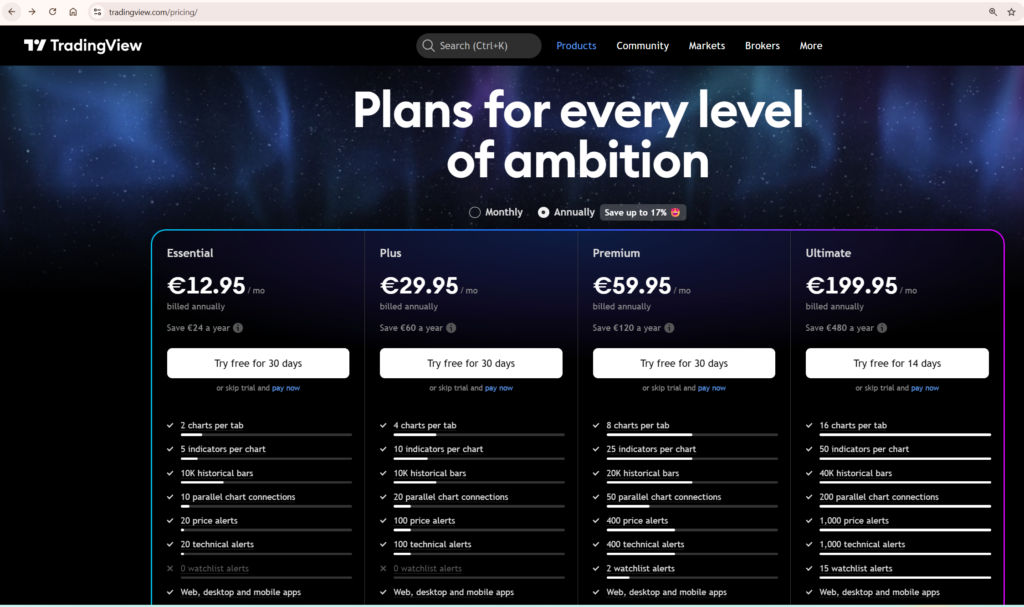
TradingView Free vs Paid: Plan Pricing in 2026
TradingView raised prices on its Plus and Premium monthly tiers in 2025 — an increase of approximately 13% that caught many existing users off guard. Annual billing remains the better value across every paid plan, with savings ranging from $24 per year on Essential to $480 per year on Ultimate. Every paid plan from Essential through Premium includes a 30-day free trial. Ultimate offers a 14-day trial. There is no reason not to test a plan before committing to it.
| Plan | Monthly billing | Annual billing (per month) | Free trial |
|---|---|---|---|
| Free | $0 | $0 | — |
| Essential | $14.95 | $12.95 | 30 days |
| Plus | $33.95 | $28.29 | 30 days |
| Premium | $67.95 | $56.49 | 30 days |
| Ultimate | $239.95 | $199.95 | 14 days |
A word of caution: many third-party review sites still list Plus at $29.95/month and Premium at $59.95/month. These figures are outdated following the 2025 price increase. Always verify current pricing directly against TradingView’s official pricing page rather than relying on older articles — platform pricing changes and I recommend confirming before subscribing.
TradingView also runs significant Black Friday promotions. Discounts of 70–80% off annual plans were reported in November 2025, making that the best window to upgrade if timing is flexible. For traders who are ready to upgrade now, every paid plan includes a free trial period — start there before paying anything. You can compare all plans and start a free trial through my TradingView affiliate link.
Indicators Per Chart: The Limit That Hits First
For most traders, the indicator limit is the first free plan restriction they actually feel in practice. Two indicators per chart sounds workable in theory until you realise that a moving average, an RSI, and a volume indicator already exceeds that ceiling. Anyone running even a basic multi-indicator setup will find the free plan insufficient within the first serious charting session.
This is not a hypothetical inconvenience. It is a hard block that forces a choice between indicators every time you open a chart. For traders who rely on layered analysis — combining trend, momentum, volume, and volatility signals — the free plan simply cannot support it.
| Plan | Indicators per chart | Charts per layout | Saved layouts | Historical bars |
|---|---|---|---|---|
| Free | 2 | 1 | 1 | 5,000 |
| Essential | 5 | 2 | 5 | 10,000 |
| Plus | 10 | 4 | 10 | 10,000 |
| Premium | 25 | 8 | Unlimited | 20,000 |
| Ultimate | 50 | 16 | Unlimited | 40,000 |
Essential at five indicators per chart is a meaningful step up from free, but it still constrains traders who run layered analysis. A typical setup — trend indicator, momentum oscillator, volume indicator, volatility band, and a custom Pine Script overlay — already maxes out Essential. Plus doubles that to ten, which covers the majority of retail trading workflows comfortably. Premium’s 25 indicators per chart is where professional-grade multi-system setups become possible.
Notice that Plus and Essential share the same 10,000-bar historical data limit. This is one of the most important things to understand when comparing plans — Plus costs more than double Essential but offers no advantage in historical data depth. Premium jumps to 20,000 bars, and Ultimate reaches 40,000 bars, covering decades of data on daily and weekly timeframes.
The multi-chart layout limit matters for traders who run simultaneous timeframe analysis. Free users get one chart per tab. Essential unlocks two. Premium’s eight charts per layout is where serious multi-timeframe workflows become genuinely practical without switching tabs constantly. For a full breakdown of how to use multiple chart layouts effectively, my guide to using multiple charts in TradingView covers every layout option and workflow.
Alerts: The Most Important Paid Feature Most Traders Underestimate
The free plan allows three price alerts and zero alerts on technical conditions or custom indicators. For any trader using TradingView seriously, this is the most crippling single limitation on the free tier. The moment you want to be notified when RSI crosses a threshold, when a moving average crossover occurs on a watchlist of twenty tickers, or when a custom Pine Script condition fires — you need a paid plan.
| Plan | Price alerts | Technical alerts | Alert duration | Webhooks | Second-based alerts |
|---|---|---|---|---|---|
| Free | 3 | 0 | 1 month | No | No |
| Essential | 20 | 20 | 2 months | Yes | No |
| Plus | 100 | 100 | 2 months | Yes | No |
| Premium | 400 | 400 | Never expire | Yes | Yes |
| Ultimate | 1,000 | 1,000 | Never expire | Yes | Yes |
There are two alert-related tier boundaries that traders consistently underestimate until they run into them directly.
The first is alert expiry. Essential and Plus alerts expire after two months, requiring manual recreation. Premium and Ultimate alerts never expire. For traders running automated strategies via webhooks — where alerts trigger order execution on external platforms — having alerts silently expire is a serious operational risk. If you are connecting TradingView to any kind of execution system or trading bot, Premium is the minimum viable tier. An alert expiring mid-strategy means your system stops working without warning.
The second is second-based alert resolution, available only on Premium and above. For traders who need to react to short-duration conditions — particularly in crypto markets where moves can develop and reverse within minutes — minute-based alert resolution on Essential and Plus may be too slow. Premium’s second-based alerts bring TradingView into line with what active traders actually need.
Webhook notifications are available from Essential upward, meaning you can connect TradingView alerts to external services, bots, or trading platforms from the entry-level paid tier. For a practical breakdown of how to configure every alert type, my TradingView alerts guide covers the complete setup process.
Bar Replay: Unavailable on Free, Depth Varies on Paid
Bar Replay — the ability to step through historical price action bar by bar — is completely unavailable on the free plan. This is a significant omission for traders who use replay to practise entries and exits on historical data, or to review how a strategy would have behaved during a specific market event.
| Data granularity | Essential | Plus | Premium | Ultimate |
|---|---|---|---|---|
| Daily and above | Yes | Yes | Yes | Yes |
| Minute-level | 180 days | 365 days | All available | All available |
| Second-level | No | No | Yes | Yes |
| Tick-level | No | No | No | 7 days |
For swing traders working on daily charts, Essential’s Bar Replay is fully adequate. For intraday traders who want to replay a full year of minute-level data, Plus covers that with its 365-day cap. For traders who need all available intraday history or second-level data, Premium is the correct tier.
The Bar Magnifier feature — which uses lower-timeframe data to simulate more realistic backtest order fills rather than assuming fills at bar close — is restricted to Premium and Ultimate. This makes a meaningful difference to the reliability of backtesting results. A strategy tested without Bar Magnifier may show significantly different performance metrics than one tested with it, particularly on shorter timeframes. My dedicated guide to using TradingView Bar Replay walks through the full replay workflow.
Pine Script Capabilities by Plan
In the TradingView free vs paid context, Pine Script is available on all plans including Free — you can write, test, and apply custom indicators without paying anything. But several Pine Script capabilities are gated behind paid tiers and matter significantly for serious script developers and systematic traders.
Script calculation time is the most immediately practical limit. Free users get 20 seconds of calculation time per script execution. Essential through Premium get 40 seconds. Ultimate gets 100 seconds. Complex multi-timeframe scripts or strategies that process large datasets will hit the 20-second ceiling on the free plan — producing a “Script could not be executed” error rather than a result.
Deep Backtesting — extended historical strategy testing beyond the standard bar limit — is restricted to Premium and Ultimate. If you are using Pine Script to validate trading strategies on long historical datasets, Premium is effectively the minimum viable tier for meaningful backtesting.
The most significant new Pine Script capability in 2026 is the request.footprint() function, introduced in March 2026. This gives Premium and Ultimate users programmatic access to Volume Footprint data directly inside Pine Script — enabling custom order-flow indicators, delta divergence strategies, and volume profile analysis that previously required dedicated third-party platforms costing significantly more than TradingView’s Premium tier.
Publishing scripts publicly is available from Essential upward. Publishing invite-only scripts — the mechanism Pine Script vendors use to sell or share proprietary indicators with paying subscribers — requires Premium or Ultimate. For a complete introduction to writing Pine Script from scratch using the current v6 syntax, my Pine Script tutorial for beginners covers the full workflow including indicators, alerts, and strategy backtesting.
Volume Footprint and Advanced Order Flow Tools
Volume Footprint is TradingView’s answer to dedicated order-flow platforms. It displays traded volume broken down by price level within each bar, showing the balance between buying and selling pressure at every tick. Dedicated order-flow platforms that offer comparable data typically cost significantly more than TradingView’s Premium tier. Volume Footprint charts are available exclusively on Premium and Ultimate.
It is worth being clear about the distinction between Volume Profile and Volume Footprint. Volume Profile indicators — which show volume distribution across price levels over a selected period — are available from Essential upward. Volume Footprint is a different and more granular tool that shows the bid/ask breakdown within each individual bar. Both are valuable but they answer different questions. Do not assume that having Volume Profile on Essential means you have access to the full order-flow toolkit — you do not.
Other advanced chart types restricted to Premium and Ultimate include Time Price Opportunity (TPO) charts and Volume Candles. Free, Essential, and Plus users have access to 17 customisable chart types. Premium and Ultimate unlock 21 types, adding the order-flow variants.
Paper Trading, Data Export, Ads, and Everything Else
Paper trading is one of TradingView’s most generous features — fully available on every plan including Free. Simulated trading on charts, DOM trading, and live broker connectivity for real trading are all accessible without a subscription. For traders evaluating TradingView before paying, the paper trading functionality is identical across all tiers and gives you a genuine feel for the platform’s execution interface.
Data export is more restrictive. Chart data download — exporting OHLCV price data as a CSV file for external analysis — requires Plus or higher. Screener and watchlist exports unlock at Essential. Strategy report export also requires Plus or above. If you run quantitative analysis on exported price data, Plus is the minimum viable plan.
The free plan displays ads on charts, in the social feed, and in mobile apps. All paid plans are completely ad-free. For traders who use TradingView during extended analytical sessions, the ad-free experience on even the cheapest paid tier is a noticeably cleaner working environment.
Watchlist capacity scales significantly across tiers. Free users get one watchlist with 30 symbols. Ultimate users get unlimited watchlists with 1,000 symbols each. For traders monitoring broad market universes or running systematic screening across hundreds of instruments, the watchlist limits on Free and Essential become a practical constraint faster than expected.
The Honest Verdict: Which Plan Should You Actually Pay For?
The TradingView free vs paid decision comes down to one question: what does your actual trading workflow require? The free plan is sufficient for one specific use case — occasionally opening TradingView to look at a price chart with one or two indicators. The moment you try to build any kind of systematic analytical workflow around it, you will hit its limits within a single serious session.
Essential at $12.95/month (annual billing) is the correct entry point for paid TradingView. It removes ads, unlocks Bar Replay, enables technical alerts with webhook support, gives you five indicators per chart, opens up custom time intervals, and provides access to exotic chart types like Renko and Kagi. For a trader evaluating whether TradingView is worth paying for at all, Essential answers that question cleanly at a price that is hard to argue with.
Plus at $28.29/month is the hardest plan to justify. It doubles Essential’s indicator and chart layout limits — from 5 to 10 indicators, and from 2 to 4 charts per layout — which matters if you specifically need those higher limits. But it shares Essential’s 10,000-bar history ceiling and its two-month alert expiry. At more than double Essential’s price, Plus earns its cost only if the indicator count or layout capacity genuinely constrains your current workflow and you do not yet need Premium’s alert permanence or order-flow tools.
Premium at $56.49/month is where TradingView becomes a professional-grade platform. Non-expiring alerts, second-based alert resolution, Volume Footprint and TPO charts, Deep Backtesting with Bar Magnifier, 25 indicators per chart, 8 charts per layout, 20,000 bars of history, and Pine Script footprint data access — this is the tier where serious active traders find the platform fully capable.
Ultimate at $199.95/month is priced for professionals with specific high-volume needs — tick data, 50 indicators per chart, 1,000 alerts, 40,000 bars of history, 100 seconds of Pine Script calculation time, and unlimited market data subscriptions. For the vast majority of retail traders, Premium covers everything they will practically use.
The practical TradingView free vs paid decision framework: start with Essential to validate whether paid TradingView fits your workflow, then upgrade to Premium when alert expiry, indicator count, or order-flow tools become the limiting factor. Skip Plus unless you have a specific reason to stop there — the value gap between Plus and Premium is narrower than the price gap suggests.
What To Do Next
If you are on the free plan and hitting its limits, start a 30-day free trial on Essential before paying anything. Use that trial period to test whether five indicators per chart, technical alerts, and Bar Replay cover your actual workflow. If you find yourself needing more after a week, move to Premium. The jump from Essential to Premium is significant — but so is the difference in what the platform can do. You can compare all plans and start a free trial through my TradingView affiliate link. For a full assessment of the platform beyond this comparison, my TradingView review covers features, charting capabilities, and broker integrations in detail.
Frequently Asked Questions
Is TradingView free good enough for beginners?
For a complete beginner who is learning to read charts and exploring how technical analysis works, the free plan is a reasonable starting point. It gives you access to the full charting interface with two indicators per chart and three price alerts. The limitations become apparent quickly — within a few serious sessions — but for pure learning purposes the free tier is functional. Once you are ready to build a real workflow, Essential at $12.95/month removes the constraints that matter most.
What is the difference between TradingView Essential and Plus?
Essential gives you 5 indicators per chart, 20 alerts, 2 charts per layout, and 10,000 bars of history. Plus gives you 10 indicators per chart, 100 alerts, 4 charts per layout — but the same 10,000-bar history limit and the same two-month alert expiry as Essential. Plus costs more than double Essential. Unless you specifically need the higher indicator count or alert volume and are not yet ready for Premium, Plus is difficult to justify over Essential.
Do TradingView alerts expire on paid plans?
Yes — on Essential and Plus, alerts expire after two months. On Premium and Ultimate, alerts never expire. This is one of the most practically significant differences between mid-tier and Premium plans. For traders running automated strategies where alerts trigger external execution systems, two-month expiry on Essential and Plus is a genuine operational risk. Premium is the minimum viable tier for any strategy that depends on alerts remaining active indefinitely.
Is TradingView Premium worth it?
For active traders who use TradingView daily as their primary analytical platform, Premium at $56.49/month is justified. Non-expiring alerts, Volume Footprint and order-flow tools, Deep Backtesting with Bar Magnifier, 25 indicators per chart, and second-based alert resolution together represent a genuinely professional-grade feature set. For traders who use TradingView occasionally or only need basic charting, Essential covers the essentials at a fraction of the cost.
Can you use TradingView for free forever?
Yes — TradingView’s free plan has no time limit. You can use it indefinitely with its restrictions: 2 indicators per chart, 3 price alerts, no technical condition alerts, no Bar Replay, ads on charts, and a single saved layout. Many casual traders use the free plan long-term for basic price chart monitoring. The free plan only becomes a genuine obstacle when you try to build a systematic trading workflow around it.
How does TradingView compare to other charting platforms?
TradingView’s free tier is more capable than most competitors’ free offerings. At the paid level, it competes directly with platforms like MetaTrader, NinjaTrader, and Thinkorswim depending on your use case. TradingView’s strengths are its browser-based accessibility, Pine Script flexibility, social features, and — at Premium — its Volume Footprint and order-flow tools at a price point well below dedicated order-flow platforms. My comparisons of TradingView vs MetaTrader and TradingView vs NinjaTrader cover the key differences in detail.
