
Semrush Keyword Gap Tool: Honest Complete Guide (2026)
This site earns revenue through affiliate partnerships with other platforms. This article does not currently contain affiliate links for Semrush.
Last verified: August 2026, using Semrush’s official documentation and pricing page.
Your closest competitor keeps outranking you and you have no idea which specific keywords are actually driving that gap. I’m Andreas Maratheftis, 30 years in finance, and I use Semrush’s toolkits directly on this site. The Semrush Keyword Gap Tool exists precisely for this problem — it compares your keyword profile against up to five competitors side by side and tells you exactly which terms they rank for that you don’t.
It’s one piece of the broader workflow covered in our Semrush Competitor Analysis guide, but this article goes deep on the tool itself.
Key Takeaways
- The Semrush Keyword Gap Tool compares your keyword profile against up to 5 competitor domains at once, across Organic, Paid, or PLA rankings.
- Results split into six intersection types — Shared, Missing, Weak, Strong, Untapped, and Unique — each highlighting a different competitive relationship.
- Missing and Weak keywords are worth investigating first, but they’re opportunity pools, not automatic priorities — check relevance, intent, and difficulty before acting.
- URL, subdomain, and subfolder comparison — plus historical data — require a Guru or Business SEO Toolkit plan.
- Export goes straight to Excel, CSV, or PDF, and you can route keywords into Keyword Strategy Builder before exporting.
Quick Answer: What Is the Semrush Keyword Gap Tool?
The Semrush Keyword Gap Tool offers a side-by-side comparison between your keyword profile and up to five competitors at once. Enter the domains, choose Organic, Paid, or PLA keyword types, and the report shows shared keywords, keywords you’re missing entirely, keywords where you rank weaker than competitors, and keywords unique to your own site. It’s part of the SEO Toolkit rather than a standalone product, and the deepest filtering — URL-level comparison and historical data — is reserved for Guru and Business plans.
How to Run Your First Comparison
Open the Semrush Keyword Gap Tool from Competitive Research in the left-hand menu — full mechanics are covered in Semrush’s own official documentation. Enter your own domain in the first field, labelled “You,” then add the competitor domains you want to compare — Semrush currently describes Keyword Gap as supporting comparisons with up to five competitors.
Don’t already know your top competitors? Semrush auto-suggests them in a dropdown once you’ve entered your own domain, pulled from the Organic Rankings Competitors report. You can also enter an exact URL, subdomain, or subfolder instead of a root domain for a more granular comparison — useful if you only want to compare one section of a larger competitor site against your own.
Before scrolling into the full keyword table, check the Top Opportunities widget — it recalculates dynamically as you apply filters, giving a quick view of the most relevant opportunities under your current criteria without manually sorting thousands of rows.
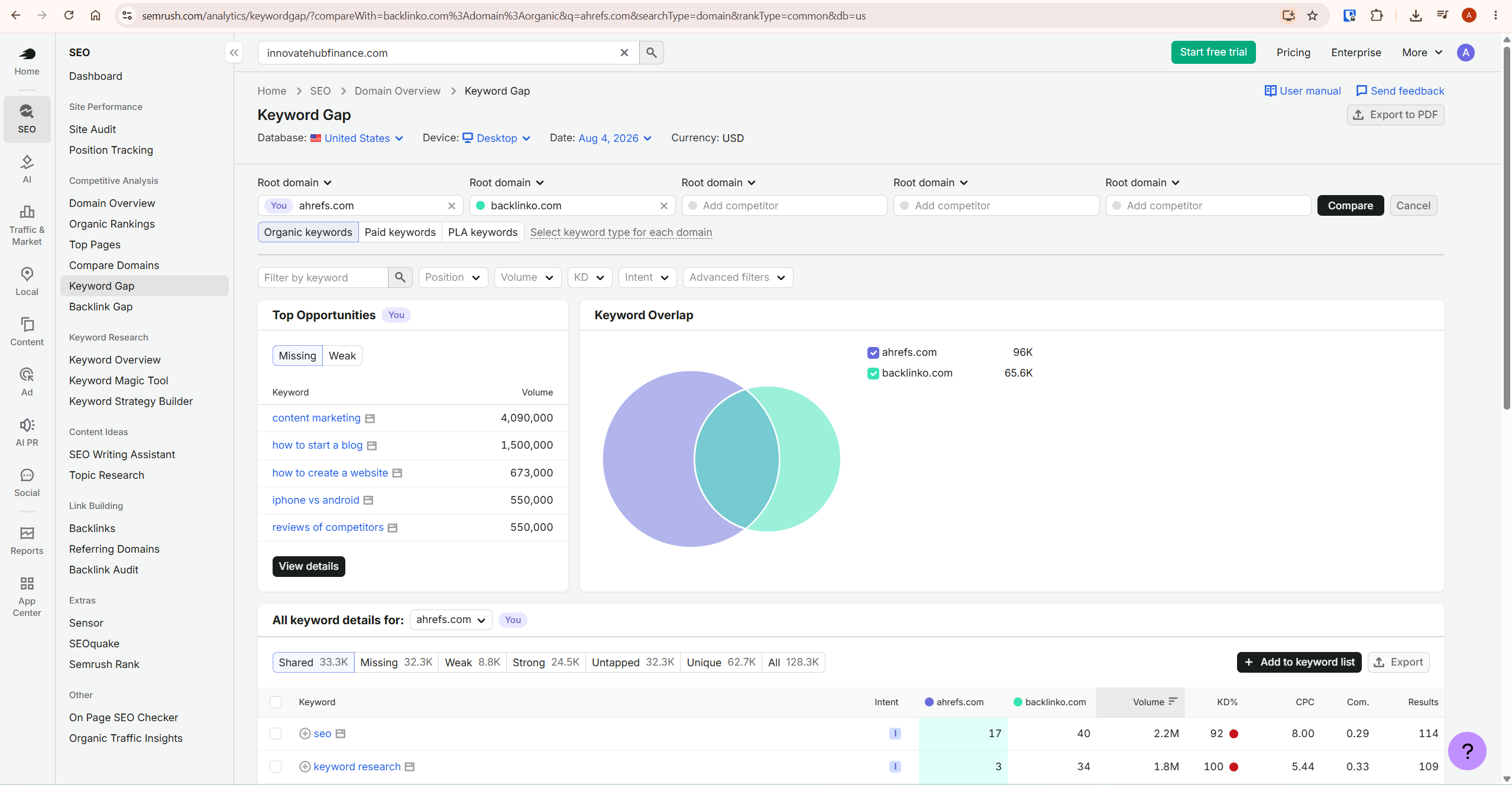
Choosing Your Keyword Type in the Semrush Keyword Gap Tool
Select which type of ranking you’re comparing before running the report — this determines what you’re actually analysing.
- Organic — keywords where a domain ranks in Google’s top 100 unpaid results. This is the default for most content-focused comparisons.
- Paid — keywords where a domain shows up through Google Ads in the top 8 paid positions.
- PLA — keywords that trigger a domain’s Google Shopping product listing ads.
You can also mix types across domains — comparing your organic keywords against a competitor’s paid keywords, for example — by selecting “select keyword type for each domain” rather than applying one type universally.
The Six Intersection Types, and What Each One Tells You
The Semrush Keyword Gap Tool’s keyword table at the bottom of the report is where the real work happens, and each intersection type points toward a different action.
Missing and Weak — where to investigate first
Missing keywords are ones every competitor you entered ranks for, but you have zero ranking on at all. Weak keywords are ones you do rank for, just lower than every competitor. These are usually the first intersections worth investigating, but they are opportunity pools rather than automatic priorities — filter them by relevance, intent, volume, difficulty, and genuine business fit before adding anything to a content plan.
Strong and Unique — what’s already working
Strong keywords are ones where you outrank every competitor entered. Unique keywords are ones you rank for that none of your competitors do at all. Both are diagnostic rather than action items — they tell you where your current strategy is genuinely working, which is useful context when deciding where to double down versus where to shore up gaps.
Untapped and Shared — the wider picture
Untapped keywords are ones you don’t rank for but at least one competitor does — a broader, less filtered version of Missing. Shared keywords are ones every domain entered ranks for, useful for understanding baseline market keywords everyone in your space competes on regardless of individual strategy.
Pro tip: a competitor’s Unique keywords can be as valuable as your own Missing list. They show opportunities that none of the other domains in your comparison currently rank for — but verify the wider SERP before assuming the broader market has overlooked them too.
Filtering the Report for Realistic Opportunities
A raw Missing/Weak export from the Semrush Keyword Gap Tool can run into thousands of rows. These filters narrow it to what’s actually worth your time.
The Position filter lets you target a specific ranking range — for example, competitors ranking positions 11 to 20 shows you keywords stuck on page two. These can be useful optimisation candidates since you’re already relatively close to the top 10, though ranking distance alone doesn’t tell you how difficult the remaining gap actually is to close.
The Intent filter narrows results to specific search intents, useful for aligning gap keywords with the type of content you’re actually planning to write. The Keyword Difficulty filter covers six difficulty levels, letting you exclude anything unrealistic for your site’s current authority before you even start reviewing the list.
Advanced filters add keyword include/exclude terms, minimum search volume, CPC range, and competitive density — combine several at once to get from thousands of rows down to a genuinely actionable shortlist in one pass. Also check the country database, device, and date range before interpreting results — changing any of these can materially shift the comparison, and Keyword Gap supports both desktop and mobile analysis.
Original Framework: Turning Gap Data Into a Publishing Queue
A filtered Semrush Keyword Gap Tool export is still just a spreadsheet until you sequence it. Use this three-step method to turn it into an actual content calendar.
First, filter to Missing keywords where at least one relevant competitor ranks strongly, sorted by volume descending.
A competitor’s top-10 ranking confirms the topic matters within your competitive set — it does not prove your own domain can rank for it, and volume, not position, is the actual demand signal.
Second, filter to Weak keywords where your own position is 11-30. Inspect the ranking URL first: if the existing page clearly matches search intent, optimising it is often the faster path.
If the ranking page is tangential, cannibalised, or mismatched to what the SERP actually wants, a dedicated new page may serve the term better than patching the existing one.
Third, before creating any new page for a Missing keyword, open the live SERP and check whether the ranking pages actually serve the same intent your planned article would. Keyword Gap identifies a ranking gap, not necessarily a content gap — those aren’t always the same thing.
Finally, cross-reference your shortlisted terms against Personal Keyword Difficulty in our Keyword Magic Tool guide, since Gap data shows what competitors achieved, not necessarily what’s realistic for your specific domain today.
Honest Limitation
Keyword Gap tells you what competitors rank for, not why they rank for it or whether the same approach will work for your site. A competitor’s Missing-list keyword might rank well for them because of years of accumulated backlinks or domain authority you don’t yet have — the gap tool surfaces the opportunity, but closing it still depends on factors this report doesn’t measure. Treat every export as a starting hypothesis to validate, not a guaranteed roadmap.
What To Do Next
Open the Semrush Keyword Gap Tool now, enter your domain plus two or three relevant competitors, and start with Missing and Weak. For Missing terms, look for relevant keywords where competitors already rank strongly. For Weak terms, inspect keywords where your existing URL sits relatively close to the top 10.
Then narrow the shortlist by intent, volume, and difficulty before exporting anything.
Before writing anything from that list, run each shortlisted term through the Semrush Keyword Magic Tool to check Personal Keyword Difficulty as a domain-specific feasibility signal.
Frequently Asked Questions
How many competitors can I compare in the Keyword Gap Tool?
Semrush currently describes Keyword Gap as supporting comparisons with up to five competitors alongside your own domain. You can compare root domains, exact URLs, subdomains, or subfolders, though URL, subdomain, and subfolder comparison requires a Guru or Business SEO Toolkit plan.
What’s the difference between Missing and Untapped keywords?
Missing keywords are the strictest form of gap: every competitor you entered ranks while your site doesn’t. Untapped keywords are broader — you don’t rank for them, but only at least one competitor does, not necessarily all of them. Start with Missing for investigation, then expand to Untapped once you’ve worked through the stricter set.
Can I export Keyword Gap results?
Yes. Export to Excel, CSV, CSV Semicolon, or PDF, choosing individual selected keywords or the first 100 up to 50,000 rows depending on your plan and report size. You can also send keywords to Keyword Strategy Builder before exporting, which lets you refresh metrics on demand later rather than working from a static export.
Does the Keyword Gap Tool show historical data?
Historical keyword data is available, but it’s restricted to Guru and Business SEO Toolkit plans — the Pro plan only shows current rankings. If you need to track how a keyword gap has changed over time rather than just its current state, that requires the higher tier.
Can I use Keyword Gap for PPC research, not just organic SEO?
Yes. Selecting Paid or PLA as the keyword type shows where a competitor is winning ad or shopping placements. This is also useful for identifying keywords where a competitor ranks well organically but faces little to no paid advertising competition — a potential opening for a low-competition ad campaign rather than a content play.
Final Verdict
If I had to summarise the Semrush Keyword Gap Tool in one sentence: it turns “I think my competitor is beating me” into a filterable comparison of where the keyword gaps actually sit. The six intersection types do more strategic work than most users realise — Missing and Weak are the obvious places to investigate first, while Unique and Strong help confirm what’s already working before you pursue new opportunities.
The honest caveat: it shows you what competitors achieved, not why, and closing a gap still depends on factors this specific report doesn’t measure — domain authority, backlink history, content depth. Cross-check every shortlisted keyword against your own site’s realistic ranking potential before committing writing time to it. For a full breakdown of everything Semrush offers, see our Semrush review.
