
Semrush Keyword Magic Tool: Honest Complete Guide (2026)
This site earns revenue through affiliate partnerships with other platforms. This article does not currently contain affiliate links for Semrush.
Last verified: August 2026, using Semrush’s official documentation and pricing page.
You type one seed keyword into the Semrush Keyword Magic Tool and suddenly you’re staring at thousands of results with no clear idea which ones actually matter for your site. I’m Andreas Maratheftis, 30 years in finance, and I use Semrush’s toolkits directly on this site. The Semrush Keyword Magic Tool is Semrush’s core keyword discovery engine — it turns one broad idea into a filtered, grouped list you can actually act on, provided you know which filters matter and which to ignore.
Key Takeaways
- The Keyword Magic Tool draws from a database of over 27.3 billion keywords, with country-level databases for global research.
- One seed keyword returns thousands of results, auto-grouped into topic-specific subgroups you can expand individually.
- Free accounts get 10 reports per day and 10 results per report, with no export. Paid plans raise these limits substantially (Pro: 3,000 reports/day; Guru: 5,000; Business: 10,000) but none are unlimited.
- The tool isn’t sold on its own — it’s always part of a wider Semrush SEO Toolkit subscription.
- A “Questions only” filter exists specifically for finding question-based keywords worth targeting in FAQ or how-to content.
- Enter your domain to unlock Personal Keyword Difficulty (PKD) and Potential Traffic — both AI-powered and both restricted to paid subscriptions.
Quick Answer: What Is the Semrush Keyword Magic Tool?
The Semrush Keyword Magic Tool is Semrush’s primary keyword discovery engine. Enter one seed word or phrase and it returns a responsive table of related search terms, automatically organised into topic-specific subgroups, each carrying search volume, keyword difficulty, intent, CPC, and SERP feature data. Semrush positions it as its most powerful keyword research tool, and it’s part of Semrush’s SEO Toolkit functionality rather than sold as a standalone product.
How to Run Your First Search
Open the Semrush Keyword Magic Tool from the left-hand menu under Keyword Research — full details are in Semrush’s own official documentation. Type in one broad seed term related to your niche — not a long-tail phrase, just the core topic.
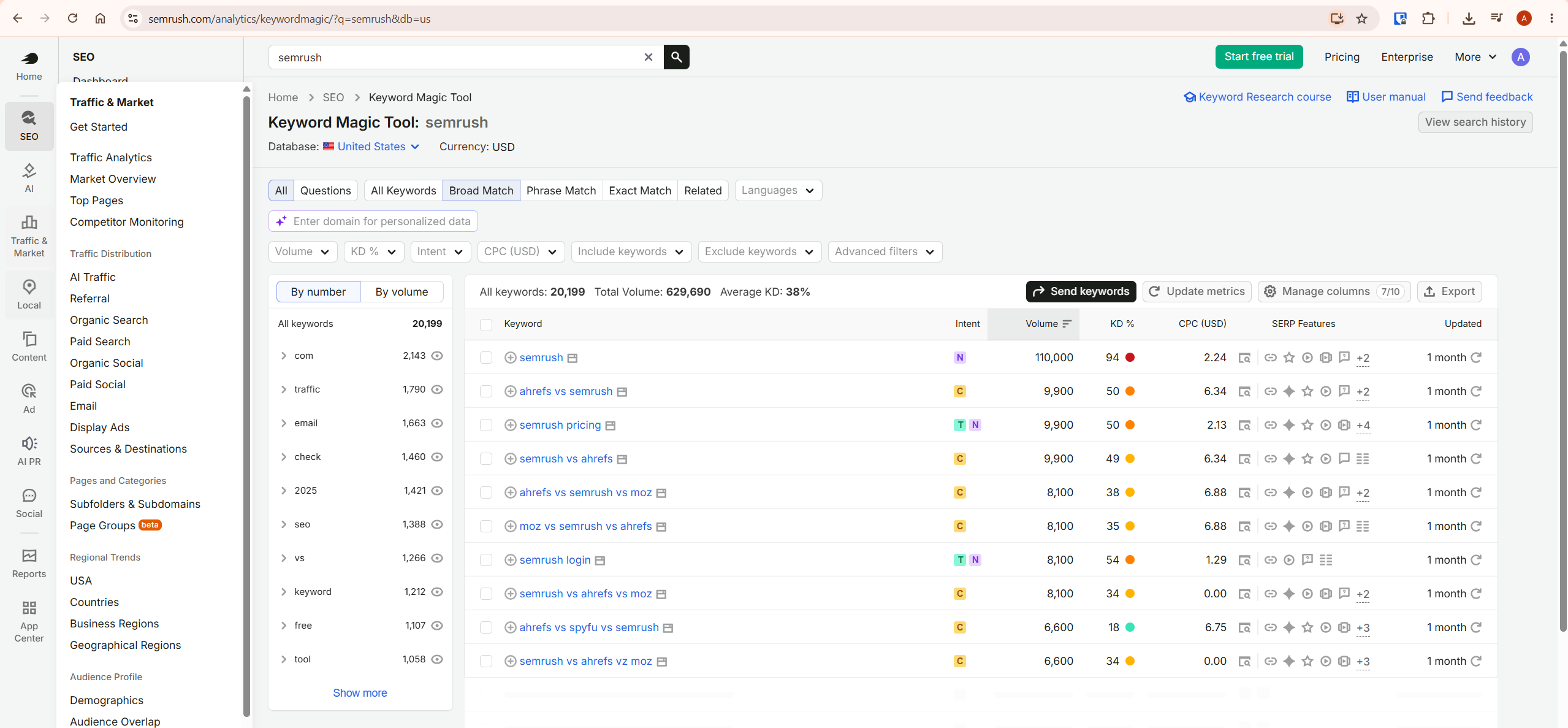
Semrush returns a table broken into topic subgroups on the left sidebar — a single seed term can return thousands or even millions of related keywords depending on the topic — with the total combined search volume and average keyword difficulty for the whole set calculated automatically at the top. This top-line number is your first useful signal: a seed term returning a low average difficulty across most subgroups suggests a genuinely accessible topic area worth exploring further.
The Filters That Actually Matter
The Semrush Keyword Magic Tool gives you far more filters than you need on any single pass. These are the filters and signals I would prioritise first.
Keyword difficulty
For a newer site, Semrush’s 0-29 KD range is a sensible starting point, but don’t treat 30 as a hard cutoff. Generic KD reflects how competitive the SERP is overall — it doesn’t know anything about your specific domain.
Personal Keyword Difficulty (PKD) — the stronger signal
Inside the Semrush Keyword Magic Tool, enter your domain in Semrush’s AI-powered personalization field and Semrush unlocks Personal Keyword Difficulty (PKD) and Potential Traffic for the keywords in your results — two AI-powered metrics calculated specifically for your site rather than the market in general. Where generic KD tells you how competitive a keyword is overall, PKD estimates how hard that same keyword would be for your specific domain to rank for.
Use PKD as your first-pass filter whenever it’s available, and treat generic KD as broader market context around it — Semrush’s own Keyword Magic Tool manual covers the full mechanics of both metrics. A keyword with high generic KD but low PKD can be a genuine opportunity — competitive in general, but realistically achievable for your specific site given its existing relevance and authority. Both PKD and Potential Traffic require a paid subscription; they’re not available on the free tier.
Search intent
Filter by informational, commercial, transactional, or navigational intent depending on what the page you’re planning is meant to do. A lower-volume keyword with clear, matching intent that you can genuinely rank for beats a high-volume term with intent your page doesn’t actually satisfy.
Questions only
This filter isolates question-phrased keywords specifically. It’s the fastest route to a genuinely useful FAQ section, since every result is already phrased the way a real searcher would type it rather than something you’ve paraphrased yourself.
SERP features
Filter by which SERP features currently appear for each keyword — AI Overviews, People Also Ask, local packs, or video results. This has become genuinely more important in 2026 than it used to be: a keyword with an AI Overview may have different click potential than raw search volume alone suggests, so review the live SERP before committing significant content resources to it. Checking this before committing content time to a keyword tells you whether ranking well will actually translate into traffic.
Pro tip: run your seed keyword through the Questions filter before writing any FAQ section. It takes two minutes and consistently surfaces phrasing you wouldn’t have guessed on your own.
Saving Keywords to Keyword Strategy Builder
Select useful keywords in your results and send them directly to Keyword Strategy Builder rather than just exporting a one-off spreadsheet. Semrush stores these lists persistently, so you can keep building the same list across multiple research sessions over weeks rather than starting from scratch every time you open the tool.
This matters more than it sounds. A single seed keyword search rarely produces a finished content plan in one sitting — you’ll come back to the same topic area repeatedly as your site grows into it. Keyword Strategy Builder can also cluster a saved list into topic groups automatically, which is often a faster route to a structured content plan than manually sorting a spreadsheet.
Original Framework: Turning a Keyword List Into a Content Plan
A raw list of 200 keywords exported from the Semrush Keyword Magic Tool isn’t a content plan — it’s a spreadsheet you’ll never open again, a point Backlinko’s own keyword analysis guide makes well too. Use this three-pass method instead.
First pass: filter by your difficulty ceiling and minimum volume, then sort by volume descending. Second pass: within that shortlist, group anything that could realistically live under the same article heading — three near-identical keywords rarely need three separate articles.
Third pass: check the Questions filter for that same seed term and fold genuinely relevant questions into the FAQ section of the article you’re already planning — unless the live SERP clearly shows that question has a distinct intent worthy of its own page, rather than automatically treating every question as FAQ material. A seed term like “email marketing” might return a subgroup for “email marketing software,” a separate one for “email marketing examples,” and a cluster of questions like “is email marketing still effective” — that’s naturally three distinct articles, not one bloated page trying to cover all three intents at once.
Honest Limitation
The Keyword Magic Tool tells you what’s searched for and how hard it is to rank — it doesn’t tell you whether ranking for it will actually make you money. A keyword can clear every filter you set and still be commercially useless if it doesn’t align with what your site sells or promotes. Run every shortlisted keyword through a genuine “would this reader actually convert” test before committing writing time to it.
Keyword Magic Tool vs Keyword Overview
These get confused constantly, and the distinction genuinely matters for your workflow. The Semrush Keyword Magic Tool is for discovery — one seed keyword becomes thousands of grouped ideas. Keyword Overview is for decision-making on a single term you’ve already found — click through from Magic Tool to see deeper metrics, including the specific pages currently ranking, before you commit to targeting it.
Use them as two steps in sequence, not two competing options. Our Keyword Difficulty guide covers how to read the difficulty metric itself once you’re at the Overview stage.
What To Do Next
Open the Semrush Keyword Magic Tool now and run one seed keyword from your niche. Set your difficulty ceiling, filter by the intent that matches your next planned article, then check the Questions tab for that same term before you close the tab.
For the next step after building your shortlist — finding keywords your competitors already rank for that you don’t — see our Semrush Competitor Analysis guide.
Frequently Asked Questions
How many keywords does the Keyword Magic Tool have access to?
Semrush currently says Keyword Magic Tool accesses more than 27.3 billion keywords and supports global research through country-level keyword databases. That figure updates periodically as Semrush expands coverage, so treat it as a current snapshot rather than a fixed number.
Can I use the Keyword Magic Tool for free?
Yes, in a limited way. A free Semrush account is capped at 10 reports per day, 10 results per report in the interface, and zero export — and it lacks the AI-powered PKD and Potential Traffic metrics entirely. Paid SEO Toolkit plans raise these limits substantially and unlock PKD, though none are truly unlimited — verify current limits and pricing at semrush.com.
Can I buy the Keyword Magic Tool on its own?
No. It’s not sold as a standalone product — it’s always included as part of a wider Semrush SEO Toolkit subscription, alongside site auditing, position tracking, and competitor research tools.
What does keyword difficulty actually measure?
KD estimates how much SEO effort may be required to rank in Google’s top 10 for that term, using factors such as referring-domain strength, authority metrics, and SERP characteristics of currently ranking pages. Treat it as a directional guide for the market in general — for a difficulty estimate tailored to your own domain specifically, use Personal Keyword Difficulty (PKD) instead, available on paid plans.
What’s the difference between broad, phrase, exact, and related match?
Broad Match returns keywords containing your seed term in any variation and word order — the widest and most common starting point. Phrase Match keeps your seed phrase in its exact form while allowing word order to vary, excluding plurals and verb variations. Exact Match preserves both the exact form and word order of your seed term.
Related surfaces semantically connected terms that may not contain your seed words at all — genuinely useful once a topic feels tapped out and you need adjacent ideas rather than closer variations.
Final Verdict
If I had to summarise the Semrush Keyword Magic Tool in one sentence: Semrush calls it its most powerful keyword research tool for good reason, and the entire value comes down to how deliberately you filter rather than how big the database is. Twenty-seven billion keywords means nothing if you never narrow the list to the handful actually worth your time.
The honest caveat: it tells you what’s searched and how competitive it is, not whether it’s commercially worth targeting for your specific site — that judgement call is still yours to make. For a full breakdown of everything Semrush offers, see our Semrush review.
