
Koinly Showing Wrong Gains? Honest Fix Guide for Cost Basis Errors (2026)
This article contains affiliate links. If you sign up for Koinly through a link on this page, I may earn a commission at no extra cost to you. I only recommend tools I have genuinely evaluated.
This article is for informational purposes only and does not constitute professional tax or financial advice. Tax laws vary by country and change frequently. Consult a qualified tax professional for advice specific to your situation.
If you have opened Koinly and found yourself staring at capital gains figures that look nothing like what you expected — Koinly showing wrong gains that are either wildly inflated or completely inconsistent with your actual trading activity — you are dealing with one of the most common and most fixable problems in crypto tax reporting. In 30 years of reviewing financial software across asset classes, Koinly showing wrong gains almost never signals a calculation error in the platform itself. It signals a data problem.
That distinction matters enormously. Chasing a software bug that does not exist wastes time and can lead to manual corrections that actually introduce errors into an otherwise sound calculation engine. The right approach to Koinly showing wrong gains is systematic: audit your data inputs before you question the outputs.
This guide walks through every meaningful cause of Koinly showing wrong gains — from missing cost basis to misclassified wallet transfers — and gives you the exact steps to resolve each one. If you are new to the platform and want to understand how it works before troubleshooting, start with our full Koinly review.
Quick Diagnostic: Koinly Showing Wrong Gains Checklist
Before working through each cause in detail, run through this checklist. In most cases of Koinly showing wrong gains, one of these steps identifies the issue immediately.
Open the Transactions tab and filter by Warnings. Check for “Missing purchase,” “Missing cost basis,” or “Missing acq. price for disposal” flags. Confirm every exchange and wallet you have ever used is imported — including old or inactive accounts. Verify that transfers between your own wallets are labelled as transfers, not trades or disposals. Check your accounting method under Settings and confirm it matches your jurisdiction’s requirements. Re-sync any wallets where recent activity may not have been captured. Check for duplicate transactions if you imported the same wallet via both CSV and API.
The Core Principle Behind Koinly Showing Wrong Gains
Before diving into specific fixes for Koinly showing wrong gains, it is worth establishing the foundational principle that explains virtually every incorrect gains scenario: the platform calculates based entirely on what you import. It has no independent visibility into your trading history. If a purchase record is missing, Koinly cannot infer it — and in the absence of acquisition cost data, it defaults to a zero cost basis, making the entire sale value appear as taxable gain.
This is not a flaw. It is how all cost basis accounting systems work — in crypto and in traditional finance. According to IRS digital assets guidance, taxpayers are responsible for maintaining accurate records of their crypto acquisitions and disposals, including cost basis for every asset. An accountant handed incomplete records produces an incomplete report. Koinly showing wrong gains follows the same logic — the software can only work with what you give it.
What Koinly Showing Wrong Gains Actually Looks Like
When investors report Koinly showing wrong gains, they usually mean one of a handful of specific scenarios. Identifying which one applies is the first step toward fixing it efficiently.
The most common presentations of Koinly showing wrong gains: gains that appear far higher than expected; a transaction showing a gain when the investor believes it was a loss; a wallet-to-wallet transfer appearing as a taxable disposal; a cost basis showing as zero or missing entirely; or a total gain figure that does not reconcile with reports from a specific exchange. In nearly every case of Koinly showing wrong gains, the root cause is data completeness or transaction classification — not an error in Koinly’s calculation logic.
How Cost Basis Works — and Why Missing Data Causes Koinly Showing Wrong Gains
Cost basis in crypto follows the same fundamental principle as cost basis in any other asset class. It represents the original acquisition price of the asset, inclusive of any fees paid to acquire it. When you dispose of the asset — whether by selling, swapping, or spending — the taxable capital gain is: Sale Price minus Cost Basis equals Capital Gain or Loss.
Where crypto diverges from traditional securities is in the complexity of the data trail. A stock purchase is recorded by a single broker. A crypto asset may have been acquired on one exchange, transferred through a self-custody wallet, staked on a DeFi protocol, and eventually sold on a different exchange — each event on a different platform with no central record keeper connecting them. Koinly showing wrong gains almost always traces back to a break in this chain where one of those platform records is missing.
This is why importing full historical transaction data — not just the current tax year — is the single most important step in resolving Koinly showing wrong gains.
Cause #1: Missing Cost Basis from Prior Years
The most frequent cause of Koinly showing wrong gains is incomplete historical data. Investors who have been active in crypto since 2017, 2018, or 2020 often import only their recent exchange data — either because they are focused on the current tax year or because they have forgotten the full scope of their earlier activity.
If you purchased Bitcoin in 2020 and Koinly has visibility into only your 2025 transactions, it cannot locate the original acquisition. When you sell that Bitcoin in 2025, the entire proceeds appear as a gain rather than the actual profit above your purchase price. Koinly showing wrong gains in this scenario is entirely explained by the missing 2020 purchase record.
This scenario also occurs when assets have been moved between exchanges over the years. If the receiving exchange is imported but the originating exchange is not, the transfer looks like an unexplained inflow with no associated acquisition cost. The fix is straightforward: import the complete transaction history for every exchange and wallet you have used, going back to your first crypto transaction.
How to Identify Cost Basis Warnings Causing Koinly Showing Wrong Gains
Koinly surfaces data gaps through its Warnings system, which is the most efficient starting point for any Koinly showing wrong gains investigation. Inside the Transactions tab, click the Warnings dropdown to reveal three specific warning types.
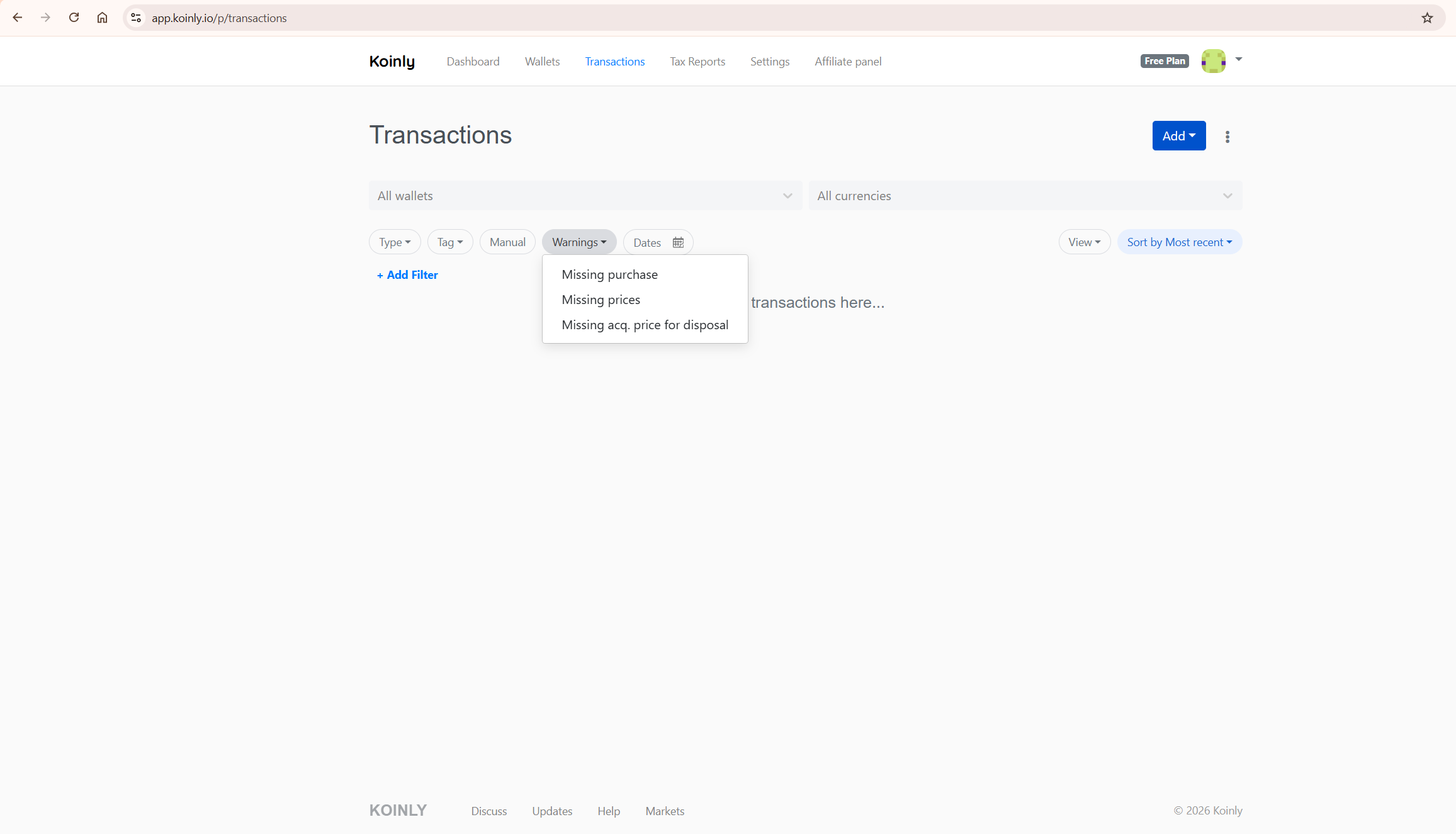
Missing purchase means Koinly cannot find the original acquisition for an asset being disposed of. Missing prices means the market price at the time of a transaction could not be determined, affecting gain calculations. Missing acq. price for disposal means a specific disposal transaction has no associated cost basis. Each warning in the Koinly showing wrong gains investigation points to the specific transaction causing the issue — resolve them systematically rather than guessing at the overall figure.
Cause #2: Incomplete Wallet and Exchange Imports
A scenario that causes Koinly showing wrong gains repeatedly: an investor imports their primary exchange but has not connected other exchanges or hardware wallets used in earlier years. Koinly receives the incoming transfers from those unimported sources and has no way to trace them back to their original purchase prices.
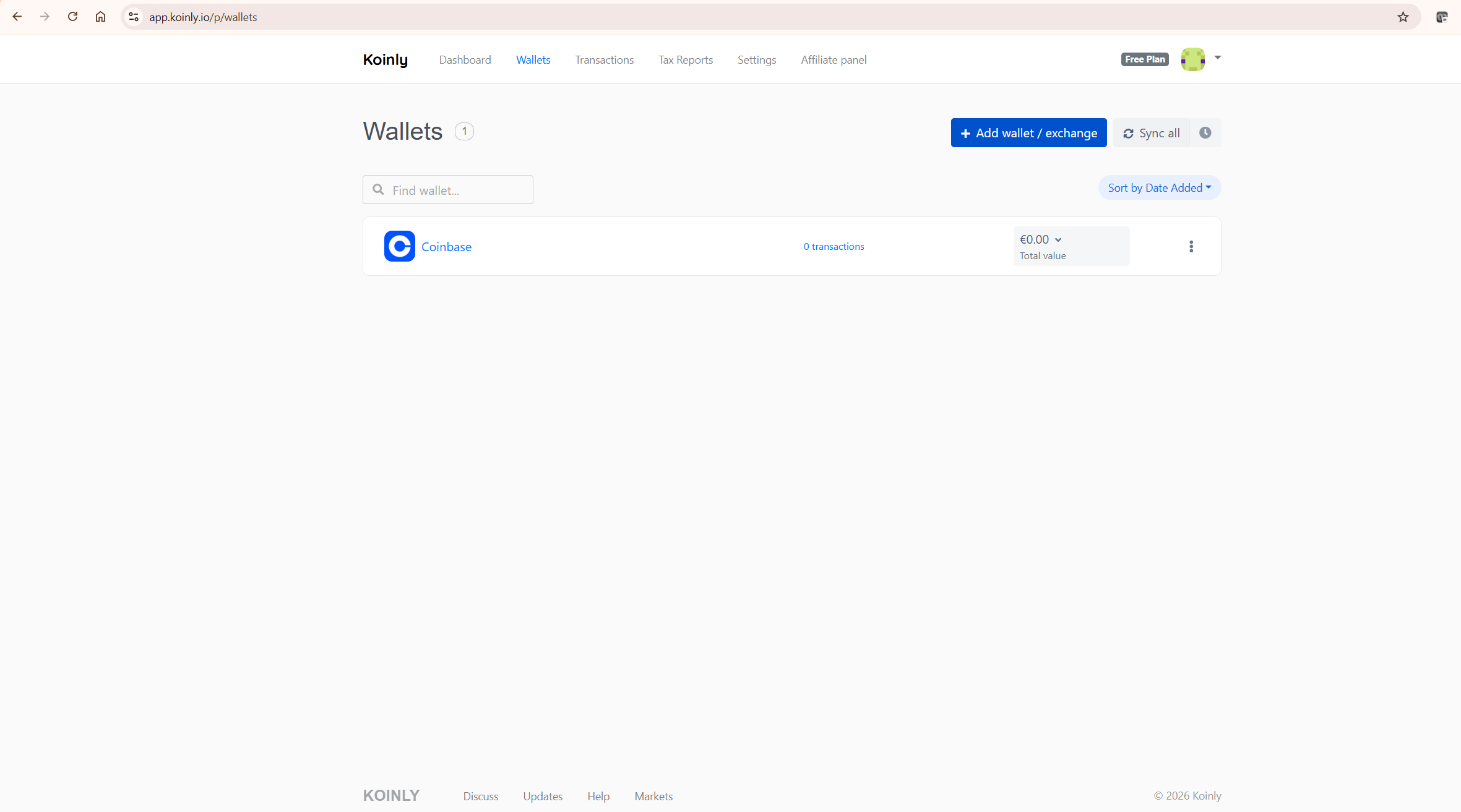
The practical impact of Koinly showing wrong gains from incomplete imports: every asset arriving from an unimported source appears as an inflow with zero cost basis. When those assets are subsequently sold, the full sale value is treated as gain. The solution is comprehensive — every exchange account, every self-custody wallet, and every DeFi protocol you have interacted with needs to be connected. This includes accounts you consider inactive or closed. For step-by-step guidance on connecting specific exchanges, our how to connect Binance to Koinly guide covers the API setup in detail.
Cause #3: Wallet-to-Wallet Transfers Causing Koinly Showing Wrong Gains
Moving crypto between wallets you own is not a taxable event in most jurisdictions. It is a transfer of the same asset between your own accounts — economically equivalent to moving cash between two bank accounts. Koinly showing wrong gains from this cause is extremely common among investors who use multiple wallets.
Koinly recognises same-owner transfers automatically — but only when both sides of the transfer are visible. If you withdraw ETH from Coinbase and that ETH arrives in a MetaMask wallet that is not imported into Koinly, the platform sees only the outgoing transaction. With no corresponding deposit to match against, the system may classify the withdrawal as a disposal, triggering Koinly showing wrong gains through an artificial capital gain.
To resolve this cause of Koinly showing wrong gains: import both the sending and receiving wallets. Koinly will then match the transactions and correctly classify the movement as a non-taxable transfer. If automatic matching does not trigger — which can happen when timestamps differ slightly between platforms — manually label the transaction as a Transfer within the Transactions tab. According to HMRC’s cryptoassets guidance, transferring crypto between your own wallets is not a disposal for UK Capital Gains Tax purposes — the same principle applies in most major jurisdictions.
Cause #4: Wrong Accounting Method Causing Koinly Showing Wrong Gains
Koinly supports multiple cost basis accounting methods, and the choice between them can produce materially different gain figures from identical transaction data. Koinly showing wrong gains from this cause is particularly confusing because the platform is calculating correctly — just under the wrong rules.
The three primary methods are FIFO (First In, First Out), LIFO (Last In, First Out), and HIFO (Highest In, First Out). Under FIFO in an appreciating market, you are selling your cheapest lots first — which tends to produce higher gains. Under HIFO, you are selling your most expensive lots first — which minimises taxable gains. FIFO is the most commonly required method for crypto in the United States and United Kingdom, but requirements vary by jurisdiction.
To fix Koinly showing wrong gains from this cause: go to Settings in Koinly, locate the cost basis method selector, and confirm it reflects your jurisdiction’s requirements. If you change the method, Koinly recalculates all gains automatically — which is normal and expected, not a new instance of Koinly showing wrong gains.
Auditing Your Transactions: Where to Look When Koinly Showing Wrong Gains
The Transactions tab is where any Koinly showing wrong gains investigation should begin. It provides full visibility into every imported record and offers filtering tools that allow you to isolate exactly where discrepancies originate.
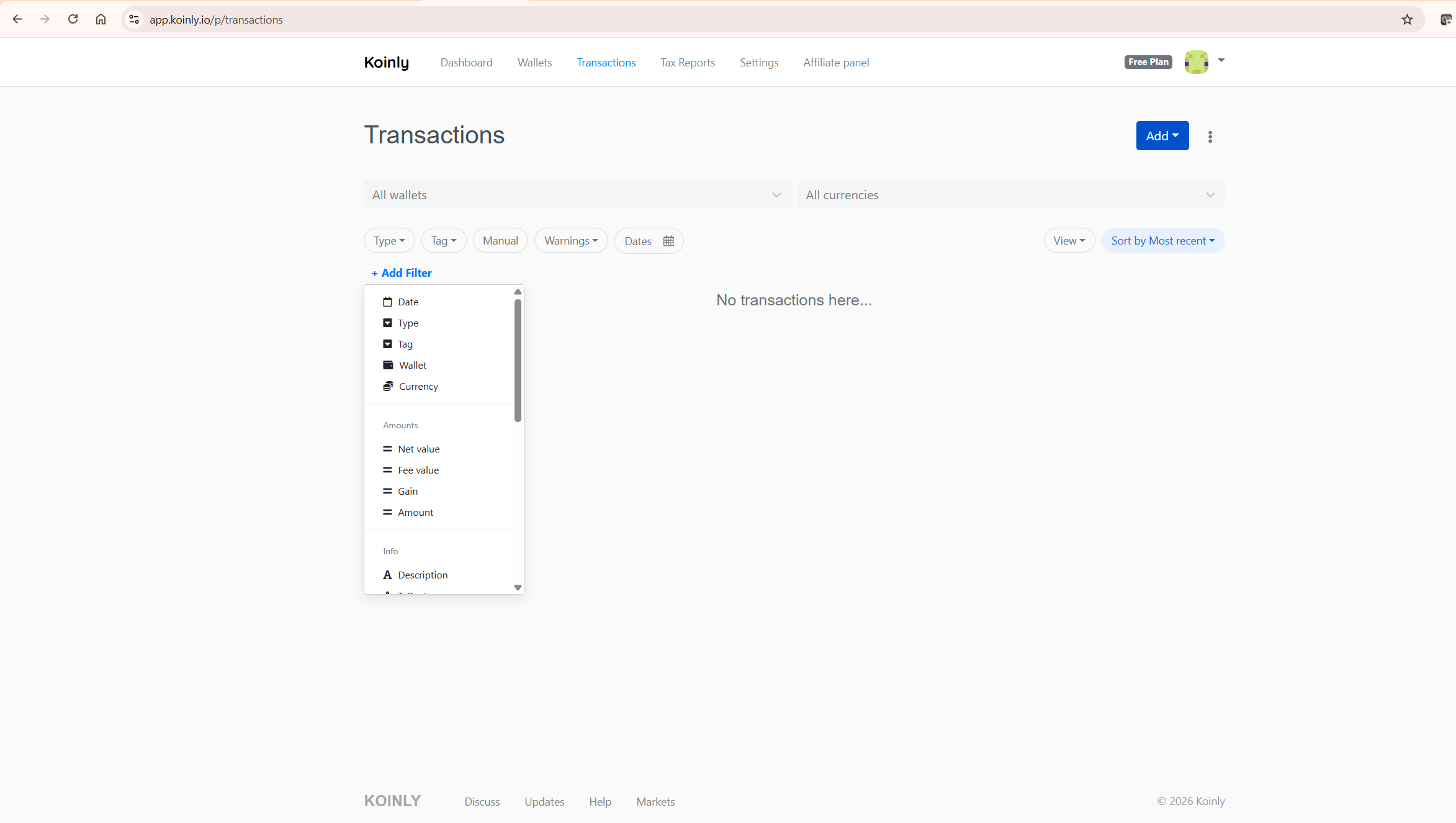
The standard filter bar gives you Type, Tag, Manual, Warnings, and Dates. The full power for Koinly showing wrong gains investigation is accessed through Add Filter, which exposes additional options including wallet, currency, net value, fee value, gain amount, and transaction description. Working through these filters systematically allows you to trace Koinly showing wrong gains back to the specific source transaction rather than attempting to reconcile aggregate figures. If the overall gain looks wrong, do not start at the tax report — start at the transaction level.
Is Koinly Actually Wrong — or Is the Data Incomplete?
This is the question that matters most when Koinly showing wrong gains appears, and the honest answer in the overwhelming majority of cases is: the data is incomplete, not the software. Koinly’s calculation engine is well-tested and handles standard cost basis methods correctly. Where the platform occasionally falls short is in automatic transaction matching across platforms with inconsistent timestamp formatting, or in handling certain DeFi protocol interactions that do not map cleanly to standard trade classifications.
For a broader assessment of how the platform performs across real portfolios and where Koinly showing wrong gains is a genuine platform issue versus a data issue, our is Koinly accurate guide covers the methodology in detail.
What to Do When Koinly Showing Wrong Gains Persists After Fixes
If you have worked through all the steps — resolved warnings, confirmed complete imports, corrected transfer classifications, and verified the accounting method — and Koinly showing wrong gains persists, the next layer of investigation involves: verifying that no duplicate wallets exist, particularly if you initially imported via CSV and later switched to API for the same exchange; checking whether staking rewards, airdrops, or referral bonuses have been classified correctly; reviewing any DeFi activity for liquidity pool entries and exits which may require manual classification; and considering deleting and fully re-importing any wallet with structural inconsistencies.
If Koinly showing wrong gains continues after exhausting these steps, contact Koinly support directly. Provide specific transaction IDs and screenshots — this accelerates resolution considerably compared to a general enquiry.
Koinly Showing Wrong Gains and IRS Reporting
If Koinly showing wrong gains is producing inflated figures, any tax report generated from that data will reflect those inflated figures — directly affecting your reported tax liability. Overstated gains mean overstated tax due. While the IRS does not receive reports directly from Koinly, the platform generates the Form 8949 and Schedule D data that feeds into your filing. Koinly showing wrong gains at the platform level becomes errors on your return.
This is why resolving Koinly showing wrong gains before generating your tax report is far preferable to attempting to correct figures after filing. For a full breakdown of Koinly’s reporting obligations, our does Koinly report to the IRS guide covers everything in detail.
How to Prevent Koinly Showing Wrong Gains Going Forward
The investors who experience Koinly showing wrong gains least frequently are those who treat Koinly as an ongoing record-keeping system rather than a tool they open once a year at tax time. The more fragmented your activity — across exchanges, self-custody wallets, staking platforms, and DeFi protocols — the more valuable consistent maintenance becomes.
Practically, preventing Koinly showing wrong gains means connecting new exchanges and wallets immediately when you open them, using API auto-sync rather than manual CSV exports wherever available, reviewing warnings monthly rather than letting them accumulate, and never deleting wallets that hold original acquisition records. A small investment of time throughout the year eliminates the concentrated effort — and potential for Koinly showing wrong gains — that comes with annual scrambles. For the complete setup guide, our how to use Koinly guide covers every step from initial setup through report generation.
Frequently Asked Questions: Koinly Showing Wrong Gains
Is Koinly actually wrong when it shows high gains?
In the vast majority of cases of Koinly showing wrong gains, no — the platform is calculating correctly based on the data it has. High or unexpected gains typically result from missing cost basis records, incomplete wallet imports, or incorrectly classified transfers, not an error in the calculation engine. Always audit your data inputs before questioning the output. The checklist in this guide covers every meaningful cause of Koinly showing wrong gains.
Why are my gains higher in Koinly than on Coinbase?
Coinbase’s tax reports are limited to activity that occurred on Coinbase. If you transferred assets to Coinbase from another exchange, Coinbase has no record of the original acquisition price and may report gains based on the transfer value. Koinly showing wrong gains relative to your Coinbase report usually means Koinly is missing some historical data from the originating exchange — or Coinbase’s report is the incomplete one. Import the complete history from all exchanges to resolve the discrepancy.
Can missing transactions cause Koinly showing wrong gains?
Yes, directly. If Koinly cannot locate a purchase record for an asset you are disposing of, it applies a zero cost basis — meaning the entire proceeds of the sale appear as taxable gain. This is the single most common cause of Koinly showing wrong gains and is resolved by importing complete historical transaction data from every exchange and wallet you have ever used.
Why did my gains change after switching accounting methods?
This is expected behaviour, not Koinly showing wrong gains. FIFO, LIFO, and HIFO each apply a different logic to which acquisition lots are treated as sold first. The same transaction data produces different gain figures under each method. If your gains changed after switching, Koinly is working correctly — the question to resolve with your tax advisor is which method applies to your jurisdiction.
What is the fastest way to fix Koinly showing wrong gains?
Open the Transactions tab, filter by Warnings, and address each flagged transaction individually. Missing purchase warnings point directly to the transactions where cost basis is absent. Importing the relevant exchange history for those specific assets typically resolves the flags and corrects Koinly showing wrong gains without requiring a full portfolio re-import. For most users, resolving warning flags is the fastest route to an accurate gains figure.
Koinly Showing Wrong Gains: Final Assessment
After working through every cause of Koinly showing wrong gains, the answer is consistent: Koinly is almost certainly not wrong. The gains figure you are seeing reflects the data you have provided. Missing acquisition records, incomplete exchange imports, misclassified transfers, or an incorrect accounting method each produce Koinly showing wrong gains that does not match your expectations — because your expectations are based on the complete picture that Koinly does not yet have.
The path from Koinly showing wrong gains to an accurate report is systematic data completeness: every exchange, every wallet, every year. Once that foundation is in place, Koinly’s calculation engine performs reliably. Start with a free Koinly account here — import all your exchanges and wallets and preview your complete capital gains position before committing to a paid plan.
For the full platform evaluation, read our complete Koinly review.