
Koinly Pricing Explained (2026): Complete Plans, Limits & Which One You Need
This article contains affiliate links. If you sign up for Koinly through a link on this page, I may earn a commission at no extra cost to you. I only recommend tools I have genuinely evaluated.
This article is for informational purposes only and does not constitute professional tax or financial advice. Tax laws vary by country and change frequently. Consult a qualified tax professional for advice specific to your situation.
Koinly pricing works differently from most software subscriptions, and that difference catches a lot of investors off guard. You are not buying an annual plan that renews automatically. You are buying a report for a specific tax year — and your transaction volume for that year determines which plan you need. Get this wrong and you either overpay for capacity you do not use, or underpay and discover you cannot generate your report when it matters.
After thirty years in finance, I am Andreas Maratheftis, and I have seen the same pattern repeatedly: investors focus on the headline price without understanding what actually determines which tier applies to them. This guide breaks down Koinly pricing in plain terms, explains how the transaction counting works, and gives you a clear framework for choosing the right plan without overpaying.
If you want to check your transaction count before deciding, you can do that on Koinly’s free plan at no cost. Try Koinly free here.
How Koinly Pricing Works
Koinly charges per tax year, not per calendar year or as an ongoing subscription. When you purchase a plan, you are paying for the ability to generate tax reports for one specific tax year. That plan remains valid for ten years from the date of purchase, meaning you can return at any point within that window to download your reports again.
The tier you need is determined by your transaction count — the number of deposits, withdrawals, and trades recorded across all your connected wallets and exchanges for that tax year. Each plan has a transaction ceiling. Exceed it and you need to upgrade before Koinly will generate your report.
One important nuance that most pricing guides skip: Koinly applies two limits simultaneously. The plan you purchase for a given year must cover that year’s transaction count. But there is also an account-wide limit — your total transactions across all years combined must also be covered. If you are importing several years of history, this account-wide total can push you into a higher tier than the current year’s activity alone would suggest. According to Koinly’s official pricing documentation, if you had transactions in previous years but do not want to purchase plans for those years, you can cover those transactions by buying a larger plan for your current year instead.
When upgrading between plans mid-year, you pay only the price difference. There is no penalty for starting lower and moving up once you know your actual transaction volume.
How much does Koinly cost for most investors?
For most active crypto investors, Koinly costs between $49 and $199 per tax year depending on transaction volume. Buy-and-hold investors with fewer than 100 trades typically pay $49 on the Newbie plan. Active investors using multiple exchanges and some DeFi usually fall into the Hodler plan at $99. Frequent traders and active DeFi users typically need the Trader plan at $199. The free plan lets you import all your data and check your exact transaction count before spending anything — which is always the right starting point.
Koinly Pricing Plans: Full Breakdown
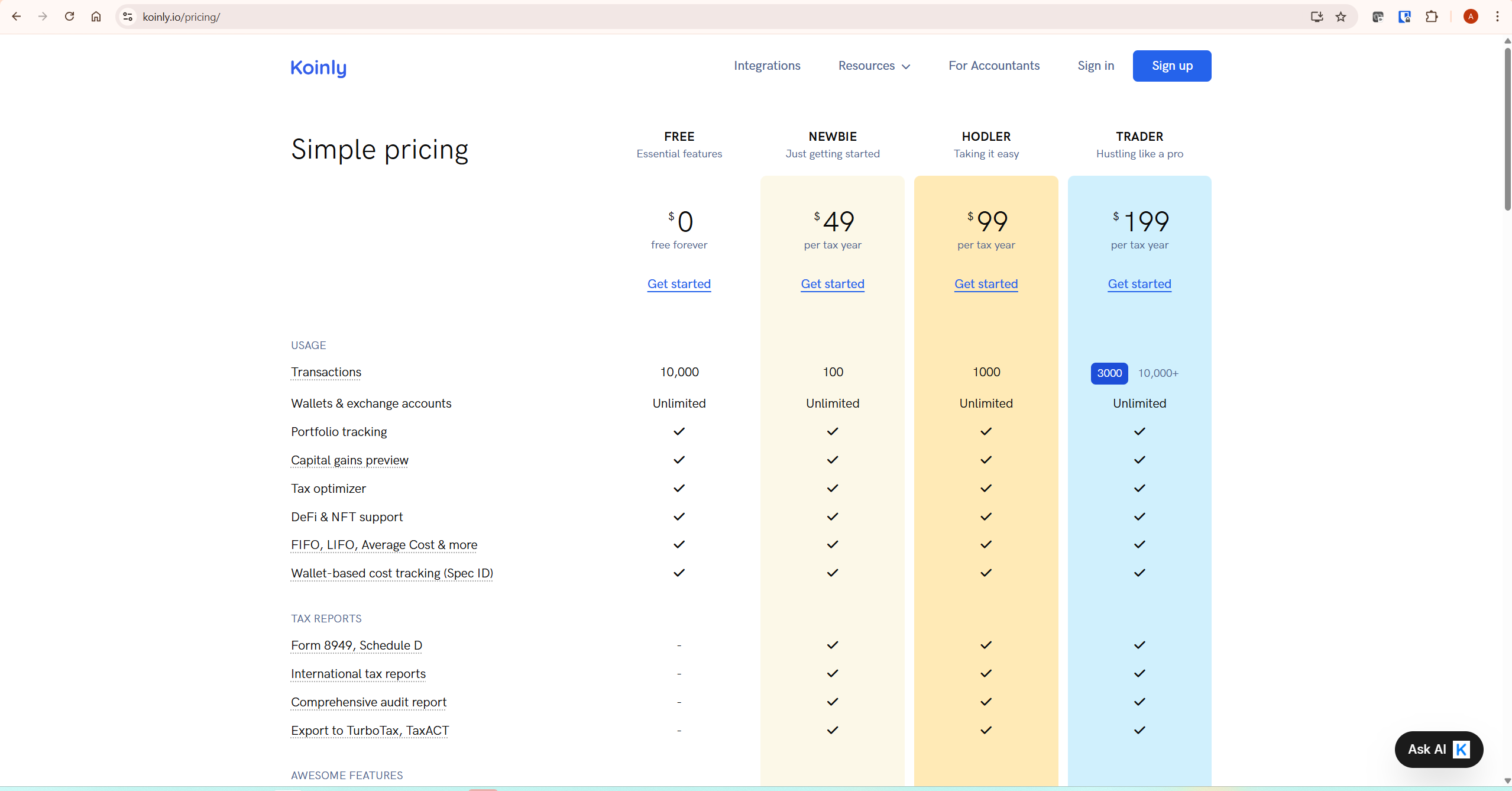
Always verify current pricing directly at koinly.io/pricing before purchasing, as figures may be updated.
| Plan | Price (per tax year) | Transaction Limit | Tax Reports | Support |
|---|---|---|---|---|
| Free | $0 | Up to 10,000 (preview only) | No download | Help centre only |
| Newbie | $49 | 100 | Full reports including Form 8949 | Help centre only |
| Hodler | $99 | 1,000 | Full reports plus audit trail | Help centre only |
| Trader | $199 | 3,000 | Full reports plus audit trail | Email support |
| Pro | $279 | 10,000 or more | Full reports plus audit trail | Priority support |
Free Plan — $0
The free plan is a permanent tier, not a trial. It gives you unlimited wallet and exchange connections, portfolio tracking, a capital gains preview, tax optimizer, DeFi and NFT support, and all major cost basis methods. Up to 10,000 transactions can be imported and calculated.
The single restriction: you cannot download any tax reports. Everything Koinly calculates is visible on screen — your gains, losses, income, liability estimate — but producing a document you can actually file requires a paid plan.
The practical use case for the free plan is twofold: testing whether Koinly handles your specific exchanges and transaction types correctly before paying anything, and using the capital gains preview throughout the year for tax planning purposes. Both are legitimate uses that do not require spending anything. For a full breakdown of everything the free tier includes and excludes, see our dedicated Koinly free plan guide.
Newbie Plan — $49 per Tax Year
The Newbie plan covers up to 100 transactions and unlocks full tax report downloads. This includes IRS Form 8949, Schedule D, international tax reports for over 100 countries, TurboTax and TaxACT export files, and a comprehensive audit trail report.
At $49 it is the most affordable entry point into Koinly’s reporting layer — but the 100-transaction limit is tighter than it sounds. Anyone who traded more than a handful of times, used DeFi protocols, or received staking rewards regularly will likely exceed this ceiling. Before purchasing, check your transaction count in the Koinly dashboard.
The Newbie plan is genuinely suitable for buy-and-hold investors who made fewer than 100 trades in the tax year — someone who bought Bitcoin or Ethereum on one or two exchanges, held it, and perhaps sold a portion once or twice. It is not suitable for anyone using DeFi protocols regularly, running multiple staking positions, or trading actively across several exchanges.
Hodler Plan — $99 per Tax Year
The Hodler plan covers up to 1,000 transactions and includes everything in the Newbie plan. The jump from 100 to 1,000 transactions represents the most meaningful capacity increase in Koinly’s pricing structure — and at $99, it is the plan that covers the largest proportion of active crypto investors.
For most investors who hold assets across two or three exchanges, make regular trades, and perhaps use one or two DeFi protocols, 1,000 transactions is sufficient headroom. It is also the right plan for anyone importing multiple years of moderate activity simultaneously.
The Hodler plan is the default recommendation for active investors who are not day traders. If you trade weekly rather than daily, use a handful of exchanges, and have some DeFi or staking activity, 1,000 transactions should cover your annual volume comfortably. One practical note: support on the Hodler plan remains limited to Koinly’s help centre — there is no email support until the Trader tier.
Trader Plan — $199 per Tax Year
The Trader plan covers up to 3,000 transactions and adds email support — the first plan tier where you have access to Koinly’s support team directly. DeFi activity in particular generates high transaction counts: every swap, liquidity provision, yield claim, and bridge transfer creates individual transaction records. Investors who are active in DeFi often find themselves in Trader territory even if their overall portfolio is not especially large.
The Trader plan makes sense if you trade daily or near-daily, run multiple DeFi positions across several protocols, or use automated strategies that generate high transaction volumes. The addition of email support at this tier is worth noting — complex DeFi portfolios regularly surface edge cases in transaction categorisation that benefit from direct support access.
Pro Plan — $279 per Tax Year
The Pro plan covers 10,000 or more transactions with priority support access. It is designed for high-volume traders and crypto professionals — accountants managing multiple client portfolios, algorithmic traders running automated strategies, or investors with unusually complex DeFi histories spanning multiple chains and protocols.
For most individual investors, the Pro plan represents significant overkill. 10,000 transactions in a single tax year is a high threshold. If you are approaching that volume, the Pro plan is the correct choice — but it is worth reviewing your actual transaction count carefully before purchasing, since the Trader plan at $199 covers up to 3,000 transactions and suits the majority of active traders.
How Koinly Counts Transactions — and Why It Matters
Understanding how Koinly counts transactions is essential for choosing the right plan. The platform’s counting methodology is more investor-friendly than it might initially appear.
What counts as a transaction: Any deposit, withdrawal, or trade counts as a transaction. Internal transfers between your own wallets — moving Bitcoin from an exchange to a hardware wallet, for example — are identified by Koinly’s smart transfer matching as non-taxable events, but they still count toward your transaction total.
What Koinly excludes from the count: Koinly excludes spam tokens and most small dust reward transactions from your billable transaction count. Exchanges frequently send unsolicited tokens to wallet addresses — these are automatically filtered. Similarly, exchanges often split large orders into multiple smaller fills — Koinly groups these into a single transaction rather than counting each fill individually. The practical result is that your Koinly transaction count is typically meaningfully lower than the raw number of activity records in your exchange history.
DeFi and transaction count: DeFi activity is where transaction counts escalate most rapidly. A single yield farming session might involve approving a contract, depositing liquidity, receiving LP tokens, and claiming rewards — each of which generates a separate transaction record. Active DeFi users should check their transaction count carefully before assuming a lower-tier plan covers them.
What Every Paid Plan Includes
All paid plans include the full feature set. The only meaningful differences between paid plans are the transaction ceiling and the support level.
- IRS Form 8949 and Schedule D
- International tax reports for 100+ countries
- Comprehensive audit trail report
- TurboTax and TaxACT export files
- Unlimited wallets and exchange connections
- Portfolio tracking and capital gains preview
- Tax optimizer
- DeFi, NFT, margin trades, and futures support
- FIFO, LIFO, Average Cost, and Spec ID cost basis methods
- Mining, staking, lending, and airdrop income tracking
- Smart transfer matching
- Accountant access
Support is the one differentiator across tiers: help centre only on Newbie and Hodler, email support on Trader, priority support on Pro.
Which Koinly Plan Do You Actually Need?
Here is a straightforward framework based on investor profile. Always import your data on the free plan first and check your actual transaction count before purchasing.
| Investor Type | Likely Plan | Why |
|---|---|---|
| Buy-and-hold, fewer than 100 trades per year | Newbie — $49 | Low transaction volume, no DeFi |
| Active investor, multiple exchanges, some DeFi or staking | Hodler — $99 | 1,000 transactions covers most active investors |
| Frequent trader or active DeFi user | Trader — $199 | DeFi generates high counts quickly |
| High-volume trader or crypto professional | Pro — $279 | 10,000+ transactions, priority support |
| Importing multiple years of history | Check count first | Cumulative total determines tier |
Koinly Pricing vs Competitors
Koinly’s pricing sits in the middle of the market — not the cheapest option available, but its pricing includes support for a very broad range of exchanges, wallets, DeFi protocols, NFTs, and international tax jurisdictions. The key structural differentiator is the per-tax-year model rather than an annual subscription. This means you only pay for years you actually file, rather than maintaining an ongoing subscription regardless of whether you need a report that year.
Most competing crypto tax platforms use either annual subscription pricing or per-tax-year pricing at different transaction tiers. Before comparing on price alone, verify the current pricing and transaction limits directly on each competitor’s official website — these figures change frequently and third-party comparisons go stale quickly. For a direct head-to-head comparison of features and accuracy, see our Koinly vs CoinTracker comparison and Koinly vs CoinLedger comparison.
What To Do Next
The right approach to Koinly pricing is always the same: import first, decide second. Create your free account, connect your exchanges and wallets, let Koinly import your transaction history, and check your transaction count in the dashboard. That number tells you exactly which plan you need — no estimation required.
Once you know your count, purchase the plan that covers it. If you are on the boundary between tiers, the lower tier is always the safer starting point — you can upgrade by paying the price difference at any time.
For the complete platform evaluation, read our full Koinly review. For a step-by-step setup walkthrough, our how to use Koinly guide covers every step from account creation to report download.
Frequently Asked Questions
Do I need to buy a new plan every year?
Yes. Koinly plans are priced per tax year. If you want to generate reports for multiple years, you need to purchase a plan for each year separately. Plans purchased are valid for ten years from the purchase date, meaning you can always return to download previously generated reports.
Can I upgrade my plan after purchasing?
Yes. If you purchase a lower tier and discover your transaction count exceeds the limit, you can upgrade at any point by paying the price difference. There is no penalty for starting low and moving up.
Does the free plan ever expire?
No. The free plan is permanent with no expiry date. You can use Koinly’s portfolio tracking and capital gains preview indefinitely without purchasing a paid plan. The restriction is solely on downloading reports.
Does Koinly offer refunds?
Koinly’s refund policy should be verified directly on their website, as terms may change. Before purchasing, use the free plan to verify your transaction count and confirm Koinly handles your specific exchanges and transaction types correctly. This reduces the likelihood of needing a refund.
Can I use one plan for multiple tax years?
No. Each plan covers one specific tax year. If you need reports for multiple years, you need to purchase a plan for each year. The transaction limit applies to the activity within that specific tax year.
Does Koinly accept crypto as payment?
Yes — Koinly accepts cryptocurrency as a payment method for paid plans, which is a practical differentiator from some competitors that require credit or debit card payments only. Verify current payment options at koinly.io/pricing.
