
GetResponse vs AWeber (2026): Which Is Better for Affiliate Marketing?
Affiliate Disclosure: This article contains affiliate links. If you purchase through these links, I may earn a commission at no extra cost to you. I only recommend tools I have personally used and genuinely believe in. Read my full disclosure policy.
GetResponse and AWeber were both founded in 1998 — making this a comparison between two long-established platforms rather than a new entrant versus an incumbent. Both have decades of real-world use and genuine strengths. The getresponse vs aweber decision is not about avoiding a bad option — it is about matching the right tool to where your affiliate site is now and where it will be in two years. I am Andreas Maratheftis, and I run InnovateHub Finance on GetResponse. That gives me a direct perspective on one side of this comparison. Where AWeber has genuine advantages, this article states them directly.
→ Try GetResponse free — 30 days of full access, no credit card required
GetResponse vs AWeber: Quick Answer
In the getresponse vs aweber comparison, GetResponse suits affiliate marketers who need conditional automation, webinar funnels, and a platform built to scale. AWeber suits beginners who want the simplest possible email setup and value phone support at every plan tier. Neither is the wrong choice — the decision depends on what you actually need, not what sounds most impressive in a feature list.
GetResponse vs AWeber: What Each Platform Is
AWeber is a focused email marketing platform. It does email well — autoresponders, newsletters, basic automation, list management — and has deliberately avoided expanding into an all-in-one tool. That focus is a strength for users who want simplicity and a weakness for users who need more.
GetResponse started as an email autoresponder and has expanded into email marketing, visual automation workflows, landing pages, webinar hosting, conversion funnels, and AI course creation. The breadth requires more learning upfront but reduces the need for third-party tools as an affiliate site grows.
GetResponse vs AWeber Pricing: What You Need to Know
Both platforms in this getresponse vs aweber comparison price based on subscriber count. Pricing changes regularly on both sides — always verify current figures at getresponse.com/pricing and aweber.com/pricing before making a decision. What follows is based on publicly available pricing as of May 2026.
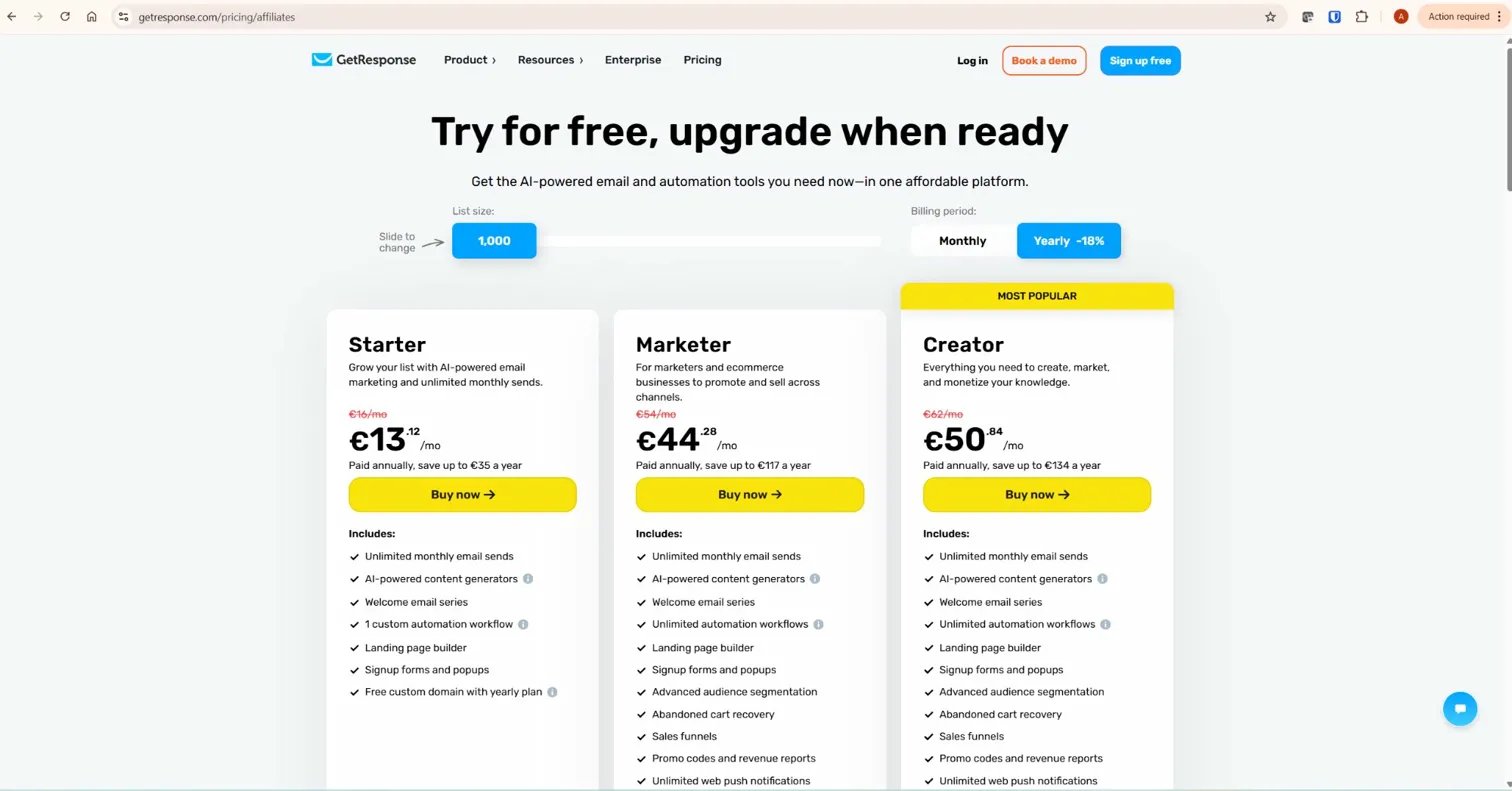
GetResponse Entry-Level Plans
- Free plan: 500 contacts, 2,500 emails/month, basic workflows, 14-day premium trial included
- Starter: From $19/month (annual billing, 1,000 contacts) — unlimited emails, landing pages, 1 automation workflow
- Marketer: From $59/month (annual billing, 1,000 contacts) — unlimited workflows, advanced segmentation
- Creator: From $69/month (annual billing, 1,000 contacts) — webinars, course creation, paid newsletters
AWeber Entry-Level Plans
- Free plan: 500 subscribers, 3,000 emails/month, basic autoresponders, AWeber branding on emails
- Lite: From $12.49/month (annual billing, 500 subscribers) — limited to 3 automations, 3 landing pages, AWeber branding still present on Lite
- Plus: From $19.99/month (annual billing, 500 subscribers) — unlimited automations and landing pages, branding removed, priority 24/7 support
The Billing Model Difference
One billing behaviour worth knowing: AWeber automatically upgrades your plan tier when you exceed subscriber limits, but plan downgrades require contacting their support team — they do not happen automatically. Both platforms bill based on subscriber count, so verify exactly how each handles your specific list management situation before committing. Check current billing policies directly at aweber.com and getresponse.com.
For a full breakdown of GetResponse’s plans, see our GetResponse pricing guide.
GetResponse vs AWeber Automation: Where the Platforms Diverge Most
This is the most consequential difference in the getresponse vs aweber comparison — and where the two platforms diverge most clearly. Automation is the mechanism that delivers lead magnets, runs welcome sequences, and moves subscribers through nurture flows without manual work.

GetResponse Automation
GetResponse’s visual workflow builder supports multi-branch conditional sequences on the Marketer plan. Triggers include email opens, link clicks, page visits, tag assignments, form submissions, and ecommerce events. You can route different subscribers into different sequences based on specific behaviour — a subscriber who clicks a pricing link enters one path, one who does not enters another. Over 50 pre-built templates cover common affiliate marketing flows including lead magnet delivery, welcome sequences, and re-engagement campaigns. For the full setup process, see our GetResponse automation guide.
AWeber Automation
AWeber’s Campaigns feature — available in full on the Plus plan — handles tag-based triggers, time delays, and basic conditional branching. For a new affiliate marketer running a single welcome sequence and lead magnet delivery, AWeber’s automation is adequate. The interface is simpler and faster to configure than GetResponse’s for straightforward flows.
AWeber’s automation becomes limiting when sequences need to branch based on multiple simultaneous conditions or respond to complex behavioural signals. The builder has not received the same level of development investment as GetResponse’s in recent years. For a site at the beginning, this rarely matters. For a growing site running multiple simultaneous sequences across different topic clusters, it becomes a practical constraint.
Verdict: AWeber handles basic automation adequately and is easier to configure. GetResponse handles conditional automation at a depth AWeber’s current builder does not match. Choose based on the complexity your affiliate strategy actually requires.
Landing Pages
When comparing getresponse vs aweber on landing pages, both platforms include a builder. AWeber includes landing pages on all plans — unlimited on Plus, limited to three on Lite. GetResponse includes unlimited landing pages with A/B testing on paid plans and an AI-powered builder option. GetResponse’s integration between landing page sign-ups and automation workflows is native — a subscriber who opts in enters your chosen sequence immediately without third-party connections. AWeber achieves the same outcome but with more manual configuration required.

For a complete walkthrough of GetResponse’s landing page builder including the subscription settings that most tutorials skip, see our GetResponse landing page guide.
Where AWeber Wins the GetResponse vs AWeber Comparison
Three categories where AWeber genuinely leads in the getresponse vs aweber matchup — stated without qualification.
Email Templates
AWeber offers 700+ email templates across a wide range of industries and campaign types. GetResponse offers around 200. For affiliate marketers who rely on visually designed newsletters and need variety in their email aesthetic, AWeber’s template library is a meaningful advantage. This is the one category where AWeber wins outright.
Ease of Use for Beginners
AWeber’s interface is simpler and faster to navigate for someone new to email marketing. Email creation, list management, and basic automation are accessible without learning a complex feature hierarchy. Independent user reviews consistently cite AWeber as the more beginner-friendly of the two platforms. For a complete beginner whose primary goal is getting their first campaign live quickly, AWeber reduces friction more than GetResponse does.
Customer Support
AWeber offers 24/7 live chat, email support, and phone support on all paid plans — confirmed on their pricing page. Phone support availability at entry-level pricing is unusual in this market and a real advantage for users who prefer voice communication. GetResponse offers 24/7 live chat and email support on all plans, with phone reserved for enterprise tiers. Both are responsive — AWeber simply offers more support channels at lower plan tiers.
Webinars
AWeber has no webinar functionality at any plan level — confirmed on their feature pages. GetResponse includes built-in webinar hosting on the Creator plan: registration pages, automated email reminders, screen sharing, polls, Q&A, and on-demand replay, with separate follow-up sequences for live attendees, replay viewers, and no-shows.
For affiliate marketers who run webinar funnels, this eliminates the cost of a separate webinar tool. For affiliate marketers who do not run webinars, it is a non-factor in the decision.
Deliverability
AWeber has a longstanding reputation for strong inbox placement, consistently cited as one of its core strengths. According to EmailToolTester’s deliverability assessments, both platforms perform above the industry average. Neither has a decisive, independently verified advantage over the other for senders following standard best practices — double opt-in, DKIM authentication, and regular list hygiene. Do not let deliverability claims from either platform’s marketing drive this decision.
AWeber and Affiliate Marketing
AWeber supports affiliate marketing on permission-based lists and has historically served the affiliate marketing community. The platform does not have the aggressive compliance enforcement history that some other platforms in this space have documented. For a content-led affiliate site sending substantive emails to an opt-in list, AWeber is a viable platform from a policy standpoint.
The practical concerns for growing affiliate sites are not policy-related. They are structural: AWeber’s automation depth does not scale as well as GetResponse’s, webinars require a separate tool, and the billing model requires active management to avoid paying for inactive contacts. None of these are disqualifying at the start. They become relevant as the site grows.
GetResponse vs AWeber: Head-to-Head Summary
| Category | GetResponse | AWeber | Verdict |
|---|---|---|---|
| Entry pricing (500 contacts) | Free plan available; Starter from $19/month | Free plan available; Lite from $12.49/month | AWeber cheaper at entry level |
| Automation depth | Multi-branch conditional workflows, 50+ templates | Linear sequences and basic tag-based branching | GetResponse for complex flows |
| Landing pages | 200+ templates, AI builder, native automation link | Unlimited on Plus, 3 on Lite, no AI builder | GetResponse on capability |
| Webinars | Built-in on Creator plan | Not available on any plan | GetResponse |
| Email templates | ~200 templates | 700+ templates | AWeber |
| Ease of use | More features, steeper initial learning curve | Simpler interface, faster to start | AWeber for beginners |
| Customer support | 24/7 live chat and email on all plans | 24/7 live chat, email, and phone on all plans | AWeber on channel breadth |
| Deliverability | Above industry average | Above industry average, strong track record | Tied |
Real Use Case: Which Platform Fits Your Stage?
Most getresponse vs aweber comparison articles give you a single verdict. The honest answer is that the right platform depends on where your affiliate site actually is right now — not where you hope it will be.
Stage 1: Starting Out (0–1,000 Subscribers)
AWeber is the better starting point. It is cheaper at entry level (Lite from $12.49/month vs GetResponse Starter from $19/month), simpler to configure, and phone support is available from day one. If your only need right now is a welcome sequence and a weekly newsletter, AWeber covers that without paying for features you will not use for months. Start here, migrate later if your strategy requires it — GetResponse accepts CSV imports without requiring re-confirmation.
Stage 2: Growing (1,000–10,000 Subscribers)
This is where the decision becomes more nuanced. If your automation needs are still simple — one or two sequences, basic tagging — AWeber remains viable and may still be cheaper at your specific subscriber count. If you are running multiple simultaneous sequences, segmenting by topic cluster, or planning your first webinar funnel, GetResponse’s Marketer plan starts paying for itself through the capability it provides. Check current pricing on both platforms at your actual subscriber count before deciding.
Stage 3: Scaling (10,000+ Subscribers)
At scale, GetResponse is the stronger operational choice. The pricing advantage at higher contact counts (verify at getresponse.com/pricing for current figures), unlimited automation workflows, built-in webinars, and conversion funnels all become more valuable as the site generates more revenue. The cost of maintaining a separate webinar tool, managing AWeber’s manual tier downgrade process, and working around automation depth limitations adds up in both time and money.
Who Should Choose GetResponse in This Comparison
- Affiliate marketers who need conditional automation workflows that respond to subscriber behaviour
- Content site owners who want email, landing pages, webinars, and funnels under one subscription
- Marketers planning to run webinar funnels without paying for a separate tool
- Anyone who wants a billing model where inactive subscribers do not require manual intervention to avoid overcharging
Who Should Choose AWeber
- Complete beginners who want the fastest possible setup with the minimum learning curve
- Affiliate marketers whose strategy is simple newsletters and basic autoresponder sequences
- Users who value phone support at every plan tier from day one
- Marketers who need the widest possible email template variety
What To Do Next
Both platforms offer genuine free access — test both before committing. GetResponse’s 30-day premium trial gives full access to the automation builder, landing page tool, and webinar features. AWeber’s free plan lets you run actual campaigns to a real list. The right decision comes from testing the interface you will use daily, not from a comparison article. Build your evaluation around the platform you need in two years — not just the one that is easiest to start with this week.
→ Start your GetResponse trial — 30 days of full access, no credit card needed
GetResponse vs AWeber: Final Verdict
For affiliate content site owners evaluating getresponse vs aweber, the verdict favours GetResponse — especially for those building toward webinar funnels, segmented automation, and a platform that scales without adding third-party costs. For that reason, GetResponse is the stronger long-term choice. It costs more at entry level and requires more setup time upfront — both of which are real trade-offs worth acknowledging.
AWeber is a reliable platform — and in the getresponse vs aweber debate its genuine strengths include excellent customer service, a strong deliverability record, and a larger template library. For a beginner with a simple email strategy and no plans to run webinars or complex funnels, AWeber is a legitimate choice. The question is whether beginner-friendliness and phone support at entry level outweigh the automation depth and all-in-one value GetResponse offers as the site grows.
For more context on what GetResponse offers, read our complete GetResponse review and our GetResponse pricing guide. For comparisons with other platforms, see our GetResponse vs MailerLite, GetResponse vs ConvertKit, and GetResponse vs Brevo articles.
Frequently Asked Questions
Is GetResponse better than AWeber for affiliate marketing?
For affiliate marketers who need conditional automation, webinar funnels, and a platform that scales, GetResponse is the stronger choice. AWeber is better for complete beginners who want simplicity and phone support at every plan tier. Both support affiliate marketing on permission-based lists — the decision is about capability and fit, not policy.
Which is cheaper — GetResponse or AWeber?
AWeber’s Lite plan starts from $12.49/month (500 subscribers, annual billing) — cheaper than GetResponse’s Starter at $19/month. AWeber’s Plus plan starts from $19.99/month at the same subscriber count. Pricing at higher contact tiers changes on both platforms regularly. Always verify current pricing at getresponse.com/pricing and aweber.com/pricing before deciding — both platforms adjust rates periodically and the figures in any comparison article may be out of date.
Does AWeber have webinars?
No. AWeber has no webinar functionality at any plan level. GetResponse includes built-in webinar hosting on the Creator plan. If webinars are part of your affiliate strategy, GetResponse eliminates the need for a separate webinar tool — which typically adds $59–$149/month to your platform costs.
Can I switch from AWeber to GetResponse?
Yes. Export your subscriber list from AWeber as a CSV and import it into GetResponse — GetResponse does not require subscribers to re-confirm their opt-in, so your full list transfers intact. Email templates need to be rebuilt in GetResponse’s editor and automation sequences need to be recreated in the workflow builder. Most users complete a migration within a week. See our GetResponse email funnel guide for how to rebuild your sequences after migrating.
Is AWeber good for beginners?
AWeber is one of the most beginner-friendly email marketing platforms available. The interface is minimal, setup is fast, and phone support is available from day one on paid plans. For someone building their first email list with a straightforward newsletter strategy, AWeber reduces friction more than GetResponse does. The trade-off is automation depth and feature breadth as the affiliate site grows. That said, if your email strategy remains simple — newsletters, a welcome sequence, basic follow-ups — AWeber can remain a sufficient long-term platform.
What is the difference between GetResponse and AWeber?
Both are email marketing platforms founded in 1998 with strong deliverability and autoresponder capabilities. GetResponse has expanded into an all-in-one platform covering automation, landing pages, webinars, conversion funnels, and course creation. AWeber has maintained focus on core email marketing with a simpler interface, more email templates (700+), and phone support at all plan tiers. Both platforms bill based on subscriber count — verify current billing policies directly with each platform.
Related Articles
- GetResponse Review 2026: The Honest Verdict for Affiliate Marketers
- GetResponse Pricing in 2026: Plans, Features & What You Actually Pay For
- GetResponse vs Mailchimp: Which Email Marketing Platform Is Better?
- GetResponse vs MailerLite: Honest 2026 Verdict for Affiliates
- GetResponse vs ConvertKit: Honest 2026 Verdict for Affiliates
- GetResponse vs Brevo: Honest 2026 Comparison for Affiliates
Pricing figures are based on publicly available information as of May 2026. Both platforms update pricing regularly — always verify current rates directly at getresponse.com and aweber.com before making a purchase decision. This article is written from direct experience using GetResponse for InnovateHub Finance and independent research on AWeber.
