
GetResponse Review 2026: Is It Worth It for Affiliate Marketers?
Affiliate Disclosure: This article contains affiliate links. If you purchase through these links, I may earn a commission at no extra cost to you. I only recommend tools I have personally used and genuinely believe in. Read my full disclosure policy.
Choosing an email marketing platform is one of the more consequential decisions you will make when building an online business. Get it right and your list becomes a compounding asset. Get it wrong and you spend months migrating contacts, rebuilding automations, and wondering why your open rates keep sliding. I have been using GetResponse to manage the InnovateHub Finance email list, and after three decades working in finance — where the quality of tools you use directly affects results — I have a clear sense of what separates a solid platform from a genuinely useful one.
This GetResponse review covers what the platform actually does well, where it falls short, who it suits, and whether the pricing makes sense for affiliate marketers and content site owners specifically. I am not going to tell you it is perfect. No platform is. But I will give you the honest picture so you can make the right call for your business.
→ Try GetResponse free for 30 days — no credit card required
What Is GetResponse?
GetResponse is a Polish-founded email marketing and marketing automation platform that has been operating since 1998. It now serves over 350,000 customers across 183 countries and has expanded well beyond its newsletter roots into a broader suite of tools covering automation workflows, landing pages, webinars, AI-generated content, and online course creation.
The pitch is an all-in-one marketing platform: one subscription, one dashboard, fewer integrations to manage. Whether that pitch holds up depends heavily on which plan you are on and what you are actually trying to accomplish — and that is exactly what this GetResponse review works through.
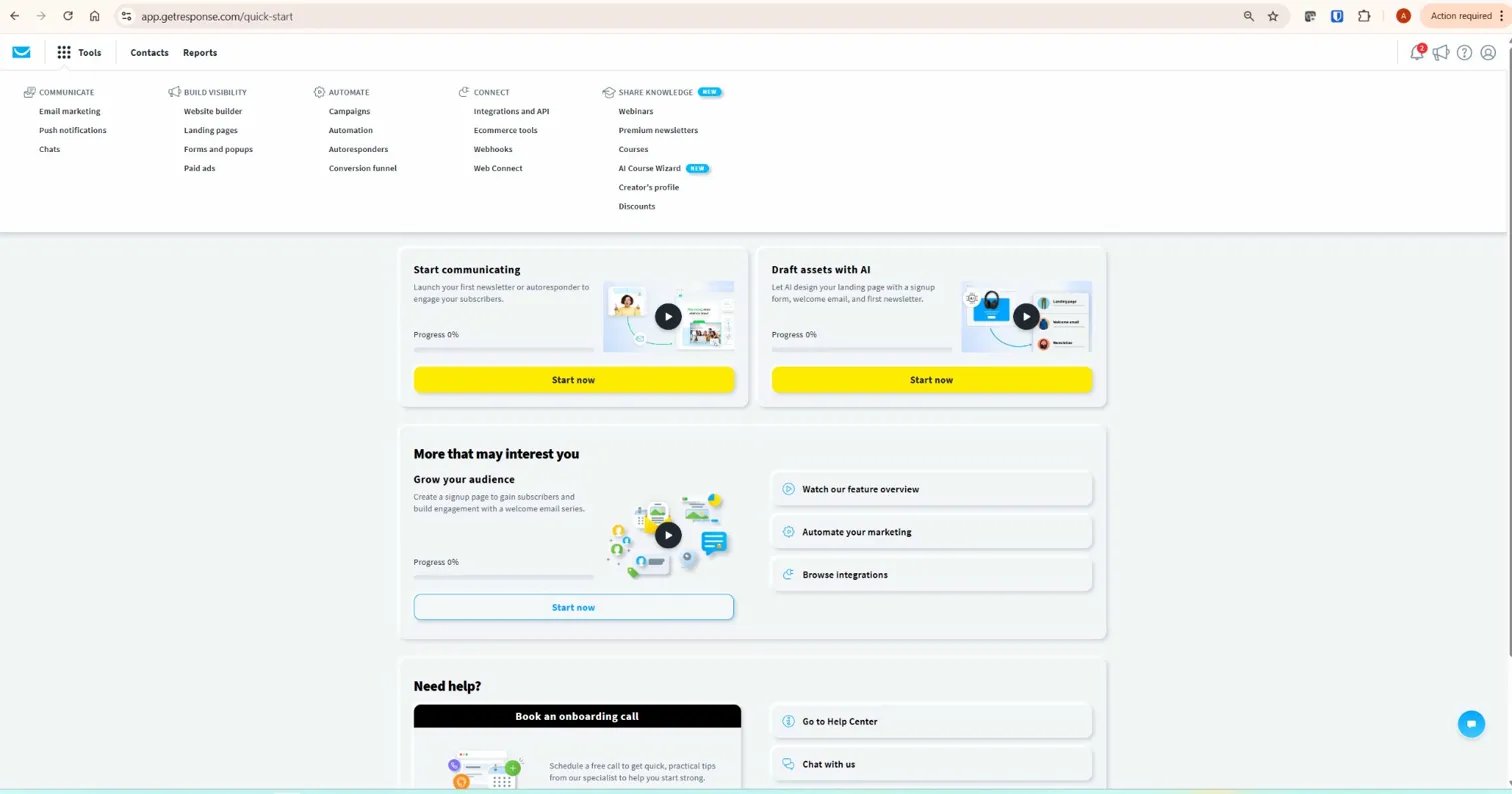
Before getting into the detail, here is a quick look at what the platform actually looks like when you log in. The navigation covers everything from email marketing and landing pages through to automation, webinars, ecommerce tools, and AI-powered course creation — all from a single dashboard.
GetResponse Plans and Pricing (2026)
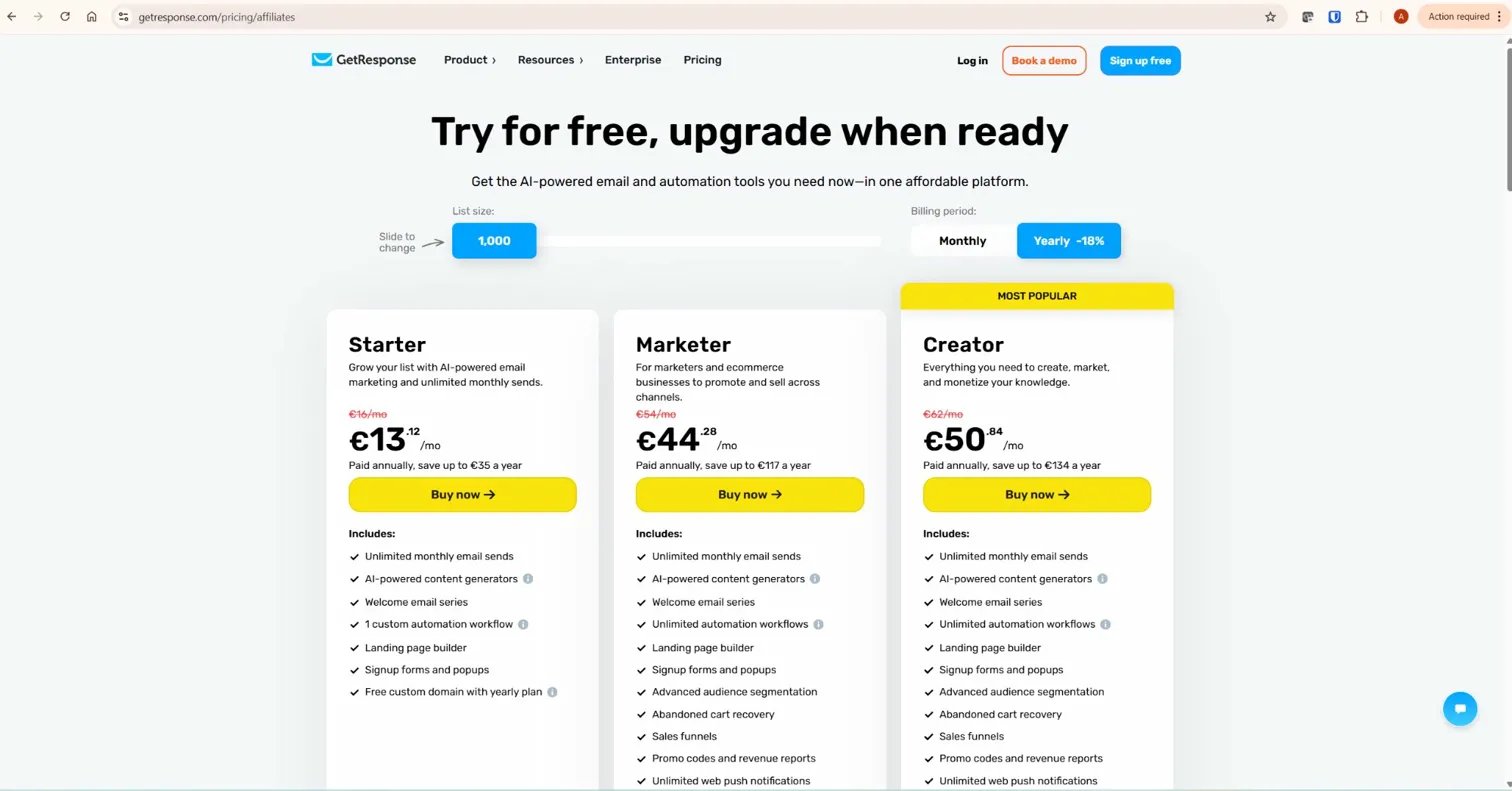
GetResponse pricing is based on two variables: the plan tier you choose and the size of your contact list. Both drive cost up as your business grows, which is important to understand before you commit.
The screenshot below shows the current plan structure for 1,000 contacts on annual billing. Prices are displayed in EUR — your local currency may differ. Annual billing saves 18% compared to monthly. Always verify current pricing directly on the GetResponse pricing page before purchasing, as plans and rates are updated regularly.
Free Plan
GetResponse offers a permanent free tier capped at 500 contacts. You can send unlimited newsletters, access the drag-and-drop email editor, and build landing pages — though page visits are capped at 1,000 per month. Emails carry the GetResponse badge, which is removed when you upgrade. Automation is essentially non-functional on the free plan — no autoresponders, no triggered workflows beyond very basic conditions.
The free plan is genuinely useful for testing the interface. As a long-term solution, it is too restricted to build anything meaningful with.
Starter Plan
The entry-level paid plan removes sending limits, includes unlimited landing pages, autoresponders, and a website builder. AI content tools are available but capped at three uses. Critically, you are limited to a single automation workflow. This is a significant restriction — if you plan to run any meaningful email sequences, one workflow is not enough. The Starter plan suits someone building their first list and sending basic newsletters. It is not suitable for affiliate marketers who need segmented sequences, conditional logic, or behaviour-triggered follow-ups.
Marketer Plan
This is where GetResponse becomes a genuinely capable tool. The Marketer plan unlocks unlimited marketing automation workflows, abandoned cart tools, revenue tracking, advanced segmentation, and unlimited web push notifications. Up to five users can collaborate on the account. For affiliate marketers who need automated sequences that respond to subscriber behaviour — link clicks, page visits, engagement patterns — this is the minimum viable plan. The pricing jump between Starter and Marketer is steep, but the functionality difference is substantial.
Creator Plan
The Creator plan adds webinar hosting for up to 100 attendees, online course creation and monetization, paid newsletters, and the full ecommerce toolkit including abandoned cart recovery and product recommendations. It also includes everything from the Marketer plan. If you run a content-heavy business, host webinars, or sell digital products directly through GetResponse, this plan earns its cost. For pure affiliate email marketing, it is likely more than you need.
MAX (Enterprise) Plan
The enterprise tier targets businesses with complex needs: dedicated IP addresses, SMS marketing, advanced security, a dedicated Customer Experience Manager, and priority support. Custom pricing starts at the higher end of the market. This is not a plan most affiliate content site owners will need, but worth knowing about if your list scales significantly.
One pricing behaviour worth flagging: if your contact list crosses a tier threshold — say from 1,000 to 1,001 contacts — you are automatically moved to the next pricing tier for that month without any warning. Keep list hygiene tight and remove inactive subscribers regularly to avoid unexpected cost increases.
Core Features: What GetResponse Actually Does
Email Marketing and the Editor
The email builder is drag-and-drop and does what you would expect from a mature platform. You can start from one of over 150 responsive templates or build from scratch. When you create a new newsletter, GetResponse gives you a clear choice: build it yourself using the drag-and-drop editor, or use the AI email generator to answer a few questions and have the platform draft something for you.

The editor produces clean, deliverable emails without needing to touch code. Template quality is functional rather than design-forward — if aesthetics matter for your brand, you will probably build custom templates rather than rely on the defaults. Autoresponders — time-based email sequences — are available from the Starter plan upward and cover the standard affiliate use case of delivering a lead magnet followed by a nurture sequence.
Marketing Automation Workflows
This is where GetResponse genuinely earns its keep for serious affiliate marketers. The visual workflow builder lets you create multi-step sequences triggered by subscriber behaviour: link clicks, email opens, page visits, tag assignments, form submissions, and more. You can branch workflows conditionally — if a subscriber clicks a specific link, they enter one sequence; if they do not, they enter another.
The screenshot below shows the automation canvas from my own live workflow on InnovateHub Finance — a lead magnet delivery sequence built directly inside GetResponse. The right-hand panel shows the full range of conditions and actions available, from basic email triggers through to ecommerce events, course enrolments, and scoring rules.
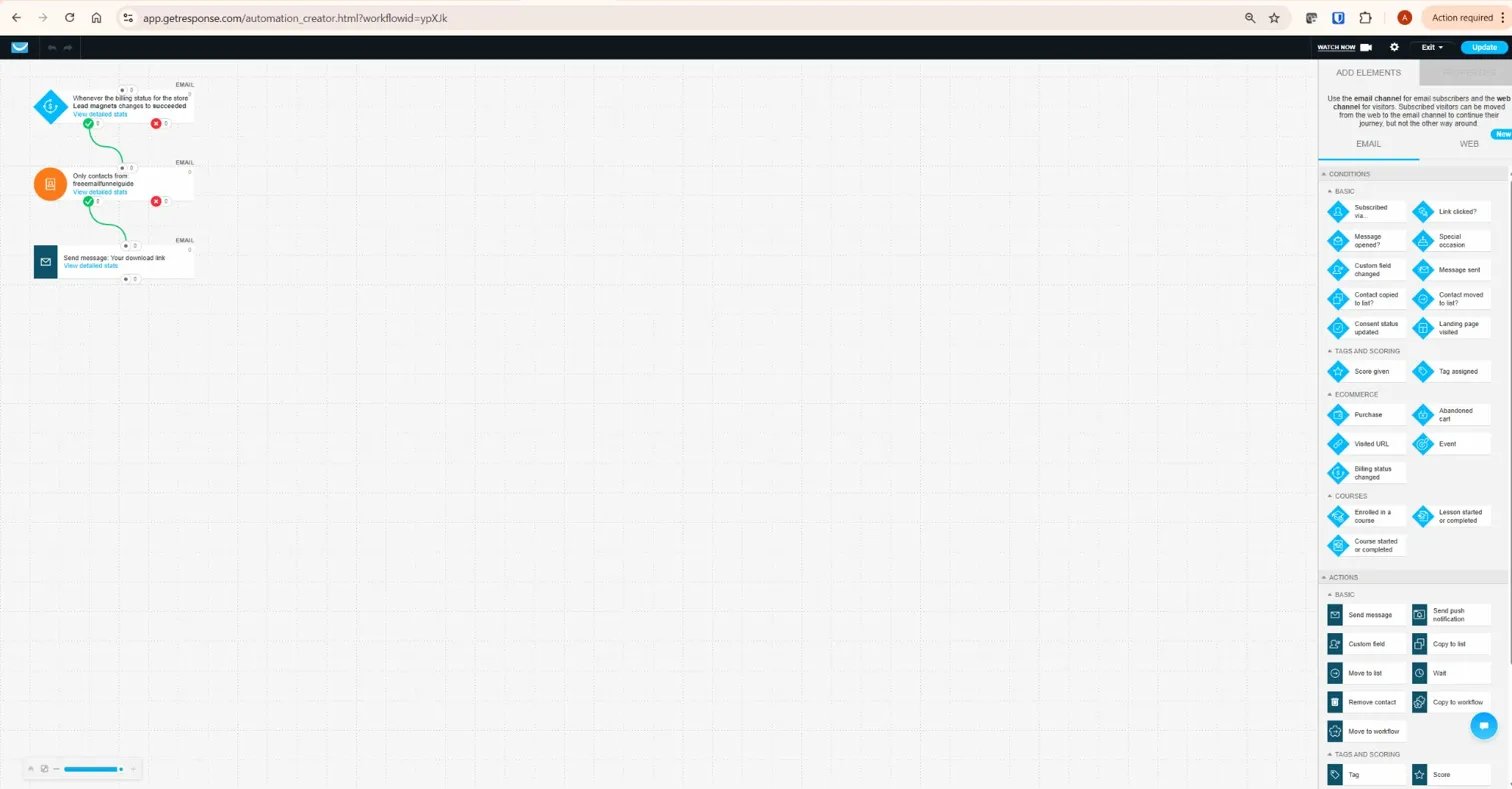
The builder includes over 50 pre-built workflow templates covering welcome sequences, post-purchase follow-ups, re-engagement campaigns, and lead nurturing funnels. For an affiliate site owner managing multiple content clusters and product recommendations, the automation builder is the feature that justifies the price difference between Starter and Marketer.
Compared to ActiveCampaign — which is the benchmark for automation depth in this segment — GetResponse’s conditions and triggers are somewhat less granular. You get 15+ condition types and multiple trigger options, which is more than enough for most affiliate marketing use cases. If you are building highly complex lifecycle sequences with fine-grained lead scoring, ActiveCampaign has an edge. For the majority of content site owners, GetResponse’s automation is more than sufficient.
Landing Pages
GetResponse includes a landing page builder across all paid plans, with unlimited pages on Marketer and Creator tiers. When creating a new landing page, the platform gives you the same dual-path choice as the email editor: use a ready-made template with the drag-and-drop editor, or use the AI-powered builder to generate a page from a brief description.

For an affiliate marketer building lead magnet capture pages or product review landing pages, this removes the need for a separate tool like Leadpages or Unbounce. The integration between landing page sign-ups and automation triggers is seamless — a subscriber lands on a page, submits the form, and immediately enters whatever welcome sequence you have configured. That tight loop is where the all-in-one model genuinely saves time.
Webinar Hosting
GetResponse’s built-in webinar functionality is one of its genuine differentiators. The Creator plan supports up to 100 attendees, with registration pages, automated email reminders, screen sharing, polls, and Q&A built in. You can run live webinars or record sessions and deliver them on-demand. This is a feature most competing platforms either do not include at all or charge significantly extra for.
For affiliate marketers who want to add a webinar funnel — teaching something valuable and then recommending a product — this is a meaningful advantage. The webinar-to-email integration is clean: attendees automatically enter follow-up sequences based on whether they attended live, watched the replay, or registered but did not show up.
AI Tools
GetResponse has added AI-generated email subject lines, body content suggestions, and an AI course creator. The content generation tools are accessible but limited on lower plans — the Starter plan caps AI uses at three per month, which is essentially a demonstration rather than a functional feature. On Marketer and above, AI tools are unrestricted.
In practice, I use these as a starting point rather than a finished product. AI-generated email copy tends toward the generic, and for a finance or marketing authority site, your voice matters more than speed. The AI subject line suggestions are more immediately useful — a quick way to test variations without manual brainstorming.
List Management and Segmentation
GetResponse allows segmentation by demographics, engagement history, tags, custom fields, and purchase behaviour. On the Marketer plan and above, you can create dynamic segments that update automatically as subscriber data changes. For an affiliate site covering multiple topics — crypto tax, trading tools, email marketing — the ability to tag subscribers based on which lead magnet they downloaded and which links they clicked means you can send targeted recommendations rather than blasting your entire list with every email.
The segmentation is capable without being exceptional. Independent user reviews note a limit of seven filters per segment on some plan tiers. For most affiliate marketing use cases, this is not a binding constraint.
Conversion Funnels
GetResponse includes a Conversion Funnel builder — pre-built funnel templates that combine landing pages, email sequences, and optionally sales pages with payment processing. These cover lead magnet funnels, product launch sequences, and webinar funnels. For an affiliate marketer who wants to build a complete opt-in-to-follow-up funnel without stitching together separate tools, the builder simplifies the process substantially.
Deliverability: The Honest Picture
Deliverability is the metric that matters most in email marketing, and it is the one that review sites most consistently gloss over. GetResponse claims a 99% deliverability rate on its marketing pages — a figure derived from its own infrastructure monitoring rather than independent inbox placement testing.
Independent testing tells a more nuanced story. EmailToolTester’s inbox placement tests measured GetResponse at around 85% inbox placement, with a meaningful portion of emails landing in junk folders. That places GetResponse in the “good” range by industry benchmarks — anything above 80% is considered acceptable, and anything above 95% is excellent — but it is not a class-leading result. ActiveCampaign and MailerLite both perform better on independent tests.
What this means practically: GetResponse’s deliverability is adequate for most affiliate marketing use cases, but it is not the platform you choose if deliverability is your primary selection criterion. The tools to improve your own deliverability are there — spam testing, DKIM authentication, double opt-in, list hygiene management — and your individual sender reputation will matter more than the platform’s aggregate score.
GetResponse for Affiliate Marketers: Specific Use Cases
Most GetResponse reviews are written for generic small business owners. The affiliate marketer use case has some specific requirements worth addressing directly.
Lead Magnet Delivery
GetResponse handles this cleanly. A subscriber downloads your lead magnet, enters a form connected to a list, triggers an automation workflow that delivers the asset via email, and enters a nurture sequence. The entire flow can be configured in under an hour. The landing page builder, form integration, and automation triggers all work together without requiring third-party glue. This is the core use case I have built on InnovateHub Finance, and it functions exactly as described.
Multi-Cluster Email Segmentation
If your site covers multiple topics — as InnovateHub Finance does, spanning crypto tax, trading tools, SEO, and email marketing — you will want to segment subscribers based on their interests and send relevant follow-ups rather than blasting everyone with everything. GetResponse’s tagging system and conditional automation workflows handle this well on the Marketer plan. A subscriber who downloads a crypto tax guide gets tagged accordingly and enters a Koinly-focused sequence; a subscriber who opts in via a TradingView lead magnet gets a different track. This kind of segmentation is essential for maintaining deliverability as your list grows.
Affiliate Link Policies
This is a point most GetResponse reviews skip over entirely, but it matters. GetResponse’s terms of service prohibit sending bulk email that is solely promotional without any substantive content — standard industry policy. For content-led affiliate marketers who send genuinely useful emails to subscribers who opted in willingly, this is not a concern. Build your list ethically, provide value in every email, and maintain low complaint rates. GetResponse is a strong choice for that model.
GetResponse vs Key Competitors
GetResponse vs Mailchimp
Mailchimp has better brand recognition and a more polished template library. However, Mailchimp’s automation becomes expensive quickly as your list grows, and its mid-tier pricing is less competitive than GetResponse’s. For advanced automation workflows, webinar hosting, and conversion funnels, GetResponse offers substantially more at comparable price points. Mailchimp suits someone who wants simplicity and familiar branding. GetResponse suits someone building a structured marketing system with sequences, segmentation, and lead generation infrastructure.
Read more in our detailed GetResponse vs Mailchimp comparison.
GetResponse vs ActiveCampaign
ActiveCampaign is the stronger automation platform. Its CRM integration, lead scoring, and conditional logic are more granular than GetResponse’s, and it performs better on independent deliverability tests. The trade-off is cost — ActiveCampaign is more expensive at equivalent list sizes — and feature breadth. GetResponse includes landing pages, webinars, and course creation where ActiveCampaign charges separately or does not offer them. If automation depth and deliverability are your priorities, ActiveCampaign has a technical edge. If you want more features per euro and value the all-in-one model, GetResponse wins on value.
GetResponse vs Brevo
Brevo prices based on emails sent rather than contacts stored, which makes it significantly more cost-effective for marketers with large lists who send infrequently. GetResponse is the better choice if you have a smaller, engaged list and send frequently. For affiliate marketers who send weekly or bi-weekly emails to a growing but not enormous list, GetResponse’s per-contact pricing model is predictable and manageable.
Genuine Limitations Worth Knowing
No review that glosses over the weaknesses is worth reading. Here are the genuine limitations of GetResponse I would want to know before signing up:
- Deliverability is good, not exceptional. Independent testing puts inbox placement in the mid-to-high 80s. Not a dealbreaker, but below the best-in-class performers.
- The Starter plan’s single automation workflow is restrictive. Any affiliate marketer building a multi-topic site needs the Marketer plan from day one.
- Pricing scales steeply with list size. Once your list crosses 10,000 contacts, monthly costs increase significantly across all plans. Budget for this in advance.
- The UI has not kept pace with competitors. The dashboard is functional but shows its age compared to newer platforms like MailerLite.
- A/B testing is less robust than competitors. Basic subject line and content testing is available, but multivariate testing capabilities are limited compared to ActiveCampaign.
- Phone support is restricted to MAX plans. Email and live chat support are available on all paid plans and are generally responsive.
- Webinar attendee caps are tight on entry plans. The Creator plan supports 100 attendees. Beyond that, you are looking at add-ons or plan upgrades.
What GetResponse Does Well
- All-in-one coherence. Landing pages, automation, webinars, and email all live in one dashboard and connect without friction.
- Visual automation builder. The workflow canvas is one of the better visual builders in this price range. Building conditional sequences is straightforward once you understand the logic.
- Webinar integration at no extra cost. On the Creator plan, hosting webinars with automated follow-up sequences built in is a genuine differentiator.
- Conversion funnels. Pre-built funnel templates reduce the time from idea to live campaign significantly.
- 24/7 live chat support. Included from the Starter plan upward. Support quality on GetResponse is generally praised in user reviews — fast, knowledgeable, and available around the clock.
- Recurring affiliate commissions. GetResponse pays recurring commissions for referred customers, which is one of the more generous structures in the email marketing space.
Who GetResponse Is Best For
GetResponse is a strong fit for:
- Affiliate marketers and content site owners who want email marketing, landing pages, and automation in a single subscription
- Bloggers and course creators building a lead magnet infrastructure from scratch
- Marketers who want webinar capability without paying for a separate platform
- Businesses with lists under 10,000 contacts where the per-contact pricing remains manageable
- Anyone who values workflow automation and needs conditional email sequences based on subscriber behaviour
GetResponse is not the right fit for:
- Marketers who need class-leading deliverability and are willing to pay for ActiveCampaign to get it
- High-volume senders with very large lists who would be better served by Brevo’s email-volume pricing model
- Businesses needing deep CRM functionality — GetResponse has CRM-adjacent features but is not a CRM replacement
- Anyone who needs extremely granular A/B testing across multiple variables
- Very simple use cases where a lower-cost tool like MailerLite would cover everything at lower cost
Verdict: Is This GetResponse Review Positive Overall?
GetResponse is a mature, capable platform that earns its place in the affiliate marketing toolkit — with one important caveat about the plan you choose.
On the Starter plan, it is genuinely useful for building a list and running basic newsletters, but the single-workflow limitation means you are paying for a capability you cannot fully use. For any affiliate marketer building segmented sequences and lead magnet funnels, the Marketer plan is the realistic starting point. That is not cheap — but compared to paying separately for an email platform, a landing page builder, and a webinar tool, the consolidated cost often makes financial sense.
After 30 years in finance, I have seen enough tools that promise simplicity and deliver complexity to appreciate when a platform actually reduces operational friction. GetResponse does that. The automation builder works. The landing page integration is clean. The support is available when you need it. The deliverability is solid without being exceptional.
If you are building an email marketing infrastructure for an affiliate content business and want one platform to handle the core workflow, this GetResponse review lands with a clear recommendation: it is worth serious consideration. Start with the free trial, map your actual automation needs before choosing a plan, and factor list growth into your cost projections from day one.
→ Start your free 30-day GetResponse trial — no credit card needed
Frequently Asked Questions
Does GetResponse have a free plan?
Yes. GetResponse offers a permanent free plan for up to 500 contacts with basic email marketing and limited landing page access. New accounts also get a trial of premium features during the initial period. The free plan is functional for testing the platform but too restricted for building any meaningful marketing infrastructure.
Can I use GetResponse for affiliate marketing?
Yes, with caveats. GetResponse supports affiliate marketing when the model is content-led — useful emails, opted-in subscribers, genuine value delivery. Like all reputable email platforms, its terms prohibit bulk unsolicited promotion. Affiliate marketers who build permission-based lists and send informative emails will find the platform well-suited to their needs.
What is GetResponse’s deliverability rate?
GetResponse reports a 99% deliverability rate based on its own infrastructure testing. Independent inbox placement tests from EmailToolTester measured around 85% inbox placement. This is in the “good” range by industry standards. Your actual deliverability will depend heavily on your own sending practices, list quality, and authentication setup.
Which GetResponse plan is best for an affiliate marketer?
The Marketer plan is the practical minimum for any affiliate marketer who needs segmented automation, conditional workflows, and unlimited landing pages. The Starter plan’s single-workflow limitation is too restrictive for building out a proper email marketing system. If you also want webinar capability, the Creator plan is worth the additional cost. Always verify current plan pricing directly with GetResponse before committing.
How does GetResponse compare to Mailchimp?
GetResponse offers more advanced automation, built-in webinar hosting, and conversion funnels that Mailchimp does not include. Mailchimp has more polished templates and stronger brand recognition. For affiliate marketers who need structural automation beyond basic newsletters, GetResponse is the stronger platform at comparable price points. See our full GetResponse vs Mailchimp comparison for a detailed breakdown.
Is GetResponse safe to use?
Yes. GetResponse is a company with over 25 years of operation serving more than 350,000 customers globally. It complies with GDPR, includes double opt-in functionality, DKIM authentication, and consent management tools. There is no credible evidence of significant data breaches or practices that would warrant concern for typical business users.
Related GetResponse Articles
- GetResponse Pricing in 2026: Plans, Features & What You Actually Pay For
- GetResponse vs Mailchimp: Which Email Marketing Platform Is Better?
- How to Build an Email Funnel with GetResponse (Step-by-Step Guide)
- How to Use GetResponse Automation for Affiliate Marketing (Advanced Guide)
- Is GetResponse Worth It? Honest Pros, Cons & Pricing Breakdown
This review reflects my direct experience using GetResponse for the InnovateHub Finance email list, combined with current platform research as of early 2026. Pricing and features are subject to change — always verify current details directly with GetResponse before making a purchase decision.