
How to Use Semrush Position Tracking: Complete Guide
This site earns revenue through affiliate partnerships with other platforms. This article does not currently contain affiliate links for Semrush. Any tool recommendations are based on independent evaluation.
How to use Semrush Position Tracking is not just about adding keywords to a dashboard. It is about building a repeatable SEO measurement system that tells you which pages are moving, which are stuck, and which content updates are most likely to produce ranking gains.
You have been publishing content consistently for months. Your articles are live, your internal linking is in place, and your keyword research was solid. But you have no idea whether any of it is actually working — because you are not tracking your rankings. That gap between publishing and knowing is exactly where most affiliate content sites stall, and Semrush Position Tracking is the tool that closes it.
Without rank tracking, SEO is guesswork dressed up as strategy. You cannot improve what you cannot measure, and you cannot prioritise content updates without knowing which pages are close to page one and which are stuck on page three. Position Tracking gives you that visibility — daily ranking data, competitor movement, and a clear picture of where your content strategy is working and where it is not.
After 30 years in finance, I approach SEO the same way I approach any performance measurement problem: establish a baseline, track movement against it, and make decisions based on data rather than assumptions. I run Position Tracking for InnovateHub Finance across four affiliate clusters — TradingView, Koinly, Semrush, and GetResponse — and the workflow in this guide is exactly what I use in practice, not a theoretical walkthrough.
By the end of this guide, you will have a fully configured Position Tracking campaign, a clear understanding of every metric that matters, and a practical workflow for turning ranking data into specific content improvements.
Quick Answer
To use Semrush Position Tracking: go to Projects, create a new project for your domain, select Position Tracking, configure your target country and device type, and add the keywords you want to monitor. Once live, the dashboard shows daily ranking updates, visibility percentage, average position, and ranking distribution across your keyword set. The most actionable view is the keyword list filtered by positions 8 to 20 — these are your quick win opportunities, where targeted content improvements can move rankings onto page one within four to eight weeks. Check the dashboard weekly rather than daily, and use ranking movement to decide which pages to update next.
If you are still deciding whether Semrush is worth adding to your SEO workflow, read our full Semrush review before setting up a paid campaign.
Who Should Use Semrush Position Tracking?
Semrush Position Tracking is most useful for site owners who already have published content and want to monitor whether specific keywords are moving up or down over time. For a new affiliate site, it becomes especially valuable once you have 20 to 50 published articles and want to identify which pages are close to page one. If your pages are not indexed yet, start with Google Search Console first. If your pages are indexed and ranking between positions 8 and 20, Position Tracking becomes a practical tool for prioritising updates.
What Semrush Position Tracking Shows You at a Glance
The four core dashboard metrics each answer a different question about your site’s ranking health. Here is what each one tells you and when to act on it.
| Metric | What It Measures | When to Act | Best For |
|---|---|---|---|
| Visibility % | Aggregate ranking health across all tracked keywords | Sustained 2-week decline | Algorithm update detection |
| Average Position | Mean ranking across tracked keyword set | 4-week downward trend | Overall strategy direction |
| Estimated Traffic | Projected clicks based on current positions | Use as directional only | Revenue potential modelling |
| Ranking Distribution | Keywords split by position band (1–3, 4–10, 11–20, 20+) | Weekly — positions 11–20 bucket | Quick win identification |
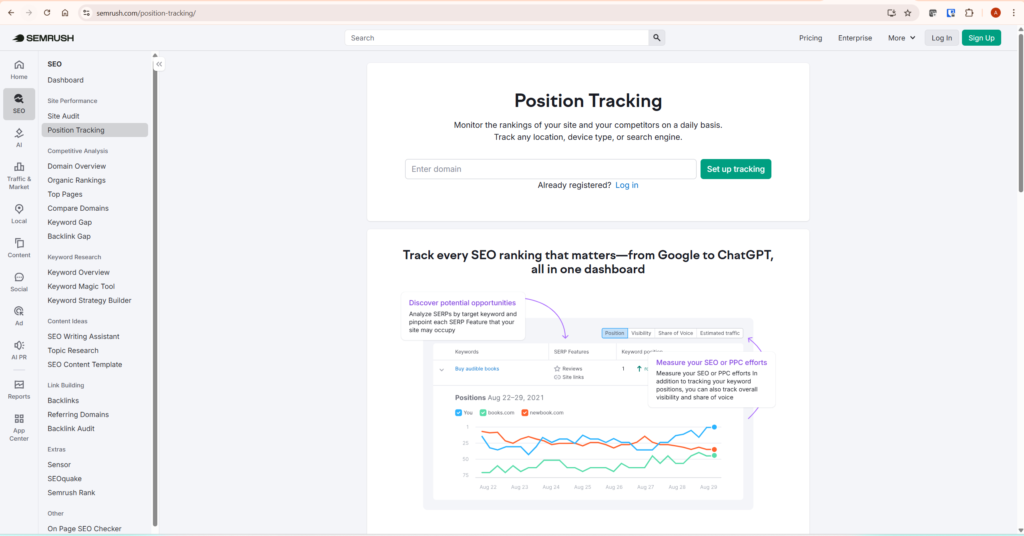
Why Affiliate Sites That Skip Rank Tracking Plateau Early
Publishing without rank tracking is the SEO equivalent of running a business without looking at your numbers — you might be doing well, you might be losing ground, and you genuinely cannot tell.
The specific problem for affiliate content sites is that ranking position directly determines revenue. A page ranking in position three drives meaningful traffic and commissions. The same page at position eleven drives almost nothing — click-through rates fall off sharply below position five, and below position ten they are negligible. Without Position Tracking, you do not know which of your affiliate pages are in that dead zone, how long they have been there, or whether they are moving in the right direction.
Position Tracking changes that picture entirely. Instead of publishing and hoping, you publish and measure. Instead of guessing which articles to improve, you identify exactly which ones are closest to a ranking breakthrough and focus your effort there first. That is the difference between a content strategy and a content plan.
Semrush Position Tracking vs Google Search Console
Google Search Console shows actual search performance for your own site — impressions, clicks, average position, indexing status, and query data. Semrush Position Tracking is different: it monitors selected keywords daily for a specific country, device, and competitor set. Use Search Console to understand what Google is already showing your site for. Use Position Tracking to monitor a focused keyword set, compare competitors, and identify ranking movement over time. For crawled-but-not-indexed pages, start with Search Console. For indexed pages ranking between positions 8 and 20, Position Tracking becomes highly actionable.
Step 1: Create Your Position Tracking Campaign
Creating a campaign takes under five minutes — but the configuration choices you make here directly affect the quality of your data, so get these right from the start.
Log into Semrush and go to Projects in the left navigation. If you do not yet have a project for your domain, click Create Project and enter your domain name. If a project already exists, open it and select Position Tracking from the project tools menu.
The setup screen asks for three configuration choices. First, target country — set this to the primary country your audience is in, not where you are based. Rankings vary significantly by country, and setting this incorrectly means tracking data that does not reflect your actual competitive situation. Second, device type — for many affiliate content sites, desktop traffic may convert better for research-heavy software comparisons — but check your own audience data in Google Analytics and Search Console before assuming this applies to your site. Third, search engine — leave this as Google for English-speaking markets.
Step 2: Add Your Target Keywords Strategically
Add the focus keyword for every published article, plus two or three high-value secondary keywords for your most important money pages — not every keyword you can think of. A cluttered dashboard with 500 keywords tells you nothing useful.
Start with 30 to 50 keywords total for a site under 50 articles. Prioritise these keyword types: commercial intent keywords on your review and comparison pages — these are your direct revenue drivers. Pillar article keywords — their ranking trajectory matters for the whole cluster. Quick win candidates — keywords already ranking between positions 8 and 20, where a focused improvement could push them onto page one.
If you have not yet done structured keyword research to build this list, our guide on Semrush keyword research covers the full workflow — including how to identify commercial intent keywords and build cluster architecture around pillar topics.
Step 3: Read the Four Dashboard Metrics Correctly
Each of the four core metrics answers a different question — use them for the right purpose or you will act on the wrong signals.
Visibility percentage is an aggregate score showing how visible your domain is across your entire tracked keyword set, weighted by search volume. Useful for spotting the impact of a Google algorithm update or a major content push, but too broad to guide specific page decisions.
Average position shows the mean ranking across all your tracked keywords. Use it to confirm whether your site is moving in the right direction over a four to eight week period. Do not react to single-week movements — average position fluctuates naturally and weekly noise is not a signal.
Estimated traffic projects the organic clicks you would receive based on your current ranking positions and search volumes. This is a model, not a measurement — treat it as directional rather than precise.
Ranking distribution is the most immediately actionable metric. It shows how many of your tracked keywords rank in the top three, positions four to ten, positions eleven to twenty, and beyond page two. The positions eleven to twenty bucket is your opportunity queue — check this weekly and prioritise updates on the pages containing these keywords.
Step 4: Add Competitors to See the Full Picture
Competitor tracking is one of the most underused features — and for affiliate sites, it is where some of the most actionable signals come from.
Add two or three competing affiliate sites in your niche to your campaign. Choose sites at a similar authority level to yours — not the major comparison portals, but the mid-tier affiliate sites targeting the same keywords you are. Once added, the dashboard shows their ranking positions for your tracked keywords alongside yours, updated daily.
When a competitor overtakes you on a keyword you were ranking for, you know immediately. Without competitor tracking, you find out weeks later when your traffic has already dropped. Pay particular attention to keywords where a competitor is ranking in positions three to five and you are in eight to twelve — that gap is closeable with focused content improvement.
Step 5: Use Tags to Organise Keywords by Cluster
Tags transform Position Tracking from a keyword list into a genuine strategic tool — letting you filter the dashboard by cluster, intent, or content type.
For an affiliate content site with multiple clusters, tag every keyword by its cluster so you can see the ranking performance of each cluster separately. This tells you immediately which cluster has the strongest momentum, which is stagnating, and where to focus your next content push. Add a second layer of tags for intent: commercial, informational, comparison.
My Actual Position Tracking Setup: InnovateHub Finance
Here is exactly how I have Position Tracking configured for InnovateHub Finance — because a concrete example is more useful than a generic description.
Campaign configuration: Target country set to United States, device set to desktop, Google only. One campaign per cluster rather than one giant campaign — this keeps each cluster’s data clean and makes it easier to spot cluster-level trends.
Keyword count: 42 articles published means 42 focus keywords tracked, plus a handful of high-value secondaries on the pillar articles. Total tracked: approximately 55 keywords. No padding with tangential terms — every keyword tracked corresponds to a published article or a directly monetised page.
Tags I use: Each keyword is tagged by cluster (Koinly, TradingView, Semrush, GetResponse) and by intent (commercial, informational, comparison). Filtering by commercial intent shows me at a glance which of my direct revenue pages are moving — that is the view I check first every week.
Competitors tracked: Two mid-tier affiliate sites in the fintech and crypto tax space — sites that are targeting many of the same keywords I am, at a comparable domain authority level. Not G2, not Investopedia — sites where the gap between their position and mine is actually closeable with content improvements.
A real quick win example: One older Koinly article had been crawled but not indexed, which showed that Google had discovered the page but was not yet confident enough to include it in the index. That page was not yet a Position Tracking opportunity — it had no stable ranking position to monitor. Instead, Search Console flagged it as an indexing-quality issue. After rewriting the article to improve search-intent coverage, structure, topical completeness, and internal linking, it gave Google stronger quality signals and became a better candidate for indexing. Once indexed, Position Tracking becomes useful for monitoring whether the page moves toward page one. That is the correct sequence: Search Console resolves indexing issues first, Position Tracking monitors ranking progress after.
This is exactly the workflow Position Tracking is built for: surfacing the pages closest to a breakthrough and giving you the signal to act on them before the opportunity passes.
Step 6: Run the Quick Win Workflow Weekly
The quick win workflow is the highest-ROI use of Position Tracking for an affiliate site — this is where rank data converts directly into revenue decisions.
Filter your keyword list to show only keywords ranking between positions 8 and 20. These pages are already indexed, already receiving ranking signal from Google, and are close enough to the top five that targeted improvements can produce measurable results within four to eight weeks. The effort-to-return ratio on improving these pages is significantly better than writing new content from scratch.
For each quick win keyword, open the page it is associated with and run through this checklist: Is the focus keyword in the first paragraph and at least one H2 heading? Is the content depth genuinely better than the pages currently ranking above it? Are there at least three contextual internal links from related articles pointing to this page? Is there a clear answer to the search query within the first 200 words?
Improving two or three quick win pages per month, consistently, compounds significantly over a year. Once you have identified which pages to improve, running a Semrush Site Audit on those specific pages will surface any technical issues that might be suppressing their rankings independently of content quality.
Step 7: Turn Ranking Signals Into Specific Content Actions
Rank tracking only earns its place in your workflow when it produces decisions, not just reports. Here is how to translate the four most common signals into specific actions.
Keyword rising from position 15 to 9 over four weeks. Positive momentum — reinforce it. Add two or three more contextual internal links from related articles, confirm the meta title clearly reflects the search intent, and consider expanding the FAQ section. Do not overhaul a page that is already moving in the right direction.
Keyword stuck at position 18 to 22 for eight or more weeks. The page is not differentiated enough. Open the top five results for this keyword and assess what they cover that your page does not. Add genuine depth — specific information, examples, or use cases that the competing pages lack.
Sudden ranking drop of five or more positions in one week. Check whether a Google algorithm update rolled out around that date — Search Engine Journal’s algorithm update tracker logs every confirmed update with dates. If no update occurred and the drop is isolated to one page, check for technical issues using Site Audit.
Competitor overtakes you on a commercial keyword. Highest-priority signal in the dashboard. Open their page and assess the specific difference — is their content more recent, more structured, or more specific? Update your page within two weeks of detecting the movement.
My Weekly Semrush Position Tracking Workflow
This is the exact sequence I run every week for InnovateHub Finance — takes 20 minutes and produces at least one specific content action every time.
- Open Position Tracking once per week, not daily.
- Check Visibility % for broad movement across the keyword set — any sustained two-week decline warrants investigation.
- Filter keywords ranking in positions 8–20 — this is the quick win queue.
- Identify one commercial or pillar page with upward momentum in that range.
- Add internal links from two or three related articles to that page if they do not already exist.
- Compare the page against the top 5 ranking competitors for its target keyword.
- Update the page only where there is a clear content gap — not for the sake of adding words.
- Record the change date so future ranking movement can be linked to a specific action.
The record-keeping step is the one most people skip — and it is what separates a content improvement workflow from a series of random updates. When a page moves from position 14 to position 6 four weeks after you updated it, you need to know what you changed. Without that record, you cannot replicate the success on other pages.
Common Mistakes When Using Position Tracking
These patterns appear repeatedly in affiliate sites that have the tool set up but are not getting real value from it.
Tracking too many keywords. A campaign with 500 tracked keywords produces data overload, not insight. Keep your tracked keyword list lean — focus keywords for published articles plus a small selection of high-value secondaries.
Reacting to daily movement. Rankings fluctuate daily for reasons entirely outside your control. Review weekly. Act monthly on confirmed trends.
Using it as a reporting tool instead of a decision tool. If your weekly review does not produce at least one specific action — a page to update, an internal link to add, a competitor page to analyse — you are not using the data correctly. Every Position Tracking session should end with a next action.
Not tracking competitors. You know where you rank. You do not know whether you are gaining or losing ground relative to the sites competing for the same keywords. Add competitors from day one.
Does Semrush Position Tracking Work on the Free Plan?
Semrush has historically offered limited free access to its toolkit, but exact project and keyword tracking limits can change. The free account may be enough to test the Position Tracking workflow on a small site, but once you want to track the focus keyword for every article, the free tier will usually become restrictive. Check current Semrush plan limits before deciding whether to upgrade.
For a site under 30 articles, the free tier covers enough to establish your baseline and identify your first quick win opportunities. Our Is Semrush Worth It? guide covers the specific article volume milestone at which the paid upgrade makes clear financial sense — including an honest assessment of where the free tier genuinely falls short.
According to Search Engine Journal’s SEO guidance, tracking and measuring ranking performance is one of the foundational disciplines for content sites competing in established niches — because it redirects effort from guesswork to validated improvement opportunities.
What To Do Next
Set up your Position Tracking campaign today — not next month. Here is exactly what to do in the next 20 minutes:
Open Semrush and go to Projects. Create a new project for your domain. Select Position Tracking from the tools menu. Set your target country to your primary audience market, device to desktop, engine to Google. Add the focus keyword for every published article — nothing else yet. Save and launch the campaign.
Come back in 24 hours when Semrush has collected its first data set. Open the Ranking Distribution panel. Filter the keyword list to positions 11–20. Whatever pages appear in that list are your first quick win targets. Pick the one with the highest commercial intent and open it for review. That is the page you improve this week.
For a complete breakdown of everything Semrush offers across all its tools — and an honest assessment of whether it is the right investment for your affiliate site right now — read our full Semrush review.
Frequently Asked Questions
How accurate is Semrush Position Tracking data?
Semrush Position Tracking provides modelled ranking data based on your configured country and device settings — it is not a live Google search result. Rankings can vary slightly from what you see if you manually search Google, due to personalisation, location accuracy, and real-time algorithm changes. For trend analysis and relative movement tracking, the data is reliable and consistent enough to make informed decisions. Treat individual position numbers as reliable trend indicators rather than exact measurements.
How many keywords should I track with Semrush Position Tracking?
For a site under 50 articles, 30 to 50 keywords is the right range — one focus keyword per published article plus a small selection of high-value secondaries for your most important commercial pages. Adding hundreds of keywords produces data overload without improving decision quality. As your site grows past 50 articles and multiple clusters are active, expanding to 80 to 100 tracked keywords is reasonable.
How often should I check Semrush Position Tracking?
Weekly is the right cadence for most affiliate site owners. Daily checks produce anxiety about normal ranking fluctuations without giving you enough data to distinguish noise from signal. Set aside 20 to 30 minutes once a week to review the dashboard, note significant movements, and decide on one or two content actions for the coming week.
Can I use Semrush Position Tracking to monitor local rankings?
Yes — Position Tracking supports country, region, and city-level targeting. For affiliate content sites targeting a broad national audience, country-level tracking is sufficient. Set up separate campaigns for each target location rather than trying to track multiple locations in a single campaign.
What is the difference between Semrush Position Tracking and Google Search Console?
Google Search Console shows your actual average ranking positions based on real Google data — it is the ground truth for your own site. Semrush Position Tracking shows modelled daily positions for a specific set of tracked keywords, including competitor rankings alongside yours, which GSC cannot do. Use both together: GSC for accurate performance data on your own site, Position Tracking for competitor comparison, daily movement signals, and the quick win workflow. Neither replaces the other.
