
TradingView vs Coinbase: Honest Comparison for Crypto Traders (2026)
This article contains affiliate links. If you sign up for TradingView through a link on this page, I may earn a commission at no extra cost to you. I only recommend tools I have genuinely evaluated.
Trading involves risk. Technical analysis tools do not guarantee profitable results. Past performance is not indicative of future results. Always manage your risk appropriately.
TradingView vs Coinbase is a comparison that sounds like it pits two competitors against each other — but the reality is more interesting than that. I am Andreas Maratheftis, and after 30 years in professional finance I can tell you these are not competing platforms. One is a charting and analysis platform. The other is a crypto exchange. They serve different primary purposes, and many serious crypto traders use both simultaneously. This guide explains exactly what each platform does, where they overlap, and how to decide which one belongs in your workflow — or whether you need both.
Quick Answer
TradingView is a charting and technical analysis platform. Coinbase is a crypto exchange for buying, selling, and holding cryptocurrency. They are not direct alternatives. The comparison gets more interesting because Coinbase Advanced — the professional trading interface on Coinbase — explicitly runs on TradingView’s charting technology. If you are using Coinbase Advanced for chart analysis, you are already using a simplified version of TradingView. For serious technical analysis, Pine Script, multi-chart layouts, and advanced alerts, the full TradingView platform is the stronger tool. For actually buying and holding crypto with fiat currency, Coinbase is the more suitable platform.
The Key Fact Most Comparisons Miss
Coinbase Advanced — the professional trading mode on Coinbase — does not run its own proprietary chart engine. Their official page states it plainly: “advanced charting powered by TradingView.” The EMA, MACD, RSI, Bollinger Bands, and drawing tools available in Coinbase Advanced are all delivered through TradingView’s technology.
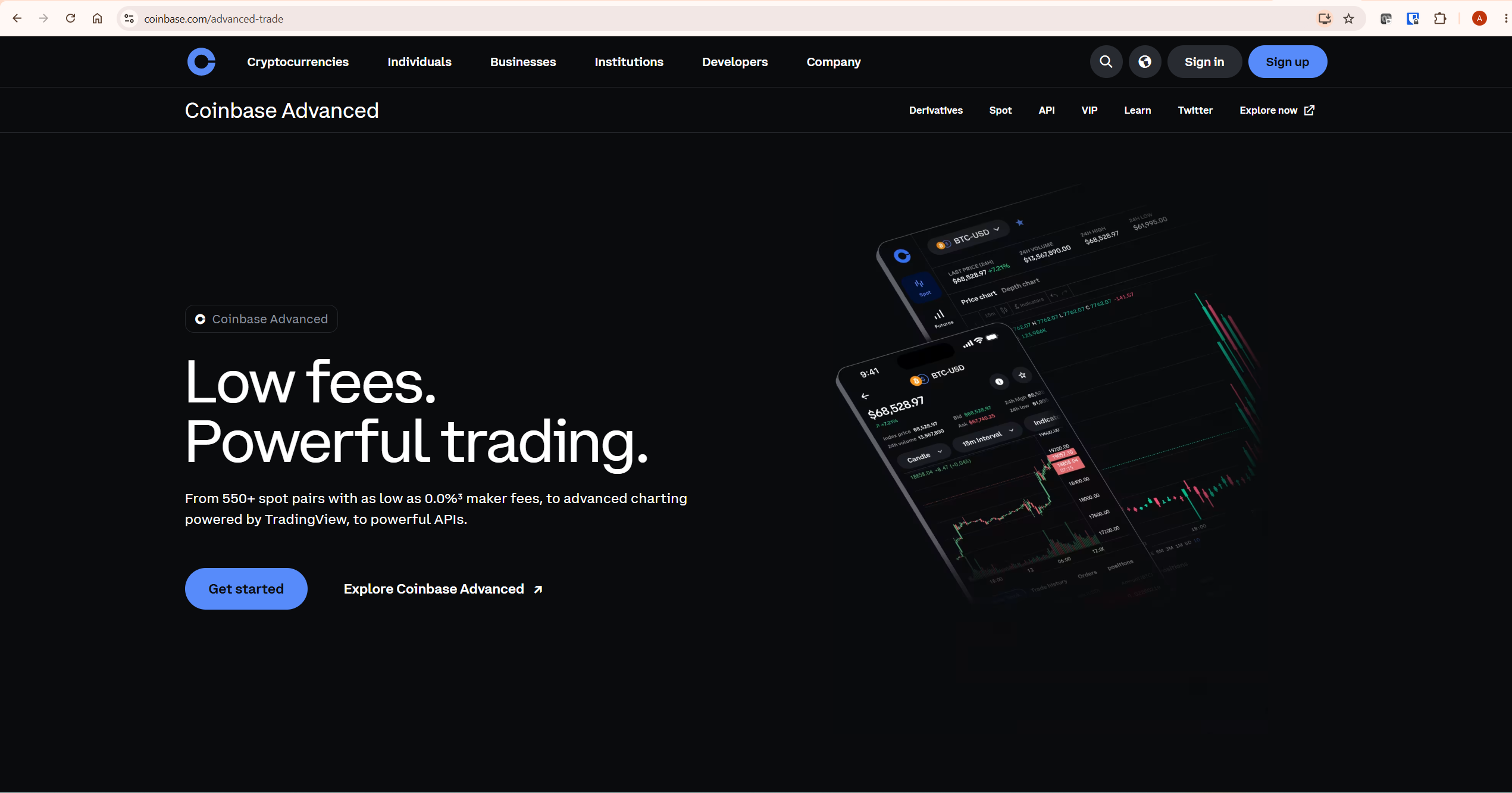
This matters for the comparison in a direct way. When traders ask whether TradingView or Coinbase is better for chart analysis, the answer is that TradingView is the source platform — Coinbase Advanced runs a simplified version of it. You get more indicators, more drawing tools, Pine Script access, multi-chart layouts, and a more capable alert system by going directly to TradingView rather than using the embedded version inside Coinbase.
What Coinbase provides that TradingView cannot is the exchange itself — the ability to buy, sell, hold, and earn yield on cryptocurrency using fiat currency. That is a fundamentally different service.
TradingView vs Coinbase: Side-by-Side Comparison
| Feature | TradingView | Coinbase Advanced | Verdict |
|---|---|---|---|
| Charting engine | Full platform — 400+ indicators, 110+ drawing tools, multi-chart layouts, custom timeframes, Pine Script | Powered by TradingView — simplified implementation with core indicators and drawing tools | TradingView |
| Buy and sell crypto | Not available — charting and analysis only (broker integration available for some markets) | Core feature — hundreds of spot pairs, derivatives, market and limit orders | Coinbase |
| Fiat on-ramp | Not available | Bank transfer, debit card, PayPal in supported regions | Coinbase |
| Maker fees | Not applicable | Maker fees from 0.0% at highest volume tiers — tiered structure based on 30-day volume | Coinbase |
| Pine Script | Full Pine Script v6 — build custom indicators, strategies, and alerts | Not available | TradingView |
| Backtesting | Built-in Strategy Tester with full performance metrics | Not available | TradingView |
| Paper trading | Available on all plans including free | Not available | TradingView |
| Alerts | Up to 1,000 alerts with webhooks, multi-condition, Pine Script triggers | Basic price alerts only | TradingView |
| Multi-chart layouts | 2 to 16 charts per tab depending on plan | Single chart view | TradingView |
| Asset custody | Not applicable — no assets held | Self-custody option via Coinbase Wallet; exchange holds assets by default | Coinbase |
| Crypto earning / staking | Not available | USDC rewards up to 5%, staking for ETH, ADA, SOL and others | Coinbase |
| Regulatory status | Charting platform — not a regulated financial services provider | Nasdaq-listed, regulated in US, UK, EU — OCC conditional national trust charter approval (April 2026, subject to final conditions) | Coinbase (for regulated exchange) |
| Free plan quality | Full chart access, 3 price alerts, 3 indicators — genuine analysis possible | Free to sign up and trade — fees apply per trade | Tie — different use cases |
| Crypto pairs | Data from 50+ exchanges including Coinbase, Binance, Kraken — analysis only | hundreds of spot pairs for actual trading | Different — TradingView for analysis, Coinbase for execution |
What TradingView Does That Coinbase Cannot
TradingView’s advantage over Coinbase for analytical purposes is substantial, even though Coinbase Advanced is technically running on TradingView’s technology. The simplified integration inside Coinbase removes the features that make TradingView genuinely powerful for technical analysis.
Pine Script is the most significant gap. TradingView’s proprietary scripting language lets traders write custom indicators, build strategy logic, set complex multi-condition alert triggers, and publish scripts to a community library of over 100,000 public indicators. Coinbase Advanced gives you access to standard built-in indicators only — no custom scripts, no Pine Script access, no community library.
The Strategy Tester is a full backtesting engine that runs Pine Script strategies against historical data and returns performance metrics — net profit, max drawdown, win rate, profit factor. This is not available in Coinbase’s chart implementation. For traders who want to validate a system before committing capital, the Strategy Tester is one of TradingView’s most valuable paid features. See our TradingView Strategy Tester guide for the full setup process. If you want to practice trading without risking capital first, our TradingView Paper Trading guide covers the free simulation tool available on all plans.
Multi-chart layouts on TradingView allow running 2 to 16 simultaneous charts per tab. Coinbase Advanced shows one chart at a time. For traders who analyse multiple timeframes simultaneously — a 4H trend chart alongside a 15M entry chart — this is a meaningful operational difference.
Advanced alerts on TradingView go far beyond simple price notifications. From Essential plan upward, you get technical alerts on indicators and drawings, webhook integration for automated trading bots, and multi-condition alerts from Plus onward. Coinbase’s alert capability is limited to basic price notifications. See our TradingView Alerts guide for the full system explained.
Volume Profile indicators — Visible Range, Session, Fixed Range, and Anchored — are built into TradingView from Essential plan upward. These show where the most volume traded at specific price levels, which institutional-level data is not available through Coinbase’s charting implementation. Our TradingView Volume Profile guide covers the full setup.
What Coinbase Does That TradingView Cannot
Coinbase’s advantages over TradingView are equally clear — they operate in a completely different domain.
Buying and selling cryptocurrency is Coinbase’s core function. TradingView is an analysis platform — you cannot purchase crypto directly on TradingView. Coinbase connects your bank account, processes fiat deposits, and executes trades across hundreds of spot pairs. For anyone entering crypto for the first time or managing an existing portfolio, Coinbase is the execution layer that TradingView cannot replace.
Low trading fees on Coinbase Advanced use a volume-based tiered structure with no subscription fee — maker fees can reach 0.0% at the highest volume tiers. This is competitive with any major exchange globally and significantly cheaper than the standard Coinbase consumer interface. TradingView has subscription plans for charting access — Coinbase charges transaction fees for actual trades.
Crypto custody and security are Coinbase’s institutional strengths. As a Nasdaq-listed company operating under multiple US and international regulatory frameworks — including receiving conditional OCC national trust charter approval in April 2026 — Coinbase offers institutional credibility that TradingView — as a charting platform — is not subject to. Customer assets are held 1:1 and are not lent without consent. For traders who need regulated custody of significant crypto holdings, Coinbase’s compliance infrastructure matters.
Yield on holdings is available through Coinbase’s USDC rewards programme and staking for ETH, ADA, SOL, and other assets. TradingView has no equivalent — it holds no assets and generates no yield.
Derivatives trading is available on Coinbase Advanced including futures products on Bitcoin, Ethereum, and other major assets. TradingView supports derivatives data and analysis but does not execute derivative trades directly — broker integration is required.
Pricing Comparison
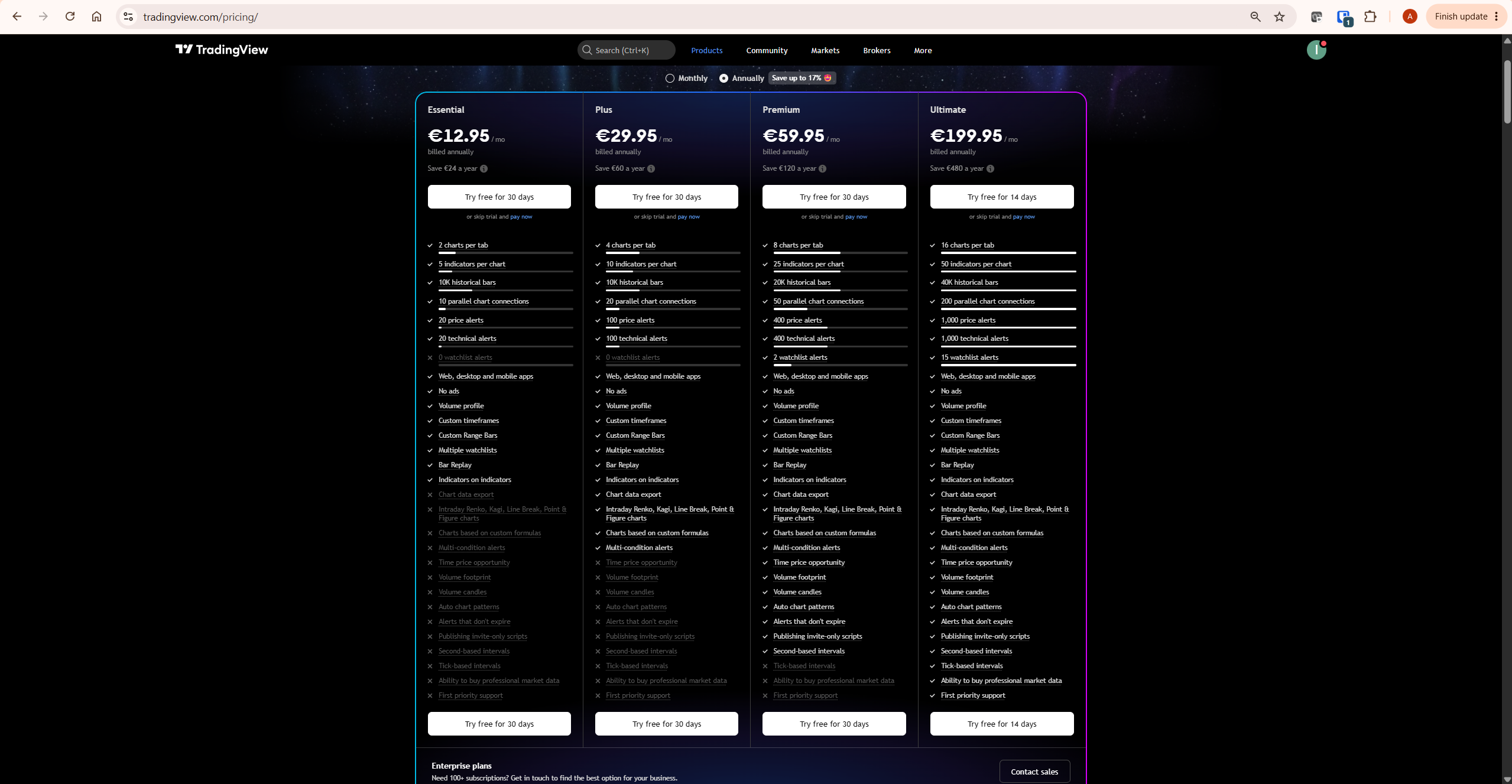
| Platform / Plan | Cost | What You Pay For | Best For |
|---|---|---|---|
| TradingView Basic | Free | Full charting, 3 indicators, 3 price alerts | Learning the platform and basic chart analysis |
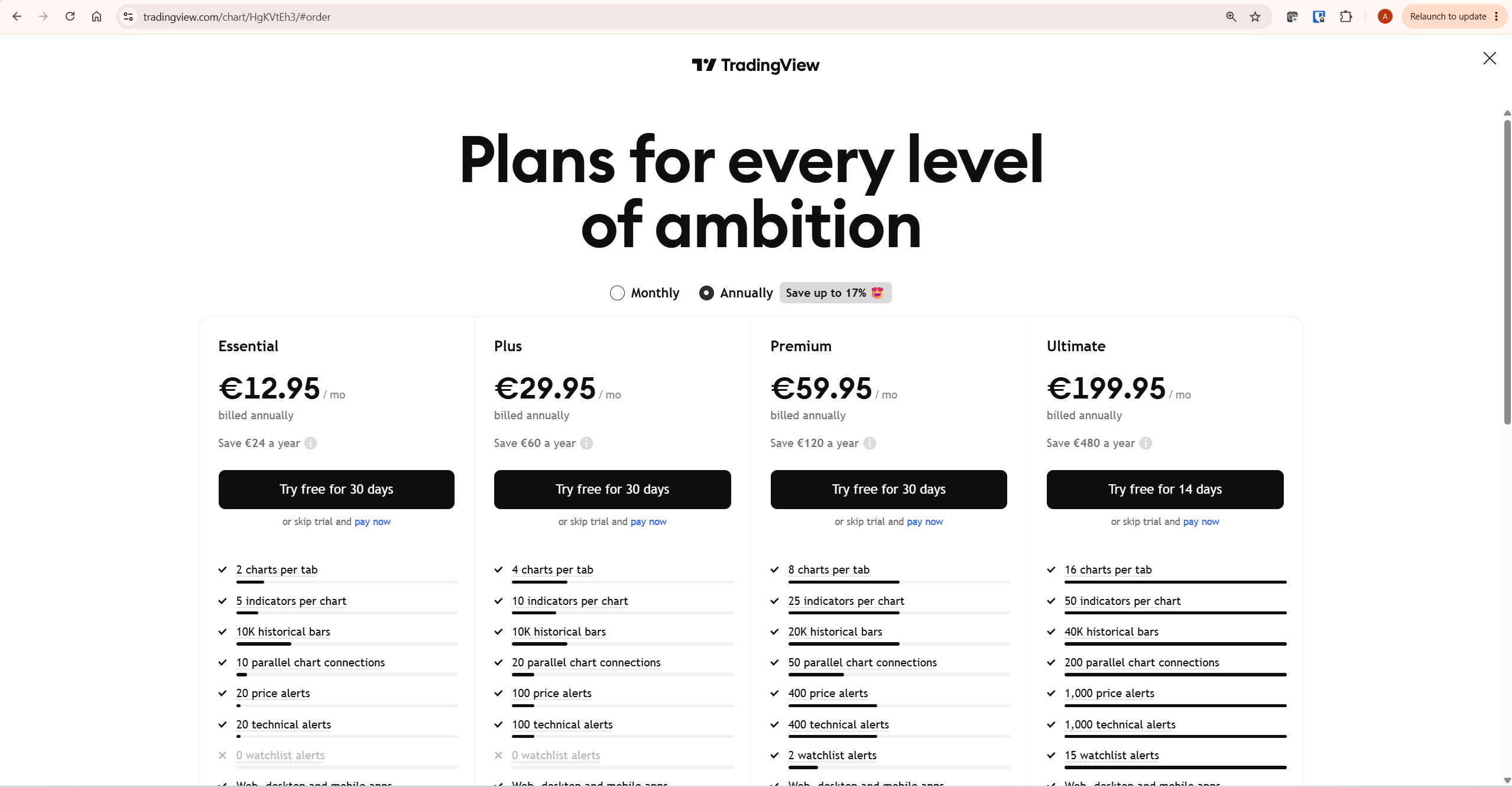
| TradingView Essential | €12.95/mo billed annually | 5 indicators, 20 alerts, Bar Replay, Volume Profile, webhooks | Active traders needing core paid charting features |
| TradingView Plus | €29.95/mo billed annually | 10 indicators, 100 alerts, multi-condition alerts, 4 charts per tab | Traders analysing multiple instruments simultaneously |
| TradingView Premium | €59.95/mo billed annually | 25 indicators, 400 never-expiring alerts, 8 charts per tab | Serious technical analysts and active day traders |
| Coinbase Advanced | Free to use — fees per trade | Tiered maker/taker fees — maker fees can reach 0.0% at the highest volume tiers | Buying, selling, and holding crypto with low fees |
The pricing models are structurally different. TradingView charges a subscription for platform access — you pay to analyse, not to trade. Coinbase charges per transaction — you pay nothing to access the platform, but every trade incurs a fee. For a high-frequency trader executing many small trades, Coinbase’s fee structure matters significantly. For an analyst who executes trades infrequently but needs deep chart capability daily, TradingView’s subscription model is the relevant cost. Always verify current pricing at tradingview.com/pricing and coinbase.com/advanced-trade before subscribing or trading.
The Professional Workflow: Using Both Together
Many active crypto traders use TradingView and Coinbase simultaneously, and the workflow is straightforward. TradingView handles all analysis — chart reading, indicator application, alert setup, and strategy testing. Coinbase handles all execution — buying, selling, and custody of the actual assets.
TradingView connects directly to Coinbase as a data source. You can view Coinbase exchange data — BTC/USD on Coinbase specifically — inside TradingView charts. This means your analysis reflects the exact price action on the exchange you are trading, not a synthetic composite. When you identify a level to buy or sell on your TradingView chart, you execute that trade on Coinbase Advanced.
TradingView also supports direct broker integration with Coinbase Advanced, allowing you to place orders directly from your TradingView chart without switching between platforms. Note that user reviews of this integration are mixed — some traders report reliable execution, while others have documented connection issues including API errors that went unresolved for weeks. Test the integration with small position sizes before relying on it for significant trades.
The practical workflow for most crypto traders looks like this: TradingView open on desktop for chart analysis, Coinbase Advanced open in a second tab or on a second monitor for order execution. When your TradingView alert fires at a key level, you switch to Coinbase Advanced, verify the price action, and execute. This two-platform approach costs nothing at the free tier of both services and covers 95% of what active crypto traders actually need.
For a complete overview of TradingView’s charting capabilities and how they fit a broader crypto trading workflow, see our TradingView Review. The independent StockBrokers.com TradingView review also provides useful third-party context on the platform’s strengths for active traders.
Can Beginners Use Coinbase Without TradingView?
Yes — and for many beginners, starting with Coinbase alone is the right approach. Coinbase’s standard interface is designed for straightforward buying and holding of cryptocurrency. You do not need chart analysis tools to purchase Bitcoin, hold it, and earn yield on USDC. Coinbase Advanced’s built-in TradingView-powered charts provide enough analytical capability for basic decision-making — checking price trends, applying RSI or MACD, and placing orders with chart context.
TradingView becomes valuable when you move beyond simple buy-and-hold into active trading decisions based on technical patterns, indicator signals, and alert-driven entries. The free TradingView plan is a natural first step — create an account, open the same chart you see on Coinbase Advanced but with more tools available, and learn the difference. Most traders who start on Coinbase’s built-in charts eventually migrate their analysis to TradingView as their technical knowledge grows. Starting with Coinbase for execution and TradingView free for analysis costs nothing and covers the full beginner workflow.
Who Should Use TradingView
TradingView is the right primary tool if technical analysis drives your trading decisions. That means any trader who reads chart patterns, applies indicators to make entry and exit decisions, uses alerts to monitor price levels, or wants to backtest a strategy before deploying capital. For crypto traders specifically, TradingView pulls real-time data from Binance, Bybit, Kraken, Coinbase, and dozens of other exchanges — giving you a unified analytical workspace across all the markets you trade, regardless of which exchange you execute on.
TradingView is not a substitute for an exchange. You cannot buy Bitcoin on TradingView. If your primary need is acquiring and holding cryptocurrency, TradingView alone does not solve that problem.
Who Should Use Coinbase
Coinbase is the right primary platform if you need a regulated, secure exchange for buying and holding cryptocurrency. Its fiat on-ramp, regulatory compliance, USDC yield programme, and staking options make it the natural home for a long-term crypto portfolio. For US-based traders in particular, Coinbase’s regulatory standing and FDIC insurance on USD balances provide a level of institutional confidence that many offshore exchanges cannot match.
Coinbase Advanced’s TradingView-powered charts are sufficient for basic technical analysis — reading price action, applying standard indicators, and placing orders with chart context. If that level of charting is enough for your workflow, Coinbase Advanced covers it without a separate TradingView subscription. The gap only becomes meaningful when you need Pine Script, backtesting, advanced alerts, multi-chart layouts, or Volume Profile — features that require the full TradingView platform.
Honest Limitations of Each Platform
For independent third-party assessment of Coinbase’s security track record and fee structure, Investopedia’s Coinbase review provides a detailed breakdown. TradingView’s free plan is deliberately limited to 3 indicators per chart, which constrains any serious multi-indicator analysis. Paid plans resolve this, but the subscription cost adds up for traders who only need charting occasionally. Customer support across all TradingView plans is widely reported as slow and primarily automated. The broker integration — including Coinbase Advanced — has had documented connectivity issues that TradingView and Coinbase have been slow to resolve. Never rely on broker integration for time-sensitive trades without testing it thoroughly first.
Coinbase’s standard consumer platform carries higher fees than Coinbase Advanced — a distinction that many new users miss. If you are trading on coinbase.com rather than the Advanced interface, you are paying significantly more per transaction. Coinbase has also experienced security incidents, including an insider data breach in May 2025 that led to customer data theft and a $20 million extortion attempt. While Coinbase’s security infrastructure is strong, no centralised exchange is immune to these risks. Additionally, Coinbase Europe is not a regulated financial service provider for digital currency services in all European jurisdictions — verify availability and regulatory status in your specific country before depositing significant funds.
What To Do Next
If you are not already using both platforms, start with a free account on TradingView and an account on Coinbase Advanced. Spend one week running your chart analysis on TradingView while executing any trades on Coinbase Advanced. The combination costs nothing at the free tier of both platforms. After that week, you will have a clear view of whether TradingView’s paid features — more indicators, advanced alerts, Pine Script — are worth the additional cost for your specific trading style.
Related TradingView Guides
- TradingView Review 2026 — complete platform assessment including plan comparison and honest limitations
- TradingView Free vs Paid — full breakdown of what each plan includes and which one suits your workflow
- TradingView Alerts Explained — how to set up price, indicator, and Pine Script alerts including webhook integration
- TradingView Screener — how to find crypto trading opportunities before opening a chart
- TradingView vs Binance Charts — similar comparison for traders using Binance as their primary exchange
Frequently Asked Questions
Is TradingView better than Coinbase?
They serve different purposes, so the comparison depends on what you need. TradingView is better for chart analysis, technical indicators, Pine Script, backtesting, and advanced alerts. Coinbase is better for buying, selling, holding, and earning yield on cryptocurrency. Many active crypto traders use both — TradingView for analysis, Coinbase for execution. Coinbase Advanced uses TradingView’s charting technology, so if you need only basic chart capability, Coinbase Advanced covers it without a separate TradingView subscription.
Does Coinbase use TradingView charts?
Yes. Coinbase Advanced’s official page states “advanced charting powered by TradingView.” Their chart tools — indicators, drawing tools, and charting interface — are delivered through TradingView’s technology. This implementation is more limited than the full TradingView platform: it includes core indicators but not Pine Script, community scripts, multi-chart layouts, Volume Profile, or advanced alert conditions.
Can I trade crypto directly on TradingView?
TradingView supports broker integration including Coinbase Advanced, which allows placing orders directly from a TradingView chart. However, TradingView is primarily a charting and analysis platform — you cannot buy or sell crypto on TradingView itself without a connected broker account. User reviews of the Coinbase Advanced broker integration are mixed, with some traders reporting connectivity issues. Always test the integration with small amounts before using it for significant trades.
Which is better for crypto chart analysis — TradingView or Coinbase?
TradingView offers substantially more functionality for advanced chart analysis. It offers 400+ built-in indicators, Pine Script for custom strategies, Volume Profile, multi-chart layouts, a full backtesting engine, and an alert system capable of handling up to 1,000 conditions with webhooks. Coinbase Advanced provides TradingView-powered charts with the core indicators — sufficient for basic technical analysis and executing trades with chart context, but limited for complex analytical workflows.
Is Coinbase Advanced free?
Coinbase Advanced has no subscription fee. You pay per trade through a maker/taker fee structure starting at competitive rates with maker fees reaching 0.0% at the highest volume tiers. Lower-volume traders pay higher percentage fees — check the current fee schedule at coinbase.com/advanced-trade before trading. TradingView has a free plan with limited features; paid plans start at €12.95 per month billed annually. The cost models are different: TradingView charges for platform access, Coinbase charges per transaction.
Is Coinbase safe?
Coinbase is one of the most regulated crypto exchanges globally — Nasdaq-listed, licensed in the US, UK, and EU, and received conditional OCC national trust charter approval in April 2026 — subject to final conditions being met. Customer assets are held 1:1 and are not lent without consent. However, Coinbase experienced an insider data breach in May 2025, and centralised exchanges carry inherent custodial risk. For maximum security, consider withdrawing significant holdings to a self-custody wallet. Verify regulatory status and protections in your specific jurisdiction before depositing funds.
Can I use TradingView without Coinbase?
Yes. TradingView is a standalone analysis platform that does not require a Coinbase account. You can chart Coinbase exchange data — BTC/USD on Coinbase, for example — inside TradingView without having a Coinbase account, because TradingView pulls public market data from exchanges. A Coinbase account is only needed if you want to execute trades from TradingView using the broker integration, or if you want to trade and hold crypto directly.
Trading disclaimer: Trading involves risk. Technical analysis tools do not guarantee profitable results. Past performance is not indicative of future results. Always manage your risk appropriately.
