
TradingView vs Binance Charts: Which Is Better for Crypto Trading? (2026)
Affiliate Disclosure: This article contains affiliate links. If you sign up for TradingView through a link on this page, I may earn a commission at no extra cost to you. I only recommend platforms I have genuinely evaluated.
Trading involves risk. Technical analysis tools do not guarantee profitable results. Past performance is not indicative of future results. Always manage your risk appropriately.
Last verified: July 2026, using TradingView and Binance official documentation and feature pages.
If you are trading on Binance and wondering whether to switch your charting to TradingView — or use both — the answer depends on what you are trying to do. I am Andreas Maratheftis, and after 30 years in professional finance I evaluate tools based on what they actually produce in a real workflow, not what the marketing says. TradingView and Binance Charts are built for fundamentally different purposes: TradingView is a dedicated charting and analysis platform, while Binance Charts is an execution interface with basic charting built in. They solve different problems, and for most serious traders, they work best used together rather than as alternatives.
This comparison gives you a direct assessment of where each platform leads, where each one falls short, and the specific scenarios where one is clearly the better choice. By the end you will know exactly which setup fits your trading workflow — and whether the TradingView subscription is justified given what Binance already provides for free.
- TradingView is a dedicated analysis platform — deeper indicators, better charting tools, Pine Script, and cross-market coverage. Binance Charts is an execution interface with basic charting built in.
- For execution, Binance Charts wins — order placement is integrated directly into the chart interface with no switching between tabs
- TradingView’s free plan allows only 2 indicators per chart and 3 price alerts — more limiting than Binance Charts for basic active trading
- The most effective setup for serious crypto traders is both together — TradingView for analysis and strategy, Binance Charts for execution
- TradingView’s broker integration allows direct Binance order placement from TradingView charts — this removes the main disadvantage of using TradingView alone
Quick Answer: TradingView vs Binance Charts
For analysis, TradingView wins clearly — more indicators, more chart types, Pine Script, better alerts, and coverage across crypto, stocks, forex, and commodities. For execution, Binance Charts wins — order placement is integrated directly into the chart. For most serious crypto traders, the optimal setup is both: TradingView for analysis and strategy development, Binance Charts for order entry. TradingView’s broker integration now allows direct Binance order placement from TradingView charts, which reduces the workflow friction of using two platforms.
TradingView vs Binance Charts: Feature Comparison
Here is a direct feature comparison across the dimensions that matter most for crypto traders.
| Feature | TradingView | Binance Charts |
|---|---|---|
| Built-in indicators | 100+ built-in, 100,000+ community | ~50 built-in |
| Custom indicators | Yes — Pine Script | No |
| Chart types | 17–21 (plan dependent) | 5 (candlestick, line, bar, area, Heikin Ashi) |
| Multi-chart layouts | Up to 16 (paid plans) | Not available |
| Alerts | 3–1,000 (plan dependent), technical + price | Price alerts only, limited |
| Order execution | Via broker integration (Binance supported) | Native — fully integrated |
| Market coverage | Crypto, stocks, forex, commodities, indices | Binance-listed crypto pairs only |
| Paper trading | Yes — all plans | Binance testnet only |
| Pine Script / scripting | Yes — full scripting environment | No |
| Social / idea sharing | Yes — large community | No |
| Cost | Free plan available, paid from $12.95/mo | Free with Binance account |
TradingView: Strengths and Limitations for Crypto Traders
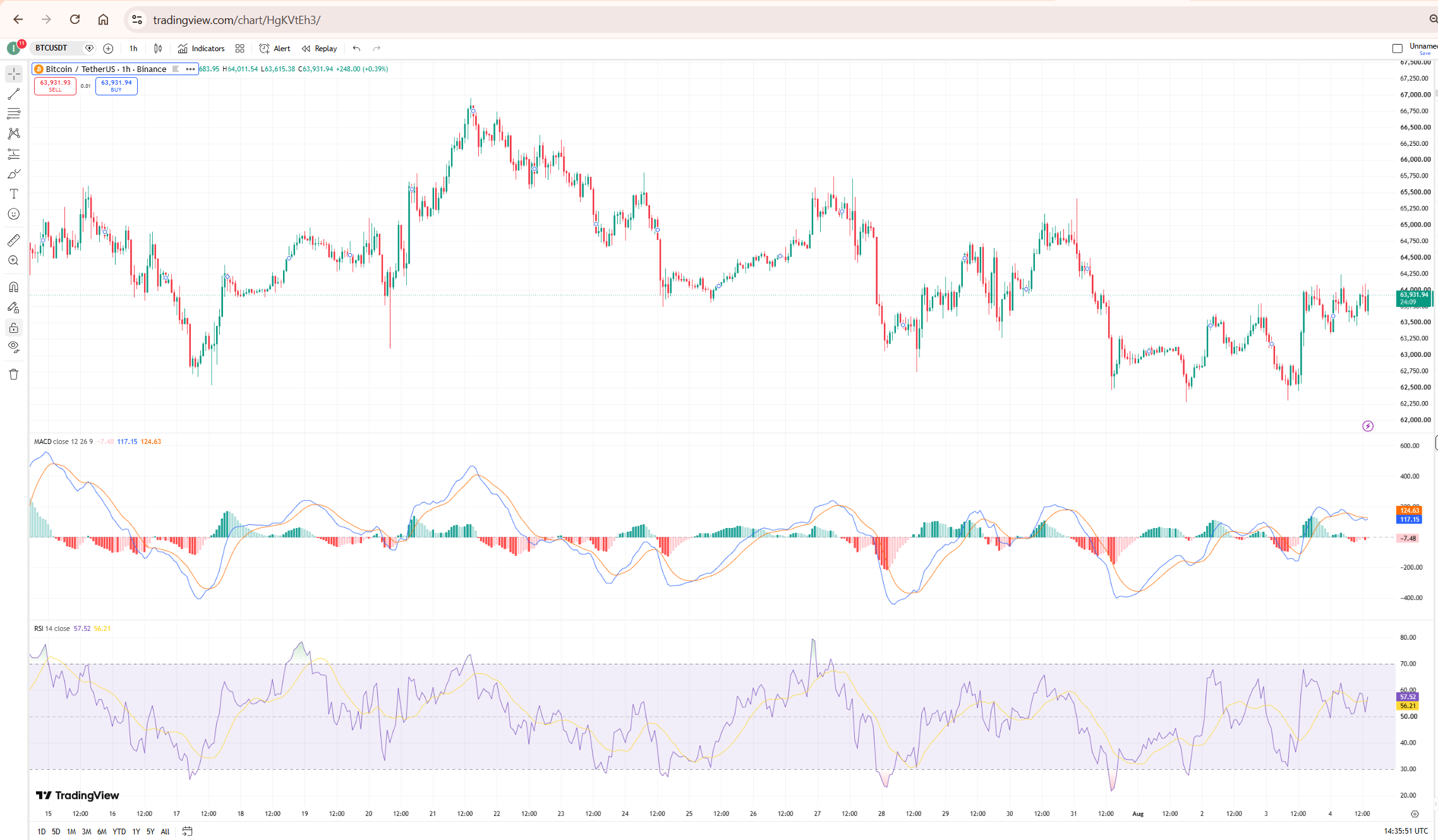
TradingView’s primary strength for crypto traders is the depth of its analytical toolkit. Over 100 built-in indicators, 100,000+ community-published scripts, and a full Pine Script environment for custom indicator development give serious traders a research and strategy-building capability that Binance Charts cannot match. The platform covers every major market — crypto, equities, forex, commodities, and indices — from a single interface, which matters for traders who correlate crypto price action with broader macro conditions.
The alert system is genuinely powerful at paid tiers. Technical condition alerts — firing when RSI crosses a threshold, when a moving average crossover occurs, or when a custom Pine Script condition triggers — are unavailable on Binance Charts. For traders who run systematic strategies with automated alert workflows, TradingView is the only practical option.
The significant limitation on TradingView for crypto traders is execution. The free plan has no broker integration — you analyse on TradingView and then switch to Binance to place the order. At paid tiers, TradingView’s broker integration supports direct order placement from the chart interface, including Binance connectivity. But this adds subscription cost that Binance Charts does not require.
The free plan’s restrictions are also more limiting than they appear. Two indicators per chart and three price alerts is workable for occasional chart browsing but constrains any serious multi-indicator workflow immediately. For a full breakdown of what each TradingView plan includes, my TradingView free vs paid guide covers every tier in detail.
Binance Charts: Strengths and Limitations
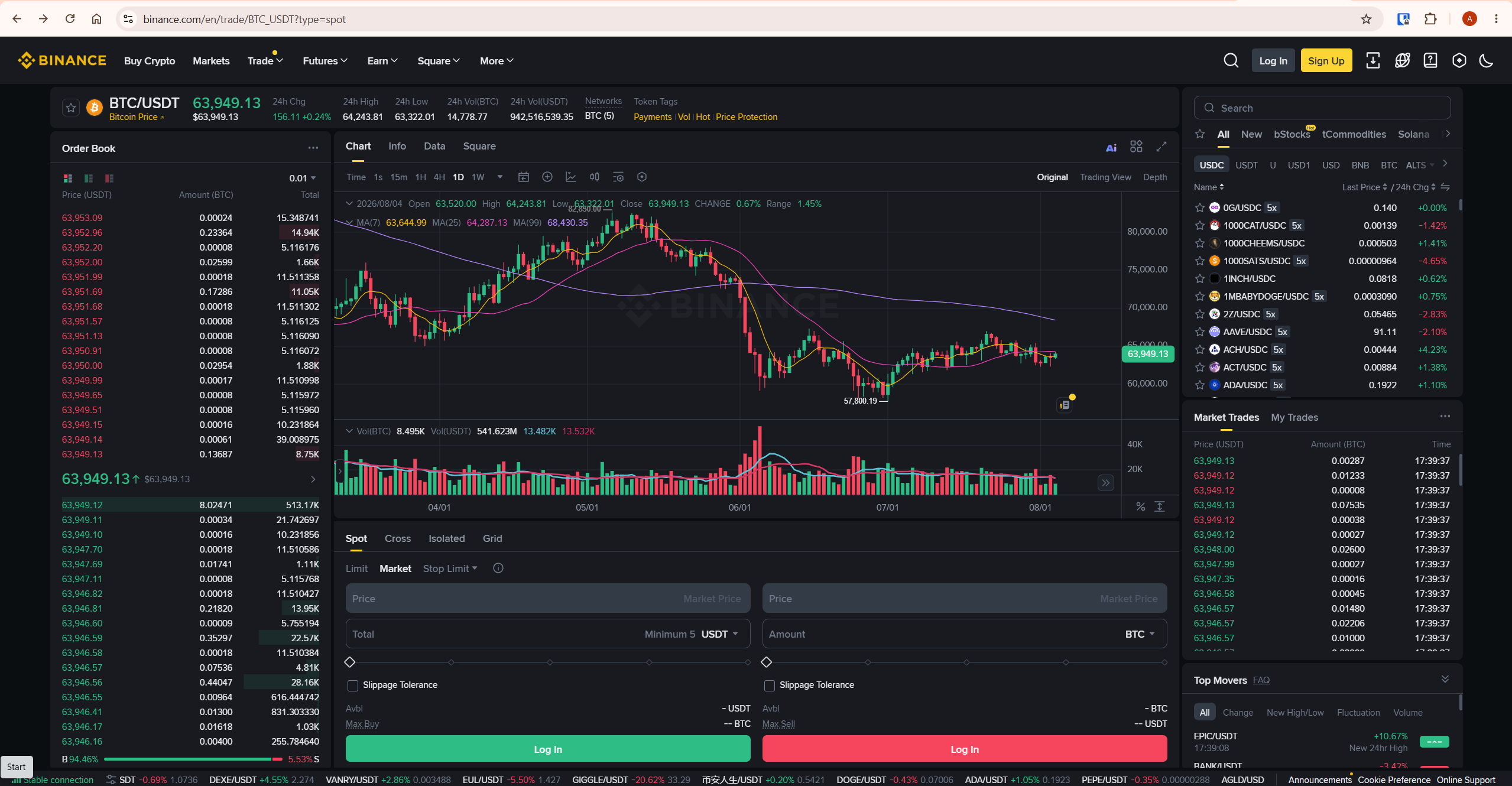
Binance Charts’ primary strength is execution integration. Order placement — market, limit, stop-limit, OCO — is built directly into the chart interface. There is no switching between analysis and execution tabs, no copying price levels between platforms, and no workflow friction between identifying a setup and acting on it. For active crypto traders who execute multiple orders per session on Binance, this integration is a genuine operational advantage.
Binance Charts also integrates the order book, trade history, and depth chart directly alongside the price chart — giving traders a complete market microstructure view within a single interface. This level of exchange-native data integration is not available on TradingView’s standard chart view.
The limitations are significant for any trader who does serious technical analysis. Approximately 50 built-in indicators covers basic setups — RSI, MACD, Bollinger Bands, moving averages — but stops well short of TradingView’s depth. There is no custom indicator scripting, no multi-chart layouts, no Pine Script environment, and no cross-market data. For traders who use advanced order-flow tools, volume profile, or custom strategy indicators, Binance Charts cannot support those workflows.
Charting and Technical Analysis: Where TradingView Leads
The charting capability gap between TradingView and Binance Charts is significant at the serious trader level. TradingView offers 17 chart types on the free plan expanding to 21 on Premium — including Renko, Point and Figure, Kagi, Range, and Volume Candles alongside the standard candlestick and OHLC formats. Binance Charts offers five chart types: candlestick, line, bar, area, and Heikin Ashi.
Drawing tools follow a similar pattern. TradingView provides over 100 drawing tools including Fibonacci retracements, Elliott Wave labels, Gann fans, Pitchforks, and advanced measurement tools. Binance Charts provides the essential drawing tools — trend lines, horizontal lines, Fibonacci retracements — but the selection is considerably narrower. For a complete guide to TradingView’s drawing toolkit, my TradingView drawing tools guide covers every category.
Pine Script is TradingView’s most significant analytical advantage over Binance Charts. The ability to write custom indicators, strategies, and alert conditions — and to access 100,000+ community-published scripts — gives TradingView users a strategy development capability that has no equivalent on Binance. For traders who build and test systematic strategies, this is decisive. My Pine Script tutorial covers the full development workflow from scratch.
Execution and Order Placement: Where Binance Charts Leads
Native order execution is Binance Charts’ most important advantage. Every order type available on Binance — market, limit, stop-limit, trailing stop, OCO — is accessible directly from the chart interface without leaving the charting view. For active traders placing multiple orders per session, this integration removes meaningful workflow friction.
TradingView addresses this gap through its broker integration feature. At paid tiers, traders can connect their Binance account to TradingView and place orders directly from TradingView charts. This effectively removes TradingView’s execution disadvantage — but it requires a paid TradingView subscription and adds the complexity of a connected broker account. For traders whose primary use case is execution rather than analysis, Binance Charts is simpler and free.
One additional advantage of Binance Charts for execution-focused traders is the integrated order book and depth chart. Seeing the current bid-ask stack and recent trade flow alongside the price chart gives context for order placement that TradingView’s standard view does not provide by default. For traders who use order book analysis as part of their entry timing, this is a meaningful practical advantage of staying on Binance’s native interface.
Alerts: TradingView vs Binance
TradingView’s alert system is significantly more capable than Binance’s. TradingView supports price alerts, technical condition alerts (when an indicator crosses a threshold), Pine Script-based custom condition alerts, and webhook notifications to external services — from 3 alerts on the free plan up to 1,000 on Ultimate. Binance’s alert system supports basic price notifications with limited customisation options.
For traders who want to be notified when RSI reaches a specific level, when two moving averages cross, or when a custom condition fires on a watchlist of multiple assets — TradingView is the only option. Binance price alerts cover basic threshold monitoring but cannot replicate technical condition alerting. For a full guide to setting up TradingView’s alert system, my TradingView alerts guide covers every alert type and webhook integration.
Who Should Use TradingView, Who Should Use Binance Charts, and Who Should Use Both
Use TradingView as your primary platform if you trade across multiple markets — crypto plus equities, forex, or commodities — and need a single analysis environment. If you build and test systematic strategies using custom indicators, run multi-chart layout analysis across timeframes, or use alert-driven workflows with webhook integrations, TradingView is the correct primary platform. The subscription cost is justified when the analytical capability is actively used in your trading workflow.
Use Binance Charts as your primary platform if you trade exclusively on Binance, your analytical workflow is straightforward (standard indicators, basic drawing tools), and execution speed and integration is your priority. Binance Charts is free, always up to date with Binance’s latest trading pairs and interface, and requires no additional subscription. For traders who primarily want to place orders efficiently with basic charting support, Binance Charts covers this without cost.
Use both if you want the analytical depth of TradingView for strategy development and the native execution integration of Binance for order placement. This is the most common setup among serious crypto traders. Analyse the setup on TradingView, identify your entry and exit levels, then switch to Binance Charts to place the order. TradingView’s broker integration is an alternative that eliminates the tab-switching — but requires a paid TradingView plan.
For a comprehensive evaluation of TradingView as a standalone platform for crypto trading, my full TradingView review covers every feature, plan, and use case in detail.
Paper Trading: TradingView vs Binance
TradingView’s paper trading feature is available on all plans including free. It allows simulated trading directly on live charts using virtual funds, with the same interface as real trading. This makes it genuinely useful for strategy testing and new trader practice without any risk. My TradingView paper trading guide covers the full setup.
Binance’s paper trading equivalent is the Binance testnet — a separate environment that simulates trading with test funds. The testnet is more technically complex to access, requires separate account registration, and does not replicate the exact Binance production environment precisely. For most traders evaluating strategies or learning execution without risk, TradingView’s paper trading is the more practical and accessible option.
What To Do Next
If you are currently using only Binance Charts, spend one session running your standard analysis on TradingView’s free plan using the same pairs and indicators you normally use on Binance. The free plan allows two indicators per chart — enough to run a basic comparative session. If you find yourself constrained by the indicator limit or wanting access to additional chart types or Pine Script tools, that is your signal to trial a paid plan.
TradingView offers a free trial on paid plans — test the full feature set before committing to a subscription. According to TradingView’s official upgrade page, trial availability and duration vary by plan — always verify current terms at tradingview.com/pricing before signing up. You can start with TradingView through my TradingView affiliate link. For a complete comparison of TradingView against other major charting platforms, my TradingView vs MetaTrader comparison covers the key differences for traders considering multiple platforms.
Frequently Asked Questions
Is TradingView better than Binance Charts?
For analysis, TradingView is significantly more capable — more indicators, more chart types, Pine Script, better alerts, and cross-market coverage. For execution on Binance, Binance Charts is better — order placement is native and integrated. The right answer depends on your priority: if analysis depth matters more, TradingView leads. If execution integration is the priority, Binance Charts is simpler and free.
Can I use TradingView to trade directly on Binance?
Yes — TradingView supports Binance broker integration at paid tiers, allowing direct order placement from TradingView charts without switching to the Binance interface. This requires a paid TradingView plan and connecting your Binance account through TradingView’s broker integration settings. The feature is not available on the free TradingView plan.
Does Binance use TradingView charts?
Binance’s Advanced chart view is powered by TradingView’s charting library — so the underlying charting engine on Binance’s Advanced interface is TradingView technology. However, Binance’s implementation is a restricted version with limited indicator access compared to a full TradingView subscription. You do not get Pine Script, the full indicator library, or TradingView’s alert system through Binance’s TradingView-powered charts.
Is TradingView free plan enough for crypto trading on Binance?
The TradingView free plan allows 2 indicators per chart and 3 price alerts — which is workable for basic chart reading but constrains any serious multi-indicator workflow. For traders who use three or more indicators simultaneously, need technical condition alerts, or want access to Pine Script, the free plan is insufficient. Essential at $12.95/month removes the most constraining limits and is the realistic starting point for active use.
Should I use TradingView or Binance Charts as a beginner?
For a complete beginner trading on Binance, start with Binance Charts. It is free, integrated with your exchange, and covers the basics — candlestick charts, standard indicators, and direct order placement. Once you have a consistent trading process and want to add more analytical depth, move to TradingView. Starting with TradingView’s full feature set before establishing a basic workflow can be overwhelming and counterproductive.
