
TradingView vs Thinkorswim: Honest Comparison for Traders (2026)
Affiliate Disclosure: This article contains affiliate links. If you sign up for TradingView through a link on this page, I may earn a commission at no extra cost to you. I only recommend tools I have genuinely evaluated.
TradingView wins the tradingview vs thinkorswim comparison for most traders — but that verdict comes with an important caveat most comparison articles never state clearly. Thinkorswim is only available to Charles Schwab account holders in the United States. If you are an international trader, a crypto trader, or anyone outside the US brokerage ecosystem, Thinkorswim is not an option for you regardless of its features. TradingView, by contrast, works for any trader anywhere in the world from a browser tab at no cost to start.
With 30 years of professional finance experience and daily use of TradingView for market analysis, I can give you a direct answer to the tradingview vs thinkorswim question: TradingView is the right choice for the vast majority of retail traders. Thinkorswim is a genuinely powerful platform for a specific type of trader — the active US options specialist who needs institutional-grade order management and is already a Schwab client. Outside that narrow profile, TradingView’s combination of charting depth, global coverage, and cost makes it the clear winner.
This guide covers every meaningful difference between the platforms, the honest limitations of both, and the verdict for crypto traders, international traders, and active stock traders specifically. If you are not yet using TradingView, you can start a free 30-day trial here — no credit card required.
Quick Answer: TradingView vs Thinkorswim
TradingView is the better platform for most traders — international users, crypto traders, beginners, and anyone who wants professional-grade charting without a US brokerage account. Thinkorswim is the better platform for active US options traders who need multi-leg strategy builders, probability analysis, and deep execution tools within the Schwab ecosystem. The tradingview vs thinkorswim decision is straightforward once you know your market focus and location: if you trade crypto, if you are outside the US, or if you are not a Schwab client, TradingView is your platform.
TradingView vs Thinkorswim: Platform Overview
Understanding what each platform actually is resolves most of the tradingview vs thinkorswim confusion immediately.
| Feature | TradingView | Thinkorswim |
|---|---|---|
| Platform type | Cloud-based charting and analysis platform | Downloadable trading platform (desktop, web, mobile) |
| Who can use it | Anyone globally — no account required to start | Charles Schwab clients only — US brokerage account required |
| Cost | Free tier available — paid from $12.95/month | Free for Schwab clients — $0.65/contract for options |
| Asset coverage | Global — stocks, crypto, forex, futures, indices | US stocks, ETFs, options, futures, forex — minimal crypto |
| Crypto coverage | 2,800+ instruments across all major exchanges | Bitcoin and Ethereum futures only via CME |
| Custom scripting | Pine Script v6 — large community library | ThinkScript — powerful but no longer actively developed |
| Options trading | Via connected brokers — no native options tools | Industry-leading — multi-leg builders, Greeks, probability tools |
| Mobile app | Full-featured iOS and Android app | iOS and Android — different layout from desktop |
| Community | 100+ million users, shared ideas and scripts | Minimal social features |
| Best for | Global traders, crypto, technical analysis | US options specialists within Schwab ecosystem |
The most important row in that table is “Who can use it.” Thinkorswim requires an active Charles Schwab brokerage account. There is no standalone subscription, no free trial without account opening, and no access for traders outside the countries where Schwab operates. This single constraint eliminates Thinkorswim as an option for the majority of global retail traders before any feature comparison begins.
Charting and Technical Analysis
TradingView leads the charting comparison in the tradingview vs thinkorswim battle — and the gap is wider than most articles acknowledge.
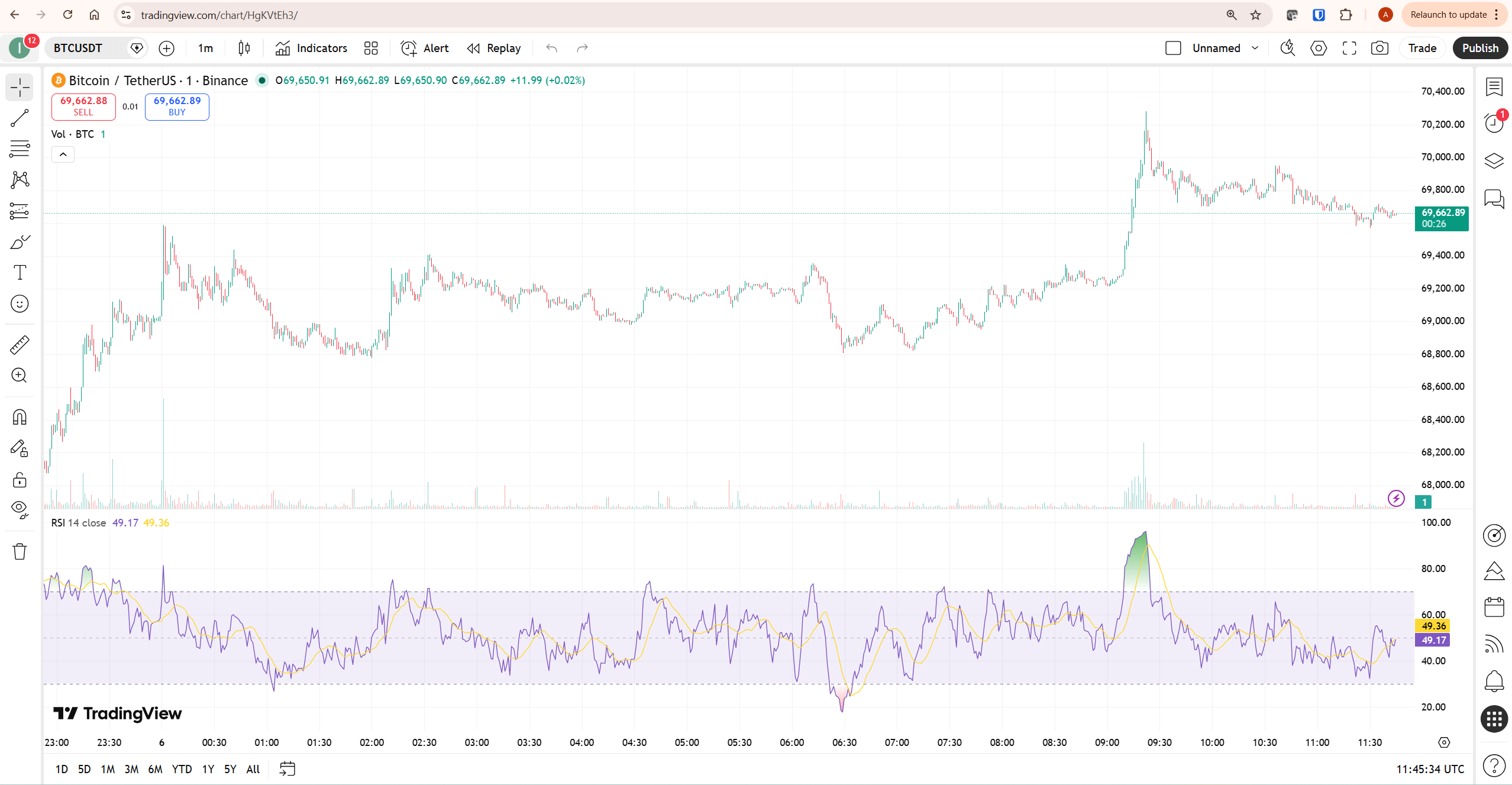
TradingView gives you access to over 100,000 community-published indicators through Pine Script, up to 50 indicators simultaneously on Ultimate, full multi-timeframe analysis across up to 16 charts per layout, and a clean browser-based interface that works identically on any device. The charting experience is modern, fast, and requires no software installation. According to StockBrokers.com’s 2026 TradingView review, TradingView consistently ranks among the top charting platforms available to retail traders globally.
Thinkorswim offers 400+ technical indicators including proprietary studies not available on TradingView, and ThinkScript — its custom scripting language — allows sophisticated indicator and strategy creation. The charting is powerful and deeply customisable, particularly on the desktop version. However, the interface was built in the late 1990s and has not been significantly modernised. Users consistently report the platform feels dated and complex compared to TradingView’s browser-based experience. The desktop, web, and mobile versions also have different layouts, which creates additional learning friction when switching between devices.
One significant development worth noting: following Charles Schwab’s acquisition of TD Ameritrade, multiple user reports and platform reviews indicate that ThinkScript is no longer being actively developed. For traders who relied on Thinkorswim’s scripting ecosystem as a competitive advantage, this stagnation is a meaningful concern. TradingView’s Pine Script v6, by contrast, received active updates throughout 2025 and 2026 including new functions, improved error handling, and the addition of Volume Footprint data access.
For a full breakdown of TradingView’s charting capabilities, our TradingView review covers the complete platform including indicators, alerts, and broker integrations.
Options Trading: Thinkorswim’s Genuine Advantage
Thinkorswim wins the options trading category decisively — and this is the one area where the tradingview vs thinkorswim comparison genuinely favours Thinkorswim for a specific trader type.
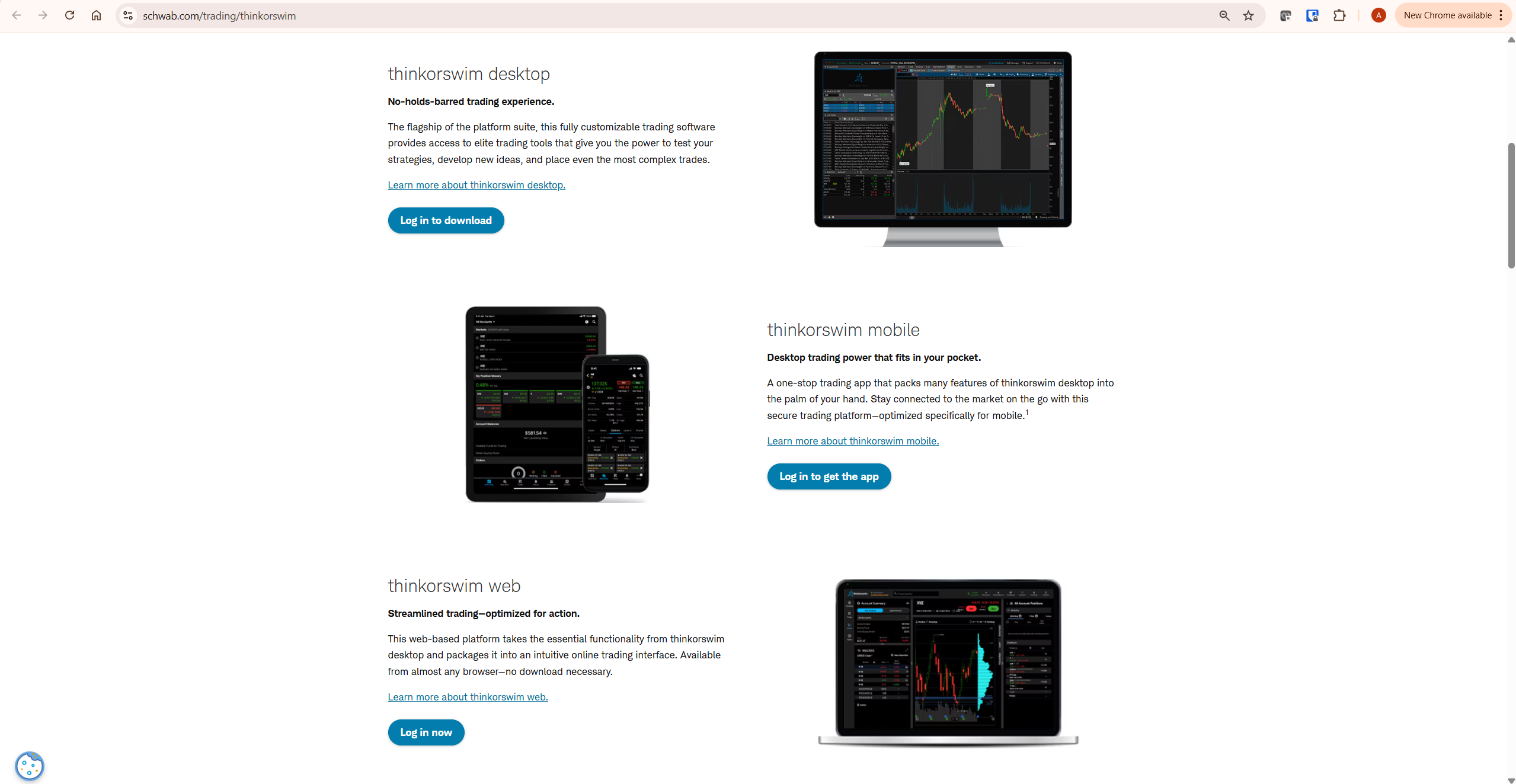
Thinkorswim’s options tools are genuinely institutional-grade. Multi-leg strategy builders handle iron condors, butterflies, and calendar spreads with visual P/L diagrams. Probability analysis estimates the statistical likelihood of touching or expiring at any strike price. Risk curves show P/L versus price across different volatility scenarios and time periods. The proprietary Sizzle Index compares current options volume against the five-day average to identify unusual activity. These are capabilities that TradingView simply does not have — TradingView has no native options analysis suite.
TradingView can execute options trades through connected brokers, but the analytical environment for options evaluation — Greeks analysis, strategy modelling, probability calculations — is not built into TradingView. For traders whose primary strategy involves options, Thinkorswim’s toolset is a genuine competitive advantage that justifies the platform’s complexity.
The honest constraint: you need a Charles Schwab account to access these tools, and Schwab operates primarily in the United States. If you are an international trader interested in options, TradingView connected to an international options broker is the practical alternative.
TradingView vs Thinkorswim for Crypto Trading
For crypto traders, the tradingview vs thinkorswim comparison is not close — TradingView wins completely and Thinkorswim is not a viable crypto trading platform.
TradingView covers over 2,800 cryptocurrency instruments across every major exchange — Binance, Coinbase, Kraken, OKX, Bybit, and more. Every instrument has full indicator support, multi-timeframe analysis, real-time alerts, and Pine Script backtesting capability. The dedicated Crypto Coins Screener covers market cap, volume, social dominance, and technical ratings across the entire crypto universe simultaneously.
Thinkorswim’s crypto offering in 2026 consists of Bitcoin and Ethereum futures contracts traded on the CME. That is it. There is no spot crypto trading, no altcoin coverage, no DeFi instrument access, and no on-chain data. Charles Schwab has announced plans to offer spot Bitcoin and Ethereum trading through a new Schwab Crypto account, but this remains in early access as of May 2026 and is limited to those two assets. For any trader whose portfolio extends beyond BTC and ETH futures, Thinkorswim offers nothing useful.
For a practical guide to using TradingView’s full crypto toolkit, our guide to using TradingView for crypto trading covers the complete workflow from chart setup to alert configuration.
Pricing: What You Actually Pay
Pricing in the tradingview vs thinkorswim comparison is more nuanced than it appears at first glance.
| Plan | TradingView | Thinkorswim |
|---|---|---|
| Free access | Yes — no account required, basic charting | 30-day guest pass only — then Schwab account required |
| Entry paid | Essential — $12.95/month (annual) | Free for Schwab clients |
| Trading commissions | Via connected broker — varies | $0 stocks and ETFs — $0.65/contract options |
| Options tools access | Basic via connected brokers | Full suite — free with Schwab account |
| Free trial | 30 days — no credit card | 30-day guest pass — limited features |
| Who pays nothing | Free plan users with basic needs | Active Schwab clients trading stocks and ETFs |
Thinkorswim is technically free if you are a Schwab client — there is no separate subscription charge for the platform. However, the hidden cost is the requirement to maintain a Schwab brokerage relationship, which means your trading capital sits with Schwab and your execution goes through their pricing structure. For options traders, $0.65 per contract is competitive but not exceptional relative to other discount brokers.
TradingView’s free plan provides genuine charting functionality with real-time data on most markets — but the two-indicator limit and three-alert cap make it restrictive for active traders. Essential at $12.95/month unlocks the platform meaningfully for most retail traders. For a complete breakdown of every TradingView plan, our TradingView free vs paid guide covers every tier in detail.
Availability: The Critical Difference Most Articles Miss
This section is the most important one in the entire tradingview vs thinkorswim comparison for a significant portion of readers — and it is the one most competitor articles treat as a footnote.
Thinkorswim is available exclusively to Charles Schwab account holders. Opening a Schwab account requires a US Social Security Number or ITIN for tax reporting purposes. Non-US residents can open international accounts with Schwab in limited circumstances, but the full thinkorswim platform and its options tools are primarily accessible to US residents with standard brokerage accounts.
TradingView requires no brokerage account, no country restrictions, and no personal financial information to access its charting tools. A free account is accessible from any country with an internet connection. The platform operates in multiple languages and covers exchanges across every major global market. For traders in Europe, Asia, the Middle East, Latin America, or anywhere outside the US brokerage ecosystem, TradingView is the default professional charting choice because Thinkorswim is simply not available as a practical option.
This availability gap also affects the tradingview vs thinkorswim comparison for traders who trade international equities, European stocks, Asian markets, or any exchange outside the US. Thinkorswim’s market coverage is primarily US-focused. TradingView covers global exchanges comprehensively.
The Schwab Transition: An Honest Assessment
Any honest tradingview vs thinkorswim comparison in 2026 must address what has happened to Thinkorswim since Charles Schwab completed the acquisition of TD Ameritrade in 2020 and fully integrated the platform in 2024.
User feedback across multiple review platforms consistently reports that platform stability has decreased since the Schwab integration. Load times have increased for some users. ThinkScript, previously one of Thinkorswim’s strongest differentiators, is no longer being actively updated according to multiple community reports and platform observers. Canadian traders lost access to the platform entirely following the integration. The platform’s interface, already dated before the acquisition, has not received a meaningful UI overhaul.
None of this makes Thinkorswim a bad platform for its target audience — active US options traders who are Schwab clients still have access to a genuinely powerful set of tools. But it does change the trajectory of the platform relative to TradingView, which has continued active development with regular feature updates, Pine Script v6, Volume Footprint integration, and improved mobile performance. If you are evaluating platforms for long-term use, the development trajectory matters alongside the current feature set.
TradingView’s Broker Integration Panel
One aspect of the tradingview vs thinkorswim comparison that most articles miss entirely is that TradingView and Thinkorswim are not mutually exclusive for US traders who want both analytical depth and execution capability.
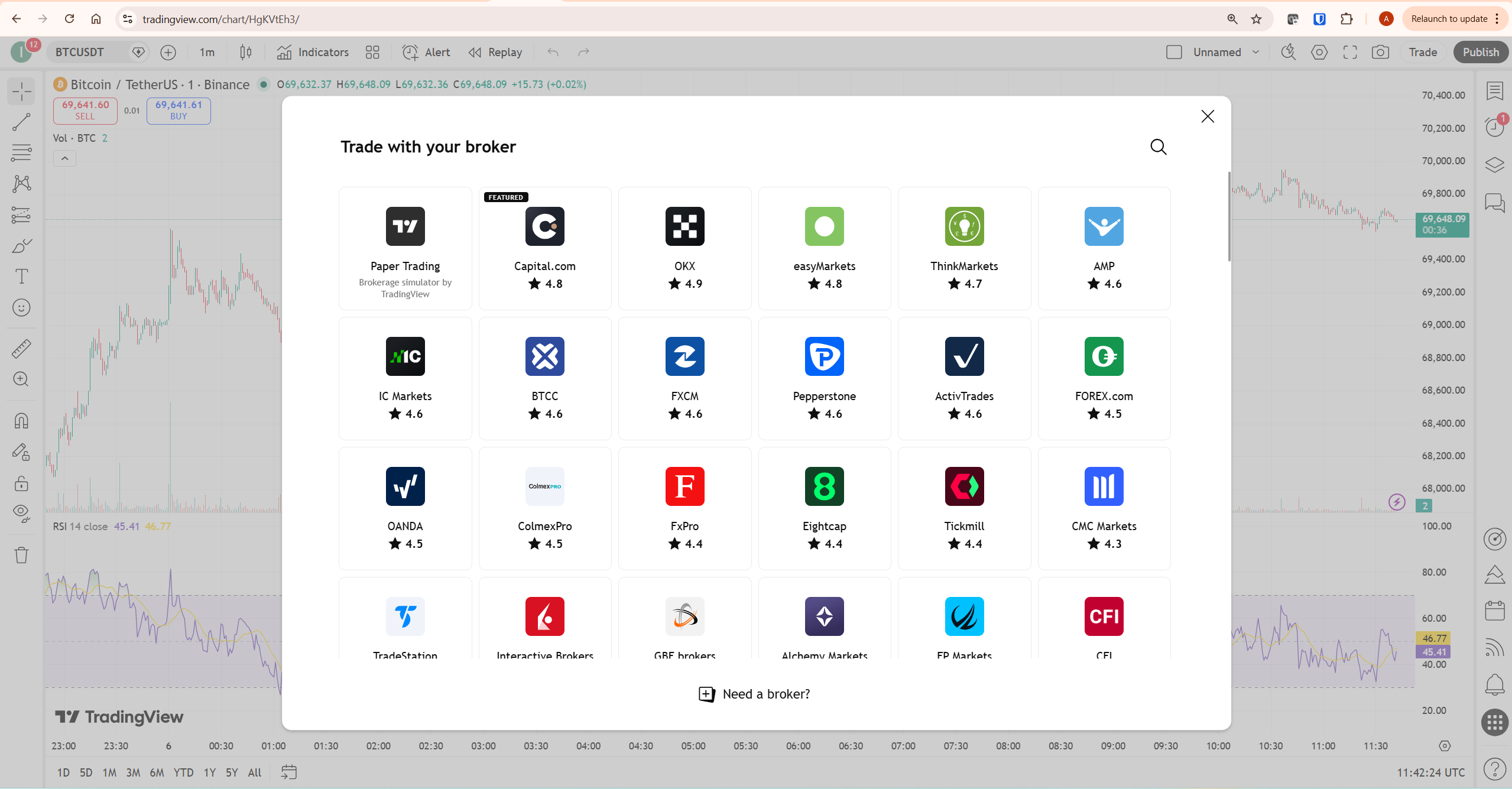
TradingView connects to dozens of broker partners through its trading panel. US options traders who prefer TradingView’s charting interface can connect to brokers like TradeStation or Interactive Brokers — both of which offer sophisticated options execution — and trade directly from TradingView charts. This gives you TradingView’s superior charting environment alongside professional options execution capability, without being locked into the Schwab ecosystem.
Thinkorswim, by contrast, only works within Schwab’s ecosystem. There is no way to use Thinkorswim’s analytics while executing through a different broker.
Honest Limitations of Each Platform
No tradingview vs thinkorswim comparison is complete without acknowledging what each platform does poorly.
TradingView’s honest limitations: the free plan’s two-indicator cap and three-alert limit are genuinely restrictive for active traders. Paid plan pricing increased approximately 13% in 2025. TradingView has no native options analysis suite — Greeks, multi-leg strategy modelling, and probability calculations require a connected broker. The social features, while powerful for learning, can create noise for traders who want a focused analytical environment.
Thinkorswim’s honest limitations are more significant for most traders. It is only accessible to Schwab account holders, effectively excluding non-US traders. The desktop interface is genuinely complex — new users consistently report a steep learning curve that can take weeks to overcome. The desktop, web, and mobile versions have different layouts and feature sets, which creates inconsistency when switching between devices. ThinkScript development appears to have stalled. Crypto coverage is minimal. And the platform’s stability has been questioned by users following the Schwab integration. According to Schwab’s official Thinkorswim page, the platform is described as designed for traders who want to “go deeper” — which is accurate, but also means it demands significant time investment before it delivers value.
Who Should Use Which Platform
Use TradingView if: you trade outside the United States, you trade crypto at all, you want professional charting without opening a brokerage account, you prefer a modern browser-based interface, you use Pine Script or want access to the 100,000+ community script library, or you trade across multiple asset classes including international equities.
Use Thinkorswim if: you are a US resident and active Charles Schwab client, options trading is central to your strategy and you need multi-leg analysis tools, probability calculations, and Greeks visualisation in a single platform, and you are willing to invest significant time learning a complex interface.
Use both if: you are a US options specialist who wants TradingView’s superior charting for market analysis and Thinkorswim’s options tools for strategy construction and execution. Some advanced US traders maintain TradingView for chart analysis and use Thinkorswim specifically for options strategy work — the two platforms serve genuinely different moments in the analytical workflow.
What to Do Next
If you are outside the United States or primarily trade crypto — start your TradingView free trial through our affiliate link today. The decision is straightforward: Thinkorswim is not a practical option for you and TradingView covers every market you trade with professional-grade tools.
If you are a US trader evaluating both platforms — try TradingView’s free plan for one week of daily charting sessions. The learning curve is minimal. If after that week you feel the platform covers your analytical needs, Essential at $12.95/month unlocks everything most active traders use. If you are specifically an options specialist and already a Schwab client, spending time with Thinkorswim’s paperMoney simulator alongside TradingView will clarify which platform’s options tools you actually need in your workflow.
Frequently Asked Questions
Is TradingView better than Thinkorswim?
For most traders — including all international traders, all crypto traders, and most retail stock and forex traders — TradingView is the better platform. Thinkorswim is better specifically for active US options traders who are Charles Schwab clients and need institutional-grade multi-leg strategy tools and probability analysis. Outside that specific profile, the tradingview vs thinkorswim comparison favours TradingView on accessibility, charting quality, asset coverage, and development trajectory.
Can I use Thinkorswim outside the United States?
In practice, no. Thinkorswim requires a Charles Schwab brokerage account, which is primarily available to US residents. Schwab does offer international accounts in limited circumstances, but Canadian traders lost access to the full platform following the TD Ameritrade integration. For international traders looking for professional charting and analysis tools, TradingView is the standard alternative — it operates globally with no country restrictions and requires no brokerage relationship.
Is Thinkorswim free?
Thinkorswim is free for Charles Schwab clients — there is no separate platform subscription fee. Non-clients can access a 30-day guest pass with limited features, after which a Schwab account is required. Opening a Schwab account requires no minimum deposit for a basic brokerage account, but does require a US tax identification number in most cases. TradingView’s free plan is available to anyone globally with no account requirements beyond a free registration.
Does Thinkorswim support crypto trading?
Very minimally. Thinkorswim supports Bitcoin and Ethereum futures contracts via CME — that is the extent of its crypto offering as of May 2026. Charles Schwab has announced a Schwab Crypto account for spot Bitcoin and Ethereum trading, but this is in limited early access. For any trader needing broader crypto coverage — altcoins, DeFi tokens, multiple exchanges — TradingView covering 2,800+ instruments is the correct platform and Thinkorswim is not a viable option.
What happened to Thinkorswim after the Schwab acquisition?
Charles Schwab acquired TD Ameritrade in 2020 and completed full platform integration in 2024. Following the integration, user reports across review platforms indicate decreased stability, Canadian trader access was removed, and ThinkScript development appears to have stalled. The platform itself remains functional and its options tools remain powerful, but the development trajectory has slowed compared to competitors. Traders evaluating platforms for long-term use should weigh this context alongside current feature comparisons.
Can I use TradingView for options trading?
TradingView supports options trading through connected broker partners — you can analyse charts on TradingView and execute options trades through brokers like TradeStation or Interactive Brokers via the broker integration panel. What TradingView does not have is a native options analysis suite with Greeks visualisation, multi-leg strategy builders, and probability tools. For traders who need those specific capabilities alongside TradingView’s charting, connecting TradingView to a full-service options broker is the practical solution. Our TradingView vs Webull comparison covers the broker integration workflow in detail.
Conclusion
The tradingview vs thinkorswim comparison resolves clearly when you define who the reader actually is. For international traders, crypto traders, and the majority of retail stock and forex traders, TradingView is the answer — it is globally accessible, actively developed, covers every market you trade, and offers professional-grade charting at a price point that scales with your needs.
Thinkorswim remains a powerful platform for its specific audience — active US options specialists who are Schwab clients and are willing to invest the time to master a complex interface. For that audience, its options analysis tools are genuinely best-in-class. For everyone else, the combination of US-only access, minimal crypto coverage, stalled ThinkScript development, and a dated interface makes the choice straightforward.
Start your TradingView free trial through our affiliate link — no credit card required and the full platform is accessible for 30 days. For a complete review of TradingView’s capabilities, our TradingView review covers everything. For traders comparing TradingView against other platforms, our TradingView vs Webull and TradingView vs Finviz comparisons cover the most common alternatives.
Trading involves risk. Technical analysis tools do not guarantee profitable results. Past performance is not indicative of future results. Always manage your risk appropriately.
