
How to Use Semrush Site Audit to Fix SEO Errors (Step-by-Step)
This site earns revenue through affiliate partnerships with other platforms. This article does not currently contain affiliate links for Semrush.
Last verified: August 2026, using Semrush’s official documentation and pricing page.
You have published consistently for months. The content is researched, the keywords are targeted, and the articles are well-written.
Yet the rankings stubbornly refuse to move. Before you write another word, run a Semrush site audit.
Technical SEO errors are invisible from the WordPress dashboard — they sit quietly in your site’s architecture, blocking Google from properly crawling and ranking pages that deserve to perform. For affiliate content sites specifically, a single batch of unchecked errors can suppress an entire cluster of articles simultaneously. This guide shows you exactly how to run a Semrush site audit, read the results, and fix the issues that matter most for a content site.
Key Takeaways
- Semrush Site Audit checks over 140 technical and on-page SEO factors, sorted into Errors, Warnings, and Notices by severity.
- Your Site Health Score is a 0-100% figure calculated from error and warning severity relative to total pages crawled.
- Always clear every Error before touching Warnings — errors carry the greatest ranking impact regardless of how visible warnings seem.
- Pro and Guru plans allow crawls of up to 100,000 pages per month.
- Never hide issues to inflate the score artificially — it exists to help you find real problems, not to look impressive.
Running an affiliate content site alongside 30 years in finance has taught me one consistent pattern: site owners who fix their technical foundation rank faster and more predictably than those who keep publishing into a broken house. You cannot outwrite a crawlability problem. You can, however, fix one in an afternoon.
Quick Answer: What Does the Semrush Site Audit Actually Do?
The Semrush site audit tool crawls your entire website and checks over 140 technical and on-page SEO factors, then delivers a prioritised report divided into errors, warnings, and notices. Errors are ranked by severity and page count so you know exactly what to fix first. For an affiliate content site, the highest-impact issues are almost always broken internal links, orphaned pages, missing meta descriptions, and crawlability problems — all of which suppress rankings silently and are straightforward to resolve once identified.
Fix all errors before touching warnings. Fix warnings before addressing notices. That sequence alone will improve most sites’ technical health significantly.
What the Semrush Site Audit Checks: The Essential Categories
Understanding what the Semrush site audit is looking for makes it considerably easier to interpret results when they arrive. The checks fall into several categories, each representing a distinct way your site can lose rankings without any visible warning.
Crawlability and Indexability. Whether search engine bots can reach and index your pages at all. Blocked pages in robots.txt, broken sitemaps, redirect chains, and 4XX errors all fall here.
If Google cannot crawl a page, it cannot rank it — regardless of how strong the content is. For a content site publishing multiple articles per week, these issues accumulate faster than most site owners realise.
On-Page SEO. Title tags, meta descriptions, H1 headings, duplicate content, thin pages, and missing image alt text. These are the most common issues on affiliate content sites and among the fastest to resolve. A site with 30+ articles will almost always have at least a handful of these — duplicated title tags and missing meta descriptions are particularly common when publishing at pace.
Internal Linking. Orphaned pages with no internal links pointing to them, broken internal links, and redirect chains within your internal link structure. For a content site building topical authority clusters — the approach covered in our guide on keyword research with Semrush — a broken internal link is not just a technical problem.
It fractures the SEO architecture you built intentionally. The Semrush site audit surfaces every one of these breaks.
HTTPS Implementation. Mixed content errors, insecure pages, and certificate issues. A site with HTTPS problems signals distrust to both users and search engines. These are less common on newer sites but worth checking.
Site Performance. Page load speed, oversized HTML files, render-blocking resources, and Core Web Vitals. Speed is a direct ranking factor. Slow-loading affiliate articles lose both rankings and conversions — a reader who cannot load your page in under three seconds rarely waits.
AI Search Health. A 2026 addition. This checks whether your site is accessible to AI-powered search tools including ChatGPT’s SearchGPT, Perplexity, and Google’s AI Overviews. As AI search captures a growing share of information queries, having your pages accessible to AI crawlers is becoming as important as traditional Googlebot access.
How to Set Up and Run the Semrush Site Audit: Step-by-Step
The setup takes under ten minutes. Here is exactly what to do.
Step 1: Navigate to Site Audit. Log in to Semrush. From the left-hand menu, go to the SEO section and select Site Audit. If you have not created a project yet, click Create Project and enter your domain name.
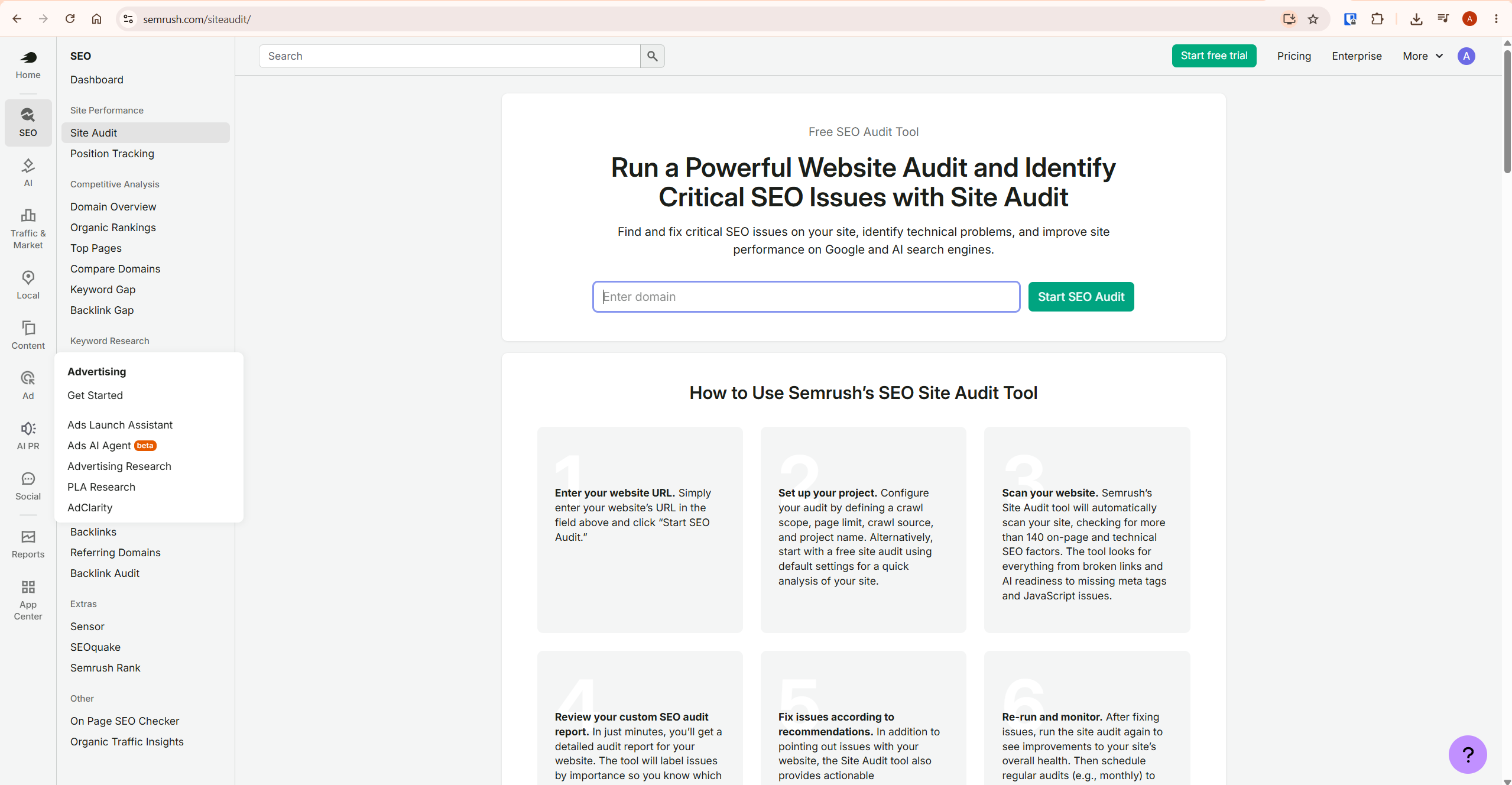
Step 2: Set your crawl scope. You can audit your full domain, a specific subdomain, or a subfolder. For most affiliate content sites, audit the root domain. If your blog runs in a subfolder such as yourdomain.com/blog/, you can scope the audit there to conserve crawl budget.
Step 3: Set the number of pages to crawl. Check how many pages your site has by searching Google for site:yourdomain.com — the result count gives a rough estimate. Set the crawl limit to match.
Do not set it lower than your actual page count or the audit will be incomplete. The Semrush site audit allows up to 100,000 pages per month on Pro and Guru plans.
Step 4: Configure the user agent. By default, Semrush crawls using its mobile bot — mirroring Google’s mobile crawler, which is correct given Google’s mobile-first indexing. You can also select the OpenAI-Search user agent to check whether your site is accessible to AI search crawlers specifically.
Step 5: Set crawl frequency. Choose daily, weekly, or on-demand. For an affiliate content site publishing regularly, weekly automated audits are the practical choice — frequent enough to catch new issues introduced by fresh articles, without burning crawl budget unnecessarily.
Step 6: Click Start Audit. Crawl time depends on site size. A 30-article site typically completes in a few minutes. You will receive an email notification when the audit finishes.
How to Read Your Semrush Site Audit Results
When the crawl finishes, Semrush presents an Overview dashboard. The first number is your Site Health Score — a percentage between 0% and 100% representing your site’s technical health, calculated from the number and severity of errors and warnings relative to total pages crawled.
Most sites that have never been audited score between 60% and 80%. That range is not alarming — it simply means there is clear work to do.
Issues appear in three categories. Errors (red) are the most severe and have the highest impact on rankings — fix these first, without exception.
Warnings (orange) are medium-severity issues, important but not as urgent. Notices (blue) are informational flags and low-priority items — address these last.
Alongside the error and warning counts you will see a Top Issues list — Semrush’s prioritisation of your most impactful problems by severity and pages affected. For a quick win, start here rather than working the full issues list from top to bottom. It cuts straight to what matters most.
For each issue, click the number next to it to see which pages are affected. Then click the “Why and how to fix it” link — Semrush provides a plain-language explanation of the problem, why it affects rankings, and the specific steps to resolve it. This explanation feature is one of the most underrated aspects of the entire Semrush site audit.
Most technical SEO tools list problems. Semrush explains them clearly enough for a non-technical site owner to act without needing an agency.
Prioritising Semrush Site Audit Fixes for Affiliate Content Sites
Not all errors carry equal weight. For an affiliate content site where topical authority, internal linking, and on-page SEO are the primary ranking levers, some issues matter considerably more than others. Here is how to triage.
Fix first — highest impact for affiliate sites:
- Broken internal links — every broken internal link disrupts your topical authority cluster. If your pillar article cannot reach its support articles, the internal PageRank flow breaks entirely. On a site with 30+ articles, this accumulates faster than you expect. The Semrush site audit flags every instance with the exact URL.
- Orphaned pages — a published article that no other page links to is invisible to Google from an authority perspective. You can build the best article in your cluster and it will underperform if nothing links to it. Fix by adding contextual internal links from related articles — not just a bottom list. The difference in how Google values those links is significant, as discussed in our Semrush review.
- Missing or duplicate meta descriptions — meta descriptions directly affect click-through rates from search results. Missing descriptions mean Google writes them for you, often poorly. Duplicate descriptions confuse both users and search engines about which page to show.
- Duplicate title tags — two pages sharing a title tag create keyword cannibalisation confusion. On a content site covering related topics across multiple articles, this is more common than most site owners realise.
- 4XX errors — broken pages waste crawl budget and kill any links pointing at them, internal or external. A 404 on a page with ten internal links pointing to it is ten broken connections simultaneously.
- Redirect chains — multiple redirects in sequence slow page loading and dilute link equity. Semrush identifies the origin of each chain so you can resolve them at the source.
Fix second — important but less urgent:
- Slow page load speed — particularly relevant for image-heavy articles
- Missing image alt text — affects both accessibility and on-page SEO signals
- HTTPS mixed content issues
- Thin content pages flagged by the audit
Address last:
- Structured data opportunities
- Social metadata gaps
- Canonical tag suggestions on non-critical pages
Proven Mistakes Affiliate Sites Make With Site Audits
Running the Semrush site audit once and never again. Every new article you publish can introduce fresh issues — a broken internal link, an accidentally noindexed page, a missing meta description. The Semrush site audit scheduler exists precisely for this. Set it to run weekly and the problems get caught before they suppress rankings for weeks unnoticed.
Fixing warnings before clearing errors. Warnings are visible and often easier to understand, which makes them tempting to address first. Errors carry greater ranking impact. Always clear every error before moving to warnings — the sequence matters.
Hiding issues to inflate the health score. Semrush allows you to mark issues as ignored, which removes them from the dashboard and improves the score cosmetically. Some site owners do this to watch the number climb.
The Site Health Score exists to help you, not to impress anyone. Hiding real problems just makes them harder to find later.
Skipping the Google Analytics integration. Semrush connects directly to Google Analytics to show which pages with errors are receiving the most traffic. This is the single most useful triage tool available — fix problems on your highest-traffic pages first, before they start costing you rankings and clicks. If you are also tracking keyword positions, our guide on using Semrush Position Tracking explains how to combine both data sources for a complete performance picture.
Ignoring the internal linking report entirely. For a content site building topical authority clusters, the internal linking section of the Semrush site audit is arguably the most strategically valuable output. Orphaned pages, broken links between cluster articles, and redirect chains within your internal architecture are all visible here — and all directly affect how Google understands your site’s structure and assigns authority across pages.
Pro Tip: Use Compare Crawls to Track Real Progress
Once you have completed your first Semrush site audit and resolved the priority errors, run a second crawl. Then use Semrush’s Compare Crawls feature to see exactly what improved and what new issues appeared. This turns a one-time diagnostic into a systematic health monitoring workflow — which is how serious affiliate sites operate.
For a site publishing one to four articles per week, a monthly comparison crawl shows clearly whether your technical foundation is improving or degrading. If the Site Health Score trends upward over three months, your publishing and fixing process is working.
If it trends downward, new content is introducing problems faster than you are resolving them — a signal to slow publishing and prioritise cleanup. Understanding your site’s pricing structure and what tools are available at your subscription tier is also relevant here — our Semrush pricing guide breaks down exactly what each plan includes for site auditing.
Your 30-Minute Action Plan After Reading This
If you have Semrush access right now, here is exactly what to do next:
- Create a project for your domain and run the Semrush site audit with default settings.
- Note your Site Health Score as your baseline — write it down.
- Open the Top Issues list and identify your top three Errors.
- Click “Why and how to fix it” on each error and read the explanation fully.
- Fix at least one error before closing the tab — even a single fix validates the workflow and starts the progress trend.
- Schedule a weekly automated audit so you never have to remember to check manually.
No Semrush account yet? You can run a limited free audit at semrush.com/siteaudit covering up to 100 pages without a subscription.
It surfaces your most critical issues and gives a genuine preview of what the full tool provides. If you are weighing up whether the subscription makes financial sense for your site right now, our honest assessment in Is Semrush Worth It? covers that question directly.
Frequently Asked Questions
How often should I run a Semrush site audit?
For an active affiliate content site publishing weekly, set the Semrush site audit to run automatically every week. New articles introduce new errors — broken links, missing meta data, accidental noindex settings. Weekly automated audits catch these before they suppress rankings for weeks unnoticed.
What is a good Site Health Score in Semrush?
Most well-maintained sites score above 80%. A score between 90% and 100% indicates very few technical issues.
More important than the absolute number is the direction — if your score improves after each audit cycle, your fixes are working. If it declines, new issues are being introduced faster than you are resolving them.
Can the Semrush site audit find duplicate content?
Yes. The Semrush site audit checks for duplicate page titles, duplicate meta descriptions, and duplicate content across pages on your own site.
It does not check for content copied from external sites — that requires a separate plagiarism tool. For affiliate content sites covering similar topics across multiple articles, near-duplicate title tags are a common flag worth addressing promptly.
Does the Semrush site audit work on WordPress sites?
Yes, and it works particularly well with WordPress because most issues the Semrush site audit flags — missing meta descriptions, broken links, slow images — have direct fixes using standard plugins. Rank Math, Yoast, ShortPixel, and Broken Link Checker all address common audit findings. WordPress sites also tend to have well-structured sitemaps that make the crawl more accurate.
Is the Semrush site audit the same as Google Search Console?
No — they complement each other. Google Search Console reports what Google has actually encountered crawling your site. The Semrush site audit simulates a crawl and checks a broader set of technical factors proactively.
Best practice: use both together. Search Console for verified Google data, Semrush for comprehensive diagnostic analysis. Connect Google Analytics to Semrush to prioritise fixes on your highest-traffic pages first.
Final Thoughts
The Semrush site audit is one of the most practical tools available to an affiliate content site owner. Technical problems are easy to overlook when the focus is on publishing — but they are often the reason well-researched articles stall at position 15 instead of breaking into the top five.
A weekly automated Semrush site audit, combined with a disciplined approach to fixing errors before warnings, builds a technical foundation that compounds quietly over time. The content you write performs the way it was written to perform, rather than fighting invisible headwinds you cannot see from the dashboard.
For a complete breakdown of everything Semrush offers — features, pricing, and whether it is the right investment for your affiliate site at its current stage — read our full Semrush review.
More guides in this cluster:
- Semrush Pricing Explained — every plan and what it includes
- How to Use Semrush Position Tracking — monitor rankings step by step
- How to Do Keyword Research with Semrush — affiliate content workflow
- Is Semrush Worth It? — honest cost-benefit for affiliate sites
- Semrush vs Ubersuggest — which tool fits your budget and stage
Feature details and plan limits change frequently. Always verify current specifications directly at Semrush’s official knowledge base.
